Vibe Coding Security: The Five Things I Check First
By Aakash Verma · · 4 min read
The biggest security hole in a vibe-coded app is almost never clever. It's a database that answers anyone who asks. The app looks finished, the login screen works, and the data behind it is readable with the public key that ships in every browser. So when someone sends me an app built with Lovable, Bolt, Cursor or a similar tool, I don't start with a scanner. I start by asking the backend for data as a stranger, and most of what matters shows up in the first ten minutes.
This isn't a theory. In 2025 Matt Palmer scanned 1,645 apps built with Lovable and found 170 that let anyone read or write their tables, because the row level security rules were missing or too loose. It became CVE-2025-48757. Separately, Veracode's 2025 GenAI code security report found security flaws in 45% of the code samples the models wrote. The tools have added scanners since then, and they help. They don't replace looking.
1. Ask the database as a stranger
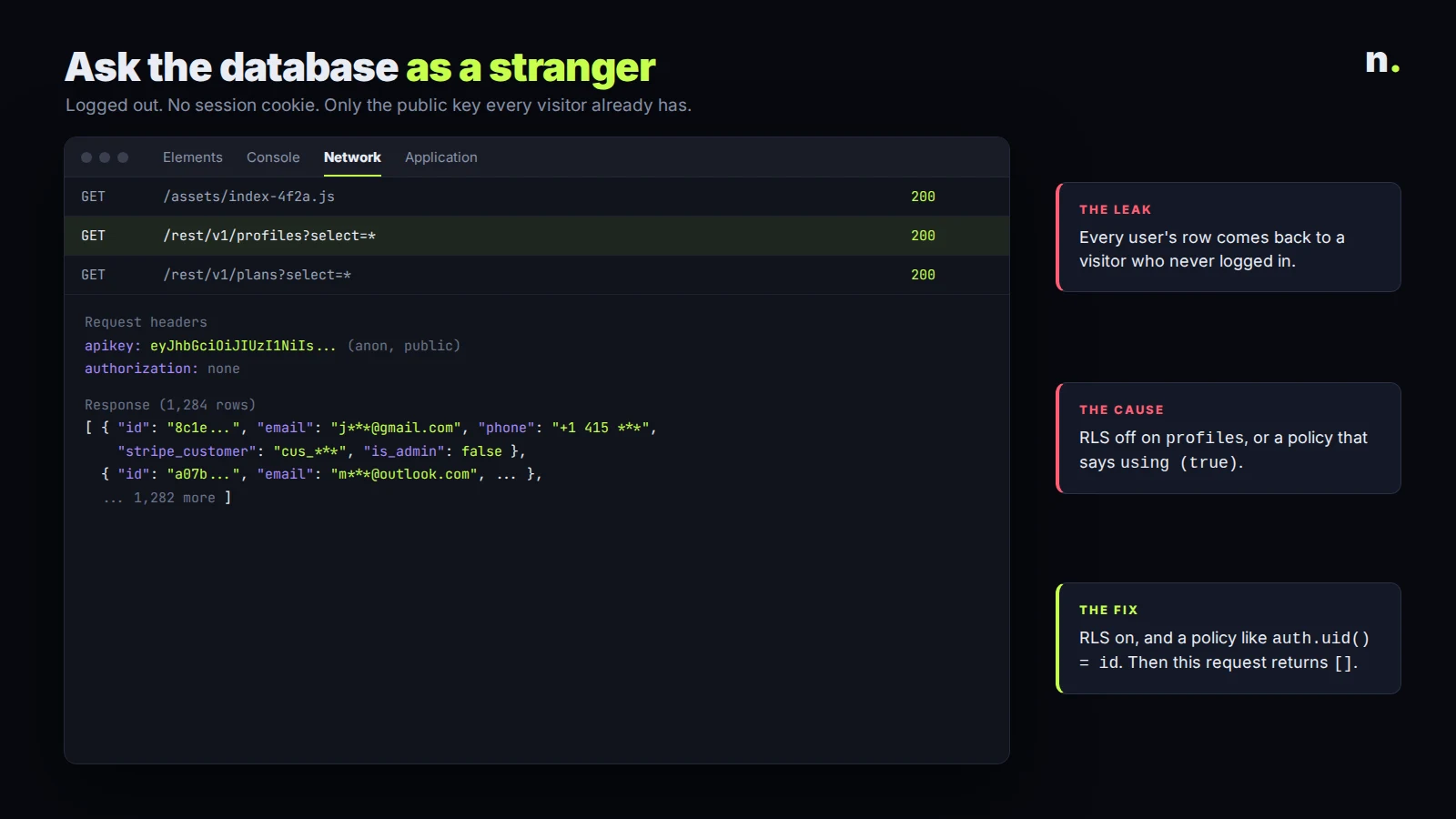
Most of these apps use Supabase. The anon key is public by design: it's in the JavaScript bundle and anyone can copy it from the network tab. That's fine only if every table has row level security turned on and policies that check who's asking.
So I open the site logged out, copy the project URL and anon key from a request, and call the REST endpoint for each table. If GET /rest/v1/profiles?select=* returns rows, the app is leaking. Then I log in as a normal test user and try to read another user's rows by changing the id in the request. Policies that say using (true) are the classic mistake: RLS is "on", and it still lets everyone through. The Supabase RLS docs explain the policy model well if you want to fix it yourself.
2. Look for secret keys in the bundle
The second check is a search. I download the built JavaScript and look for service_role, sk_live, sk- and any long random string next to words like secret, token or key. The Supabase service role key skips RLS completely, so if it's in the frontend, nothing in point 1 matters. Stripe secret keys, OpenAI keys and email API keys belong in a server function or an environment variable on the server, never in code the browser downloads. I also check the git history, because a key that was "removed" in a later commit is still there.
3. Read the server functions as an attacker would
AI tools write edge functions and API routes fast, and they often skip the boring part: checking who's calling. For each function I ask three things. Does it verify the user's token, or does it trust a userId sent in the body? Does it check the user is allowed to touch that record? And does a webhook check its signature? A payment webhook without a signature check means anyone can mark an order paid. The OWASP API Security Top 10 is a good list to read against, and broken object level authorization sits at number one for a reason.
4. Check storage buckets and file URLs
File uploads are where a lot of private data ends up: ID photos, invoices, contracts. I check whether the bucket is public, whether file names are guessable, and whether a logged-in user can list or download other people's files. A public bucket is fine for avatars. It isn't fine for anything a user would be upset to see on someone else's screen.
5. Try the abuse cases
Last, I try what a bored person with a script would do. Sign up a thousand times. Hit the password reset endpoint in a loop. Call the AI feature until the bill climbs. Paste a script tag into every text field and see if it runs for another user. Rate limits, email confirmation, a spending cap on the AI provider and output escaping close most of this, and generated code rarely adds them unless you ask.
What I don't worry about first
Headers, cookie flags and the exact version of every dependency matter, and a scanner will list them. But I've never seen a missing header be the reason an app's users lost their data. Open tables, leaked keys and functions that trust whatever they're sent are. Fix those first, then work down the scanner's list.
If you want a second pair of eyes before launch, I do these reviews, and the first call is free. If your app was built with Lovable specifically, my agency Lovable 2 Live does security reviews and the fixes that come out of them.
Introductory offer
Free cloud cost optimization. You only pay from what I save.
I cut your AWS, cloud, Supabase or Vercel bill for free and keep half of what I save for 6 months. Save nothing, pay nothing. Code, architecture and infrastructure.