Supabase Storage in Production: Policies, URLs and Limits
By Aakash Verma · · 4 min read
Supabase Storage is an S3-style file store that sits behind the same auth and Postgres policies as the rest of Supabase. Buckets hold the files, but who can upload, read or delete them is decided by row-level security policies on one table, storage.objects. Get those policies and the bucket type right and Storage is boring in the good way. Get them wrong and you either can't upload anything or everyone can read everything.
I checked everything below on November 8, 2026 against Supabase's docs on access control, file limits, resumable uploads, serving files and Storage pricing.
Policies live on storage.objects
The first surprise for most people: a new bucket with no policies accepts no uploads. Supabase is explicit about it: "By default Storage does not allow any uploads to buckets without RLS policies." The error you get looks like a permissions bug in your code. It isn't. It's a missing policy.
What each operation needs:
- Upload needs an
INSERTpolicy. - Overwriting an existing file (upsert) also needs
SELECTandUPDATE. This one bites when uploads work on day one and "replace avatar" fails on day two. - Reading and deleting need
SELECTandDELETE.
The pattern I'd use for anything user-owned is a folder per user, checked in the policy with the storage.foldername() helper:
create policy "users write their own folder"
on storage.objects for insert to authenticated
with check (
  bucket_id = 'uploads' and
  (storage.foldername(name))[1] = (select auth.uid()::text)
);
Then the client uploads to uploads/<user id>/whatever.pdf, and nobody can write into someone else's folder no matter what the front end sends. Copy the same condition into the select, update and delete policies. Supabase's own examples also use the owner_id column, which Storage fills with the uploader's id, if you prefer ownership over folders.
The service role key skips all of this. Supabase says it "entirely bypass[es] RLS policies". That's what you want in a server job that cleans up old files, and it's a disaster in a browser bundle. If service_role ever appears in front-end code, rotate it today.
Public buckets, private buckets, signed URLs
A public bucket means what it says: anyone with the URL can fetch the file, no token needed, and those files get a high CDN cache hit rate. That's right for product images, avatars and blog assets. It's wrong for invoices, ID scans and anything a user would be upset to see on someone else's screen.
Private buckets are reached two ways: a signed URL from createSignedUrl(path, expiresIn), or a GET to the /object/authenticated/ endpoint with the user's own token. Signed URLs are convenient for <img> tags and downloads, with one property you should plan around: you can't revoke a single signed URL. The docs give two ways out: delete, move or rename the file, or rotate the project's URL signing key, which kills every signed URL at once. So keep the expiry short. I'd use minutes for anything sensitive, not the hour most examples show.
Public buckets have their own gotcha. The docs' public-read example adds storage.allow_any_operation() so people can fetch files without being able to list the bucket. If your bucket names are guessable and the files aren't meant to be browsed, check that listing is actually off.
The 6 MB line and the 50 MB line
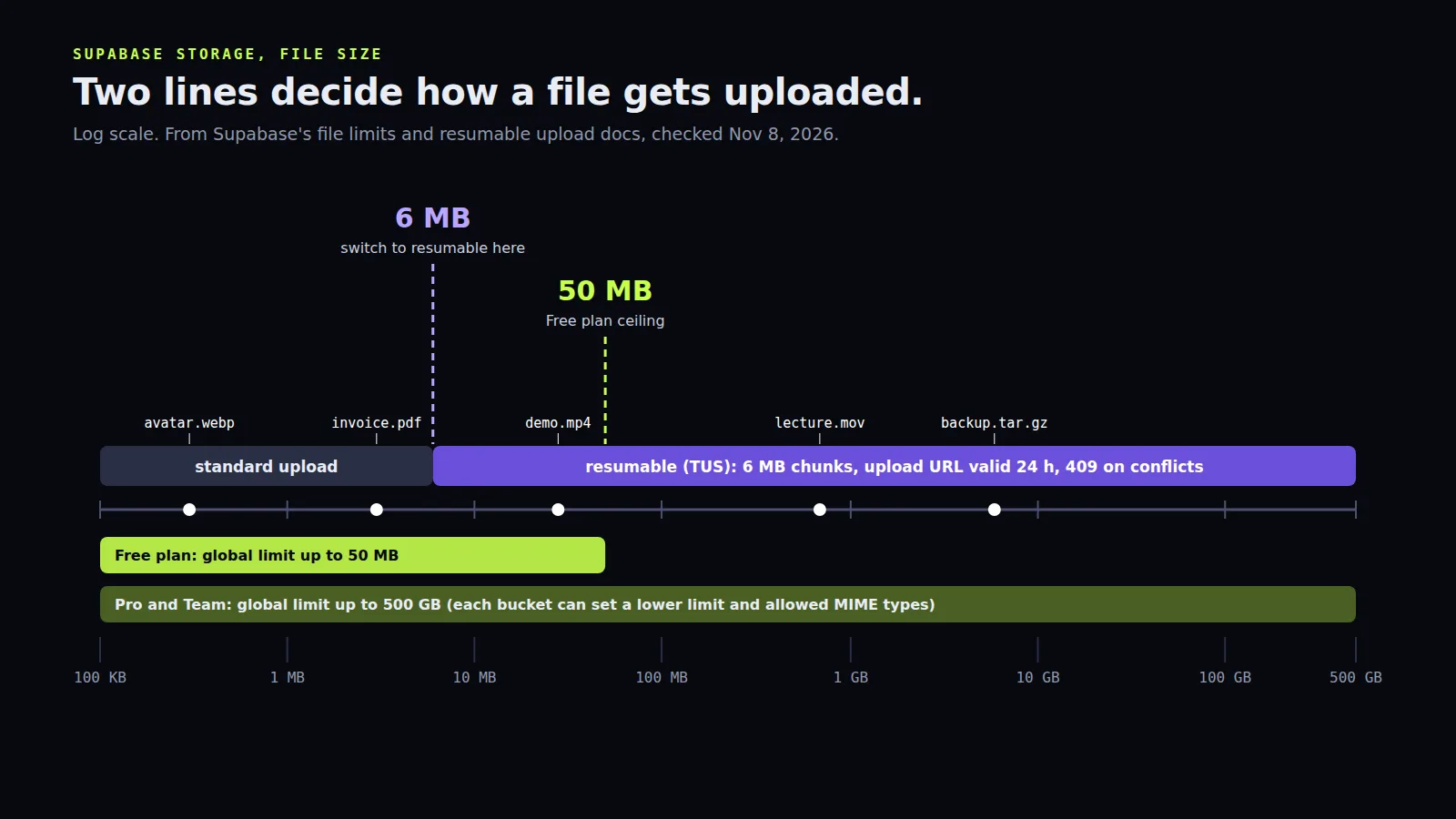
Two numbers decide how uploads should work.
50 MB is the most a Free project's global file size limit can be set to. Pro lets you raise the global limit up to 500 GB. Each bucket can have its own lower limit and an allowed list of MIME types, and I'd set both on every bucket: a profile picture bucket that accepts 2 GB .zip files is an invitation.
6 MB is where Supabase recommends switching from a plain upload to a resumable one over TUS. The resumable endpoint has a few rules that aren't optional:
chunkSizemust be 6 MB. The docs literally say "do not change it".- Use the direct storage host,
https://<project-id>.storage.supabase.co/storage/v1/upload/resumable, for better performance. - Each upload URL lives up to 24 hours, then the upload starts over.
- Two clients on the same upload URL: one wins, the others get
409 Conflict. Same path, different URLs: the first to finish wins, unless you sendx-upsert, and then the last one wins.
Uploading to a path that already exists returns 400 Asset Already Exists unless you upsert, and Supabase advises against overwriting at all, because the CDN can keep serving the old file for a while. I agree with them: write each version to a new path (avatar-<timestamp>.webp) and update the database row that points to it.
File names are picky too. Letters, digits, whitespace and a short list of punctuation are allowed. A user uploading résumé (final)#2.pdf will find out which characters aren't, so slugify names before upload.
What it bills
Storage size is billed by the GB-hour: $0.00002919, which works out to $0.0213 per GB-month. Free includes 1 GB, Pro and Team 100 GB, and you only pay past the quota. Downloads count as egress, and egress is split in two on Pro: 250 GB uncached and 250 GB cached included, then $0.09 and $0.03 per GB. Image transformations are an extra charge on top.
That split is the cheapest lever. Files served from the CDN cost a third of uncached ones, and public buckets get far more cache hits than signed URLs that change on every request. So a public bucket for public assets isn't only simpler, it's cheaper.
A lot of apps built with Lovable use exactly this setup, with buckets created early and policies nobody has read since. If that's yours, my agency Lovable 2 Live reviews and fixes them. For anything else, book a free call. All consultation is free.
Introductory offer
Free cloud cost optimization. You only pay from what I save.
I cut your AWS, cloud, Supabase or Vercel bill for free and keep half of what I save for 6 months. Save nothing, pay nothing. Code, architecture and infrastructure.