Supabase RLS: What It Actually Protects
By Aakash Verma · · 5 min read
Supabase RLS (row level security) is Postgres deciding, inside the database, which rows each request may read or change. Your publishable key ships in the browser, so anyone can call your API with it; on a table in an exposed schema, a policy plus the table's grants are the only things standing between that key and every row.
It is the first thing I would read in any Supabase project, before the frontend, before the edge functions. Most of what follows is what I look for, with the parts of the Supabase RLS guide that matter most, checked on October 21, 2026.
A policy is a WHERE clause you can't forget
The mental model that helps most people: a select policy gets glued onto every query against that table as an extra where.
create policy "own todos"
on todos for select
to authenticated
using ( (select auth.uid()) = user_id );
With that in place, supabase.from('todos').select('*') from the browser returns the signed-in user's rows and nothing else, even though the query asked for everything. A signed-out request matches no policy at all and gets an empty array. Not an error, an empty array, which is worth remembering when you're debugging: RLS failing closed looks exactly like "there's no data yet".
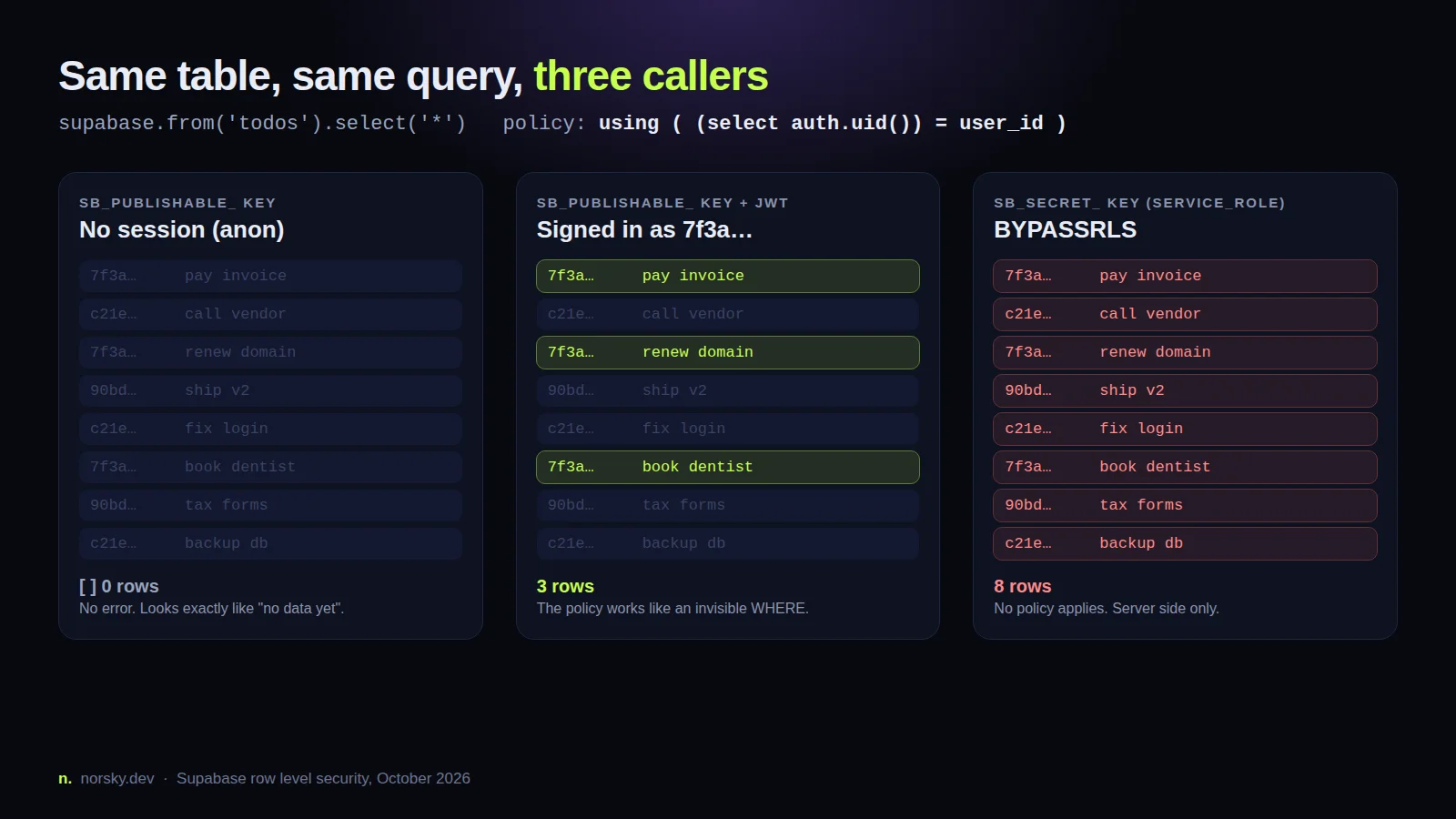
The picture above is the whole idea. Same table, same query, three callers. The secret key (the old service_role) has Postgres's BYPASSRLS attribute, so no policy you write ever applies to it. That's why it belongs on a server and nowhere else.
Grants come first
This is the part almost nobody checks. Postgres runs two checks: grants decide whether a role may run select, insert, update or delete on the table at all, and only then do policies decide which rows. On existing Supabase projects a new table in public starts with every privilege granted to anon, authenticated and service_role.
So a table with RLS on and a nice select policy can still have an insert path for signed-out users if nobody revoked the grant and someone later adds a loose insert policy. The docs now recommend doing it in this order, in one migration:
alter table public.reports enable row level security;
revoke all on table public.reports from anon, authenticated;
grant select, insert, update, delete on table public.reports to authenticated;
A missing grant shows up as error 42501 before any policy runs. If a request that your policy should allow keeps failing with that code, stop editing the policy and check the grants.
The mistakes that keep showing up
RLS off on a table that was made with SQL. A table created by a migration, a script or an AI tool's generated SQL only gets RLS if the SQL says enable row level security, and nothing stops you shipping without it. The Security Advisor in the dashboard flags these (lint 0013_rls_disabled_in_public), and I'd run it before every launch.
using (true) because the app "didn't work". Someone enabled RLS, the app went blank (see the empty array above), and the quick fix was a policy that allows everything. For a public profiles table that might even be right. For anything with user data it's the same as RLS off, just harder to spot.
An update that silently does nothing. Supabase's docs say it plainly: an UPDATE needs a matching SELECT policy too, because Postgres has to see the row before it can change it. Without one the update matches zero rows and returns no error. People lose an evening to this one.
A view that hands everything out. Views in Postgres run with the rights of whoever created them, which on Supabase is usually postgres, which bypasses RLS. A public.user_stats view over a protected table gives every caller every row. On Postgres 15 and later you fix it with with (security_invoker = true) when you create the view, so it obeys the policies of the tables underneath.
Two policies that read each other. A lists policy that checks list_members, and a list_members policy that checks lists, ends in 42P17: infinite recursion detected in policy for relation. The way out is a security definer function that reads the membership table as its owner, with search_path set to an empty string and every name schema-qualified. And keep that function out of any schema the API exposes, or it becomes an endpoint with the owner's rights.
The secret key in a frontend env var. Anything prefixed NEXT_PUBLIC_, VITE_ or NUXT_PUBLIC_ ends up in the bundle. If the value starts with sb_secret_, or is a long eyJ... JWT that turns out to be the legacy service_role key, every policy in the project is decoration. Supabase is retiring the legacy anon and service_role keys by the end of 2026 in favour of sb_publishable_ and sb_secret_ keys, which at least makes the wrong one easier to see in a diff.
Making policies fast
RLS has a reputation for being slow. Usually it's two fixable things.
Wrap the auth helpers in a sub-select: (select auth.uid()) = user_id instead of auth.uid() = user_id. The planner then runs the function once per statement (an initPlan) instead of once per row. And index every column a policy filters on. Supabase's own RLS performance page shows a count over a 100,000-row table where the policy filter forced a sequential scan, 171 ms of execution with Rows Removed by Filter: 100000. An index on user_id is the boring fix.
One detail people miss: a composite primary key on (team_id, user_id) only indexes team_id for filtering. A policy on user_id still needs its own index.
Adding to authenticated on policies that only signed-in users can pass also helps, because Postgres skips the expression entirely for anon requests.
I'd also filter in the client query even when the policy already does it. .eq('user_id', userId) looks redundant, but it gives the planner something to work with.
Test it like you mean it
Clicking around the app as two different users is a start, not a test. Supabase's guide now ends every table with pgTAP tests run by supabase test db: for each table, assert what anon and authenticated can and can't select, insert, update and delete. It feels like overkill until the day a migration drops a policy and the test catches it instead of a customer.
If you want the reference for what Postgres itself does, the Postgres row security docs and CREATE POLICY are short and worth one read, especially the part on permissive policies combining with OR. Two loose policies on one table means the loosest one wins.
If you've got a Supabase app going to production and want someone to read the policies before your users do, book a free call and I'll go through them with you.
Introductory offer
Free cloud cost optimization. You only pay from what I save.
I cut your AWS, cloud, Supabase or Vercel bill for free and keep half of what I save for 6 months. Save nothing, pay nothing. Code, architecture and infrastructure.