Supabase CLI: Migrations, Types and the Docker Catch
By Aakash Verma · · 4 min read
The Supabase CLI does two jobs, and people usually only know about one. It runs the whole Supabase stack on your machine (Postgres, Auth, Storage, Studio, a fake mail inbox), and it moves your database schema between that local copy and the real project as migration files in Git. The second job is the one that matters once a project has users. The first is the one with the catch: it needs a container runtime.
Everything here is checked against Supabase's CLI getting started guide and database migrations guide on October 30, 2026.
Installing it
I'd install it per project, not globally:
npm install supabase --save-dev
npx supabase --version
That pins the version in package.json, so everyone on the project and the CI runner use the same one. It needs Node 20 or newer; the docs say older versions like 16 "fail to start the CLI", which is a fun one to debug on an old CI image. If you want it on your PATH instead, it's brew install supabase/tap/supabase on macOS or Linux, Scoop on Windows, or a .deb/.rpm from the GitHub releases.
Updating is the same package manager again (npm update supabase --save-dev), and the docs ask you to stop the local containers first. Read the warning next to that before you copy the command: supabase stop --no-backup deletes your local schema and data changes.
The Docker catch
supabase start runs every service as a container, so you need Docker Desktop, OrbStack (what Supabase recommends on macOS), Rancher Desktop, Podman or colima. On a laptop with 8 GB of RAM the full stack is noticeable, and the first start pulls a lot of images.
There is now an experimental native runtime that runs each service as a plain process, for CI runners and sandboxes without a container engine, on Linux and Apple silicon Macs. Experimental is the word in the docs, so I wouldn't build a team workflow on it yet.
You can also skip local development altogether and still use the CLI. Linking, pulling, pushing migrations, generating types and deploying Edge Functions all work against the hosted project. Plenty of small teams should do exactly that: one staging project on Supabase instead of a Docker setup nobody maintains.
When it is running, these are the addresses it prints:
| What | Local address |
|---|---|
| API (REST, GraphQL, Edge Functions) | http://127.0.0.1:54321 |
| Postgres | postgresql://postgres:postgres@127.0.0.1:54322/postgres |
| Studio | http://127.0.0.1:54323 |
| Mailpit (every auth email lands here) | http://127.0.0.1:54324 |
Mailpit alone is a reason to run it locally. Testing sign-up and password reset emails against real inboxes is how people hit the hosted project's email limits on day one.
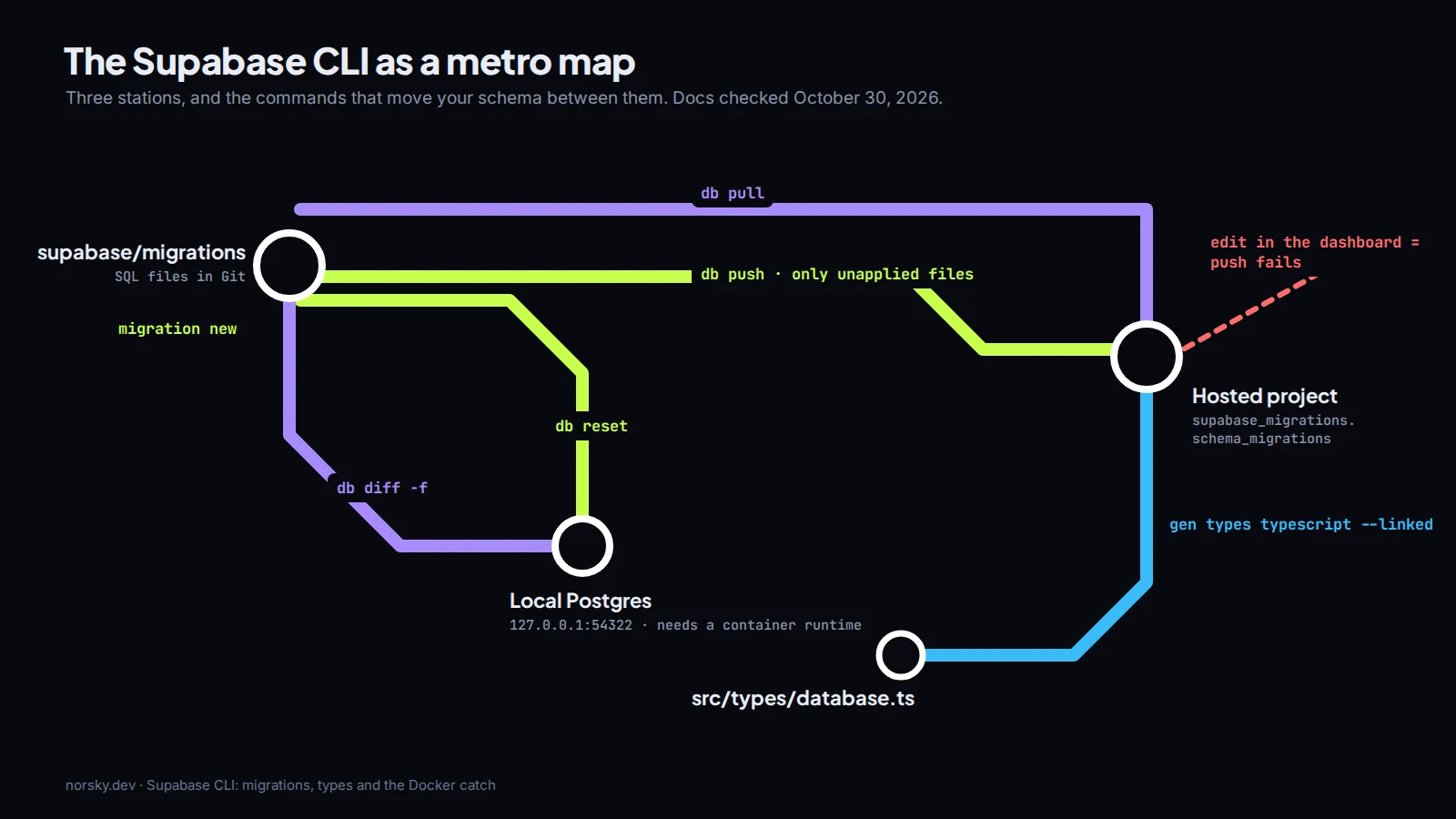
Migrations: the part worth learning properly
The loop the docs describe, and the one I'd stick to:
npx supabase login
npx supabase link                       # pick the project
npx supabase db pull                    # first time: capture the remote schema
npx supabase migration new add_invoices # write SQL in the new file
npx supabase db reset                   # rebuild local from all migrations + seed
npx supabase db push                    # apply what production hasn't run yet
db push reads the history table supabase_migrations.schema_migrations on the remote database and runs only the files that aren't in it, in order. That's the whole mechanism, and it explains every error you'll get.
If you prefer clicking in Studio, supabase db diff -f add_invoices turns the changes you made locally into a migration file. It works. I still read every generated file before committing, because a diff tool can't tell a rename from a drop and a create.
The rule that saves you: never change the production schema in the dashboard once you use migrations. The docs are blunt about it: a remote change "bypasses the migration history and will cause db push to fail with sync errors." Someone adds a column in the table editor on a Friday, and on Monday nobody can deploy.
When the history and reality do drift, supabase migration list shows local against remote, and supabase migration repair --status applied <timestamp> (or reverted) fixes the bookkeeping. Note what repair doesn't do: it "updates the tracking table only". It never runs or undoes any SQL. Use it to tell the CLI the truth, not to fix the schema.
And only one person or one pipeline should run db push. Two laptops pushing at once is a conflict the docs warn about, and it's an easy one to avoid: push from CI on merge to main and nowhere else.
Types, functions and secrets
Two commands I'd put in package.json scripts on day one:
npx supabase gen types typescript --linked > src/types/database.ts
npx supabase functions deploy send-invoice
Generated types make supabase-js queries fail at compile time when a column is renamed, which is far better than finding out from a user. Run it after every migration. Edge Function secrets go in with npx supabase secrets set STRIPE_SECRET_KEY=..., never in the function's code.
Where it gets annoying
Seeds. db reset runs supabase/seed.sql, which is great for test users and terrible the day someone puts real-looking customer data in it and commits it. Keep seeds fake.
Auth and storage config live partly in supabase/config.toml and partly in the dashboard, and not every setting syncs. I treat the dashboard as the source of truth for auth providers and redirect URLs, and write them down in the README. Boring, but it's the thing new developers on a project ask about first.
If your Supabase project grew without any of this and you want migrations, types and a clean deploy path set up properly, that's a job I take on. The Supabase pricing breakdown and RLS guide cover the other two things I look at first, and you can book a free call to talk it through.
Introductory offer
Free cloud cost optimization. You only pay from what I save.
I cut your AWS, cloud, Supabase or Vercel bill for free and keep half of what I save for 6 months. Save nothing, pay nothing. Code, architecture and infrastructure.