Supabase Cron: Scheduled Jobs, and the Green Tick That Lies
By Aakash Verma · · 5 min read
Supabase Cron is pg_cron with a dashboard on top. You schedule a job with cron.schedule('name', '0 3 * * *', 'some SQL') or through Integrations > Cron in the dashboard, and Postgres runs it on time, anywhere from every second to once a year. A job can run SQL, call a database function, or make an HTTP request through pg_net, which is how you trigger an Edge Function on a schedule.
It's the right tool for most scheduled work in a Supabase app, and I'd pick it over an external scheduler for anything that mostly touches the database. But there's one thing about it that catches people, and it's in the run history. I'll get to that.
Everything here is checked against Supabase's Cron docs, the quickstart and the pg_net docs on November 13, 2026.
The syntax, quickly
select cron.schedule(
  'nightly-cleanup',          -- job name, case sensitive
  '0 3 * * *',                -- min hour day month weekday
  $$ delete from sessions where expires_at < now() $$
);
The five fields are the classic cron ones, weekday 0 to 6 starting Sunday (7 also means Sunday). The docs write their examples in GMT, so think in UTC when you pick the hour. If your users are in New York, 3 am UTC is 10 or 11 pm for them, depending on daylight saving, which matters if the job sends emails.
For sub-minute jobs you write '30 seconds' instead of a cron expression, anything from 1 to 59 seconds. That needs Postgres 15.1.1.61 or later, so an old project might refuse it.
Two details I'd want to know on day one. Names can't be edited, and calling cron.schedule again with the same name silently replaces the old job. That's handy for idempotent migrations and nasty if two people pick the name cleanup. To change a schedule or pause a job, use cron.alter_job with active := false instead of deleting and recreating it.
Supabase recommends no more than 8 jobs running at the same time and no job running longer than 10 minutes. If a job needs longer than that, it's a batch process pretending to be a cron job. Split it, or have the cron job enqueue work for something else to chew through.
Calling an Edge Function on a schedule
This is the pattern most apps end up with: cron fires, pg_net posts to the function, the function does the real work (calls Stripe, sends emails, syncs an API).
select cron.schedule('sync-invoices', '*/15 * * * *', $$
  select net.http_post(
    url := 'https://<project-ref>.supabase.co/functions/v1/sync-invoices',
    headers := jsonb_build_object('Content-Type', 'application/json', 'Authorization', 'Bearer ' || (select decrypted_secret from vault.decrypted_secrets where name = 'cron_key')),
    body := '{}'::jsonb,
    timeout_milliseconds := 5000
  );
$$);
The docs' own example puts the key straight into the SQL. I don't. The command text sits in cron.job in plain view of anyone with database access, and it ends up in every schema dump you ever take. Keeping the key in Vault and reading it at run time is one extra line.
The URL is the other trap. It's hard-coded to one project. Restore that dump into a new project, or clone production into staging, and the job keeps calling the old project every 15 minutes. Nothing errors. It just does the work in the wrong place.
The green tick that lies
Here's the part I promised. Every run lands in cron.job_run_details with a status, and the dashboard shows it as a nice list of successes. For a job that calls an Edge Function, that "succeeded" means almost nothing.
pg_net is asynchronous. net.http_post doesn't send anything while your job runs; it queues the request, and the request only goes out after the transaction commits. The job's SQL finished fine (it queued a request), so the run is marked succeeded. Whether the function returned 200, 500 or nothing at all is recorded somewhere else, in net._http_response, and only for 6 hours by default.
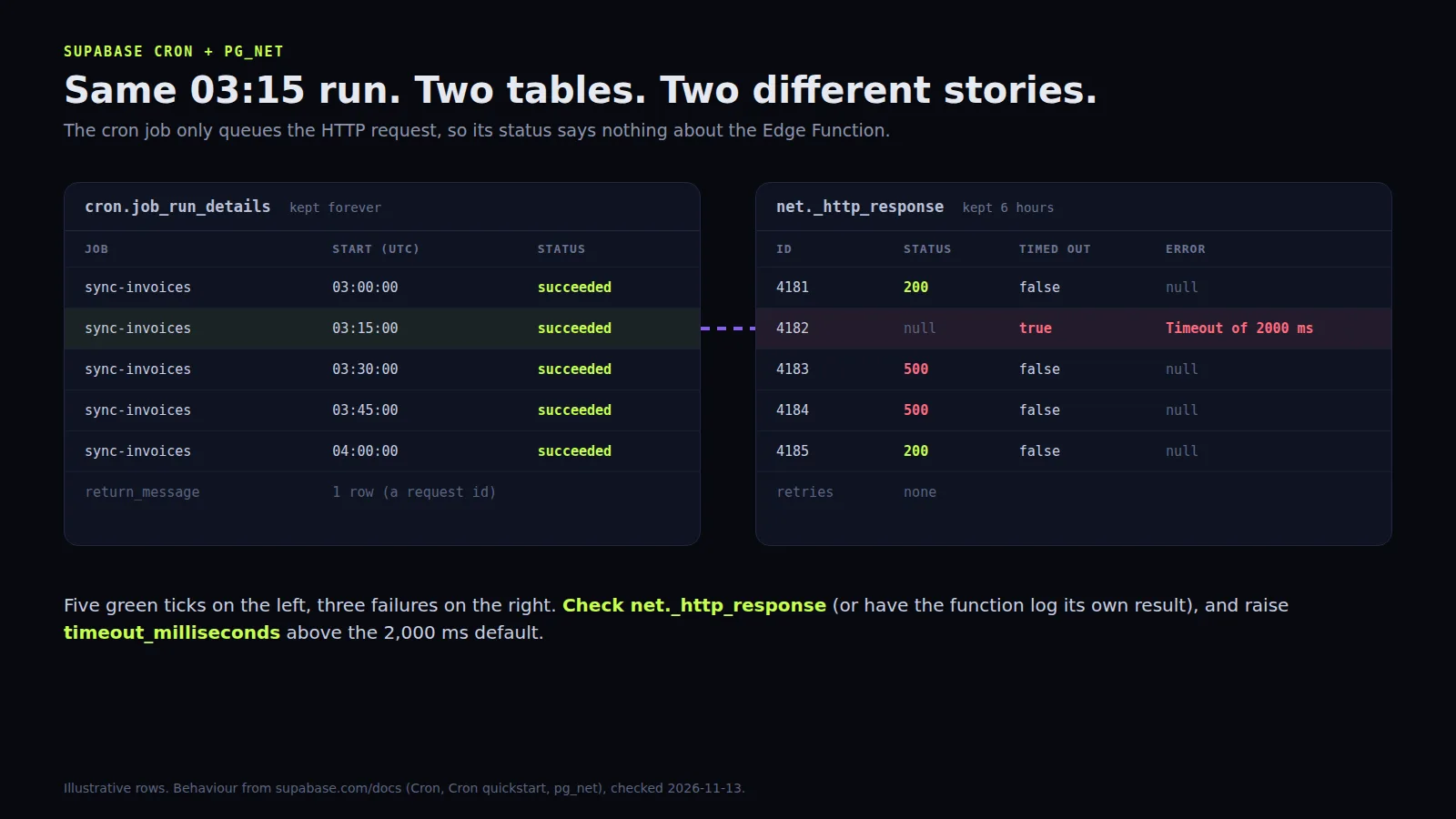
So a sync that has been failing for a week looks perfect in the cron history. To see the truth, check the responses:
select id, status_code, timed_out, error_msg, created
from net._http_response
where status_code is distinct from 200 or timed_out
order by created desc
limit 20;
The default timeout is 2,000 ms, which is short for a function that calls a slow API. A timeout there means pg_net stopped waiting, not that anything retried. Nothing retries. If the work matters, have the function write its own result row (started, finished, error) and alert on that, or at least raise the timeout. pg_net also says it's meant for about 200 requests a second at most, which you won't hit from cron, but you will if a trigger fans out one request per row.
Clean up the history
cron.job_run_details is never cleaned up automatically, and the rows stay even after you unschedule a job. A '30 seconds' job writes 2,880 rows a day. The quickstart suggests a cron job to clean up the cron jobs, which is a little funny and exactly right:
select cron.schedule('job-run-details-cleanup', '0 0 * * *',
  $$ delete from cron.job_run_details where end_time < now() - interval '7 days' $$);
Add it the same day you add your first job.
When I'd use something else
If the job is mostly about the database (expire rows, refresh a materialized view, roll up stats), cron inside Postgres is perfect. Zero network, no extra service, and the job lives next to the data it touches.
If the job is long, needs retries, or talks to five external APIs, I'd still trigger it from cron but hand it to a queue. Supabase has pgmq for that. A 10-minute cap and no retries is fine for a trigger and bad for a workflow.
Apps built with Lovable often have a few of these jobs already, created from a prompt, with keys in the SQL and a project URL that nobody will remember during a migration. If that's yours, my agency Lovable 2 Live moves and fixes them. For anything else, book a free call. All consultation is free.
Introductory offer
Free cloud cost optimization. You only pay from what I save.
I cut your AWS, cloud, Supabase or Vercel bill for free and keep half of what I save for 6 months. Save nothing, pay nothing. Code, architecture and infrastructure.