Supabase Realtime: What It Costs and Where It Breaks
By Aakash Verma · · 5 min read
Supabase Realtime is the part of Supabase that pushes changes to the browser over a WebSocket, so a chat message or a status update shows up without a refresh. It's also the feature where a small app quietly gets expensive or starts dropping connections, and almost always for the same two reasons: every listener is billed separately, and a lot of front-end code forgets to unsubscribe.
Everything below is checked on October 29, 2026 against Supabase's Realtime pricing, limits and message usage pages.
Three features under one name
Realtime is really three things that share a connection.
Postgres Changes listens to inserts, updates and deletes on your tables. It's what most people mean by "Supabase realtime", and it's what AI app builders reach for by default, because it's one .on('postgres_changes', ...) call and it works.
Broadcast sends any message from one client (or your server) to everyone on a channel. Cursor positions, typing indicators, "the export is ready". Nothing touches your tables.
Presence keeps a shared list of who's on a channel right now. The green dot next to a name.
How you're billed
Two numbers are billed: messages and peak connections.
| Plan | Messages included | Peak connections included | Past that |
|---|---|---|---|
| Free | 2 million | 200 | hard limits, no overage |
| Pro / Team | 5 million | 500 | $2.50 per million messages, $10 per 1,000 peak connections |
The detail that matters is how a message is counted. Supabase's own wording: for Postgres Changes, "each database change counts as one message per client that listens to the event." For Broadcast, it's one message sent plus one per client that receives it. Usage is billed in whole packages of a million, so 5.1 million on Pro rounds up to one extra package.
So the count isn't "how many rows changed". It's rows changed multiplied by everyone listening.
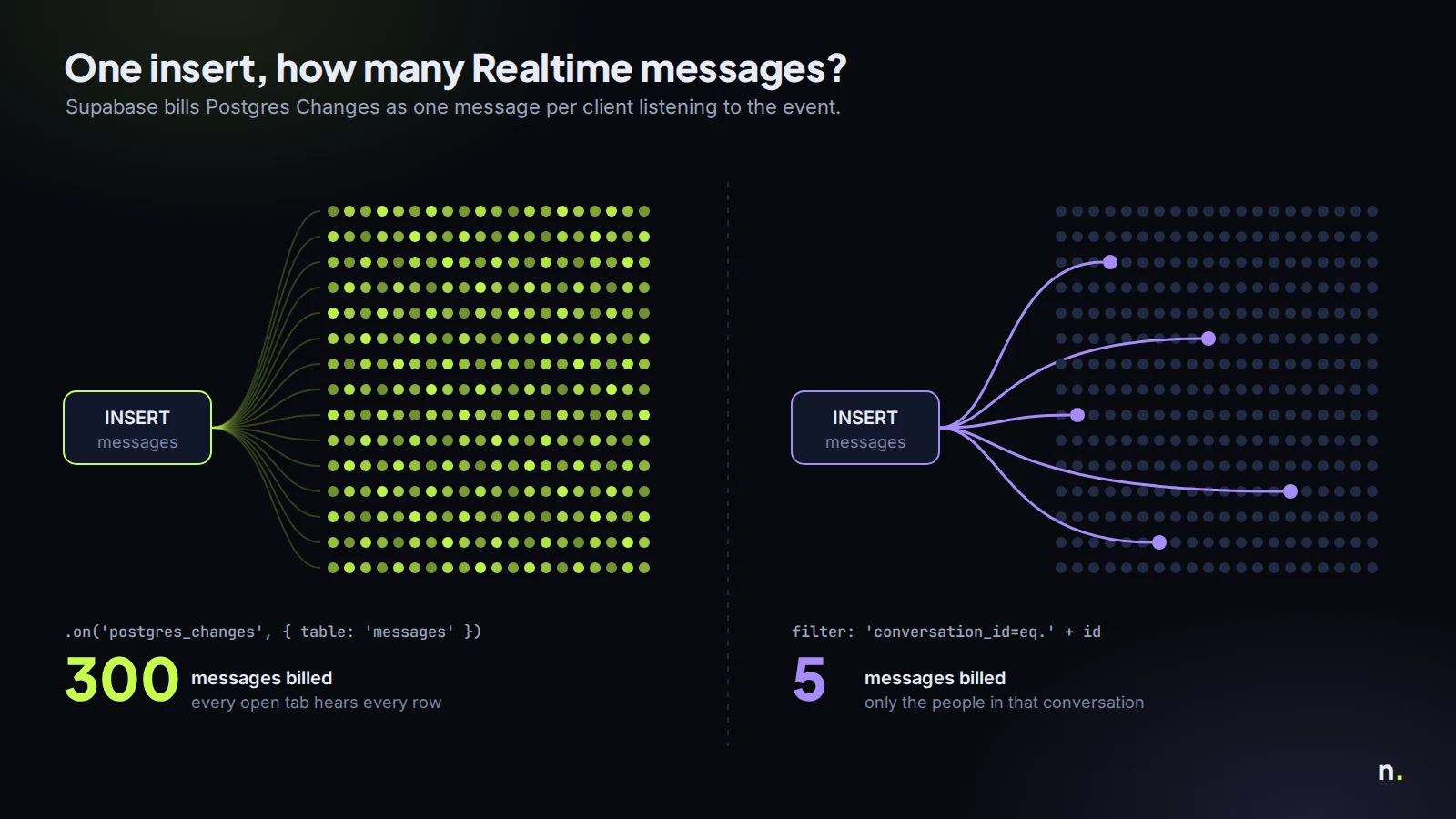
A made-up but ordinary example. A support inbox with 300 people online during the day, each with a tab subscribed to the whole messages table, and 50,000 new messages a month. That's 50,000 times 300, 15 million Realtime messages. On Pro you pay for 10 million over the quota: $25 a month, on top of everything else.
Add a filter so each tab only listens to its own conversation (filter: 'conversation_id=eq.' + id), and if a conversation has 5 people watching on average, the same month is 250,000 messages. That's well inside the 5 million you already pay for. Same app, same traffic, one line of code.
My rule is boring: never subscribe to a whole table from the browser unless the table is tiny and everyone really needs every row.
The limits you'll hit first
Cost is the slow problem. Limits are the loud one. These are per project, per plan:
| Free | Pro | Pro, spend cap off | |
|---|---|---|---|
| Concurrent connections | 200 | 500 | 10,000 |
| Messages per second | 100 | 500 | 2,500 |
| Channel joins per second | 100 | 500 | 2,500 |
| Channels per connection | 100 | 100 | 100 |
Notice the jump from 500 to 10,000 connections when you turn the spend cap off on Pro. A lot of "Realtime stopped working at launch" stories are a Pro project with the cap still on.
The errors show up in the WebSocket frames (Network tab, filter by WS) and in the Realtime logs in the dashboard:
too_many_channels: one connection joined more than 100 channels.too_many_connections: the project ran out of concurrent connections.too_many_joins: too many channel joins in one second.tenant_events: you went over messages per second, and Supabase disconnects clients until it drops.supabase-jsreconnects by itself, which makes this one look like random flakiness.
too_many_channels is the one I'd bet on in a React app. A component calls supabase.channel('room') in a useEffect, the effect runs again on every re-render or route change, and nobody calls supabase.removeChannel(channel) in the cleanup. Each visit adds a channel to the same socket until it hits 100. Search the codebase for .channel( and check that every one has a matching removeChannel in a cleanup function. It takes ten minutes and it's usually the whole fix.
Postgres Changes doesn't scale the way you'd think
Postgres Changes checks every change against every subscriber's permissions. With 100 subscribers, one insert means 100 authorization checks. And the changes are processed on a single thread to keep them in order, so buying a bigger compute add-on doesn't make it much faster. The Postgres Changes docs say it plainly: past roughly 3,000 concurrent subscribers on the same changes, use Broadcast instead. Broadcast sends a change once and fans it out.
The way to do that without rewriting the front end much is to broadcast from the database: a trigger on the table that sends the change to a channel, and clients subscribe with Broadcast rather than Postgres Changes. It's more setup (channel names, a private channel with an RLS policy on realtime.messages), but the work stops growing with the number of people watching.
Two smaller things that bite:
- You don't get the old row by default. For UPDATE and DELETE payloads with the previous values, the table needs
alter table messages replica identity full;. Without it, a delete arrives with little more than the primary key, and you can't filter DELETE events at all. - RLS isn't applied to DELETE events. Updates and inserts respect your select policies per subscriber. Deletes don't, so don't put anything sensitive in a design that relies on hiding which rows got deleted.
And the thing every first Realtime setup forgets: a table only sends changes if it's in the supabase_realtime publication. In the dashboard that's a toggle under Publications; in SQL it's alter publication supabase_realtime add table messages;. If your subscription says SUBSCRIBED and nothing ever arrives, it's this.
What I'd actually do
For a small app: Postgres Changes with a filter on every subscription, one channel per screen, cleaned up on unmount. Check the Realtime numbers on the usage page once a month.
For anything with a few hundred people online at once, or a feed many people watch: Broadcast for the hot paths (chat, live counters, presence), Postgres Changes only for low-traffic admin screens. And turn the spend cap off on purpose, with a budget alert, rather than finding out from your users that the 500th connection was refused.
A lot of the Supabase projects with these problems right now were generated by Lovable, where Realtime gets wired in early and nobody looks at it again until the bill or the errors arrive. If that's your app, my agency Lovable 2 Live does exactly this kind of cleanup. For anything else, book a free call. All consultation is free.
Introductory offer
Free cloud cost optimization. You only pay from what I save.
I cut your AWS, cloud, Supabase or Vercel bill for free and keep half of what I save for 6 months. Save nothing, pay nothing. Code, architecture and infrastructure.