Supabase Backups: What Each Plan Keeps, and What It Skips
By Aakash Verma · · 4 min read
Supabase backups depend entirely on your plan. The Free plan has none at all. Pro keeps a daily backup for 7 days, Team for 14, Enterprise up to 30. Point-in-time recovery is a paid add-on on any paid plan, starting at about $100 a month for 7 days of history. And on every plan, the backup is the database only: files in Storage are not in it.
That's the short version, checked against the Supabase backups docs and the pricing page on November 11, 2026. The rest is what those lines mean when you actually need a restore, which is always at a bad moment.
Free: you are the backup
The pricing table says "Not included" for both automatic backups and PITR on Free. The docs tell free projects to export their own data regularly with the CLI and keep copies off-site. Free projects also pause after a week without activity.
I'm fine with that for side projects. What I'm not fine with is a product with real users on the Free plan, which happens more than you'd think, because the bill is $0 and nothing breaks until the day someone runs the wrong migration. If anyone pays you, the $25 Pro plan is the cheapest insurance in your stack.
Pro and Team: daily, and a day can be a long time
On Pro you get the last 7 daily backups, on Team the last 14. Restoring one rolls the whole database back to that snapshot. The project is down while it restores, longer for bigger databases, and everything written since the snapshot is gone.
So the question to ask is how much one day of writes is worth. A bad UPDATE without a WHERE at 6 pm, last backup at 3 am: fifteen hours of signups, orders and edits, gone, unless you can rebuild them from somewhere else (Stripe, logs, emails). For a lot of apps that's survivable. For a booking or payments app it usually isn't.
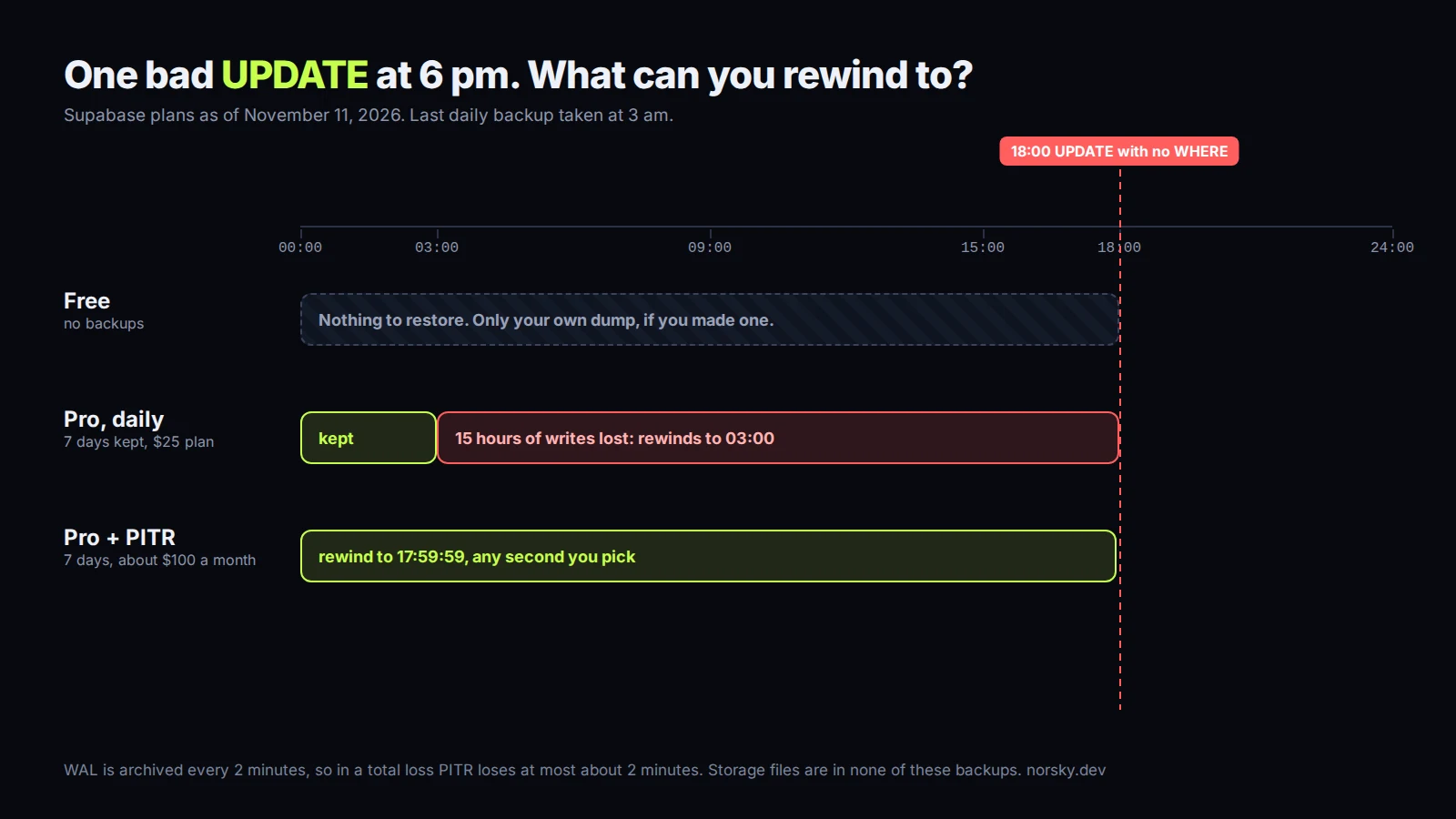
PITR: what $100 a month buys
Point-in-time recovery keeps the write-ahead log, so you can restore to a chosen second instead of last night. Supabase prices it by retention: 7 days at $0.137 an hour (about $100 a month), 14 days at about $200, 28 days at about $400. It works on every compute size. WAL files are backed up every two minutes by default, so the worst case is losing about two minutes.
Two things in the docs that people miss:
Turning PITR on stops the daily backups. You don't get both.
A PITR restore replaces the current database. If you only need to recover one table, don't restore the live project. Restore to a new project (Supabase calls it duplicating the project), copy the rows you need back, and keep the live data.
Supabase's own production checklist suggests PITR once the database passes 4 GB. My rule is simpler: once losing a day of writes would cost you more than $100, turn it on. Before that, a daily backup plus your own dump is usually enough.
What no Supabase backup includes
Storage objects. The backup holds the metadata rows, not the files. Restore an old backup and the database may point at images that were deleted since, and nothing brings them back. If uploads are the product (documents, invoices, user photos), copy the bucket somewhere else on a schedule. Any S3-compatible tool works against Supabase Storage's S3 endpoint.
Passwords for custom roles. After restoring a daily backup you have to set them again. If a reporting tool or a worker connects with its own role, it will fail right after the restore, which is a confusing time to discover it.
Your own off-site copy. Deleting a project deletes its backups with it, and the docs call that irreversible. Backups that live inside the thing they're protecting are only half a plan.
The dump I would run anyway
Even on Pro with PITR, I'd keep a logical dump outside Supabase. The db dump reference has the details. The catch is that a plain supabase db dump contains no data and no custom roles; it's the schema only, and it leaves out Supabase-managed schemas like auth and storage. The backup and restore guide uses three files:
supabase db dump --remote=$DB_URL -f roles.sql --role-only
supabase db dump --remote=$DB_URL -f schema.sql
supabase db dump --remote=$DB_URL -f data.sql --use-copy --data-only \
  -x "storage.buckets_vectors" -x "storage.vector_indexes"
That's CLI 3.x syntax. --linked and --db-url still work in v3 but are deprecated and go away in v4, so old cron scripts will start failing on an upgrade. Use the direct connection string, or the session pooler if your server has no IPv6.
Run it nightly from a machine that isn't Supabase (a small VPS, a GitHub Action with the connection string in secrets), push the files to a bucket at another provider, and keep 30 days. It costs almost nothing.
Then test a restore once. Spin up a scratch project, run the psql restore from the same guide, and see what breaks. Edge Functions, database webhooks, Realtime publications and non-default extensions don't come along and have to be set up again, and Vault secrets need the old project's root key, which you can only fetch while that project is still active. Better to learn that on a quiet Tuesday.
If your Supabase bill is part of the problem rather than the backups, I wrote up Supabase pricing line by line, and slashcloudbill does a free audit of the whole cloud bill.
Introductory offer
Free cloud cost optimization. You only pay from what I save.
I cut your AWS, cloud, Supabase or Vercel bill for free and keep half of what I save for 6 months. Save nothing, pay nothing. Code, architecture and infrastructure.