Supabase Auth: What I Check Before an App Launches
By Aakash Verma · · 4 min read
Supabase Auth is the login part of Supabase: email and password, magic links, OTP codes, Google, Apple and GitHub sign-in, phone, and anonymous users, all stored in the auth schema of your own Postgres database. You call it from the browser through supabase-js, and every logged-in request carries a JWT that your row level security policies read with auth.uid(). Getting a login screen working takes ten minutes. Getting it right for real users is a short list of things people skip, and that list is this post.
Facts below are from Supabase's own docs as of November 18, 2026: the Auth overview, the rate limits page and the getClaims reference.
getSession, getUser, getClaims
This is where most server-side auth bugs come from, because all three return something that looks like "the user".
getSession() reads the session from storage (local storage in the browser, cookies with the SSR helpers). It doesn't check anything with the server. In the browser that's fine for deciding what to render. On a server, in middleware, an API route or a server function, it means you're trusting whatever cookie the request brought, and Supabase's own server-side docs say not to.
getUser() sends the token to the Auth server and gets back the current user. It's always right, and it costs a network round trip on every call.
getClaims() verifies the JWT locally against your project's public keys at /.well-known/jwks.json (usually cached) and returns the claims, so it's fast and safe. The catch is in the docs: that only works if your project uses an asymmetric signing key (ECC or RSA). On the old shared-secret setup, getClaims() quietly falls back to calling the Auth server, just like getUser(). If you've never touched the JWT signing keys page in your dashboard, check which one you're on.
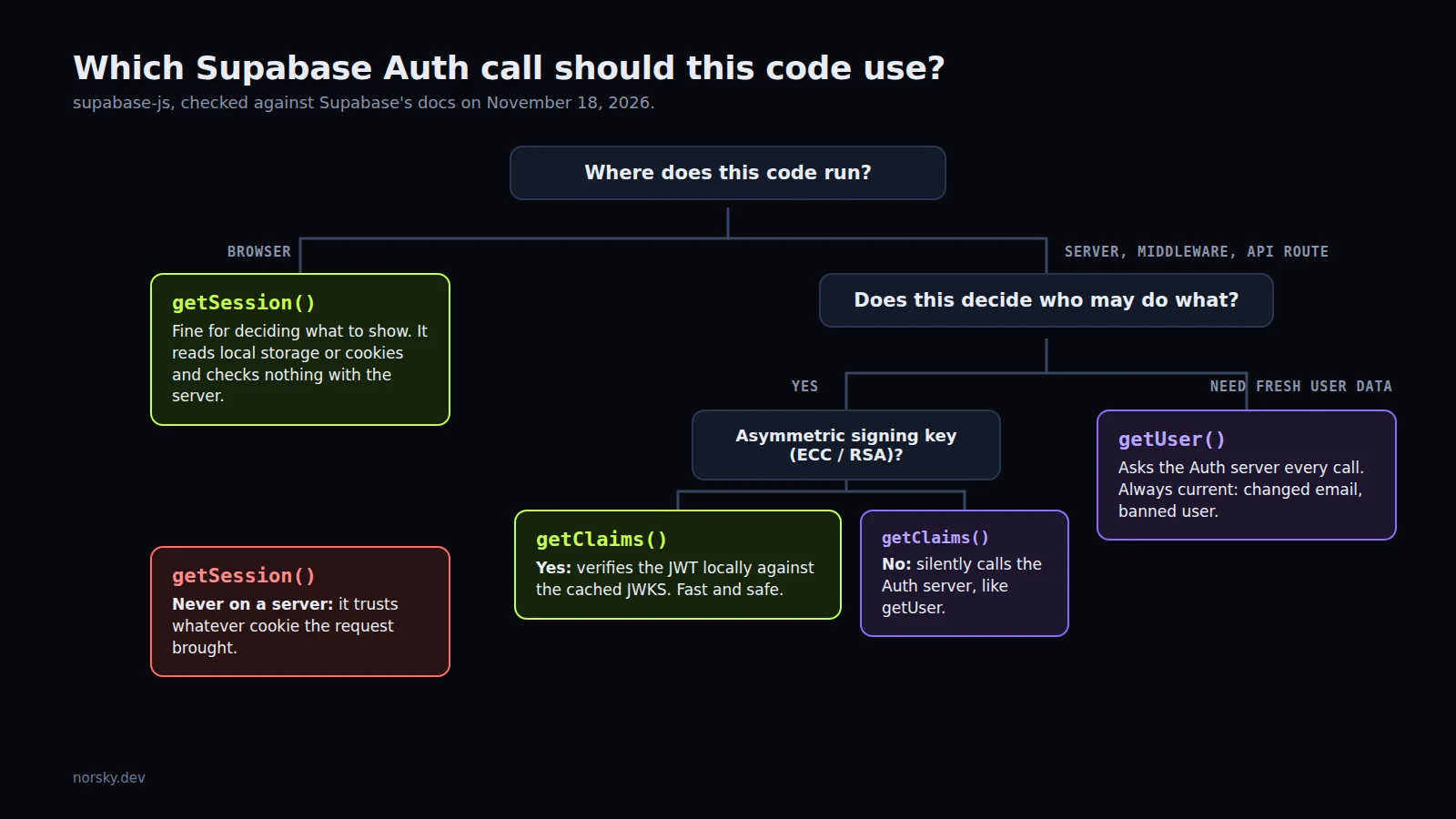
My rule: browser UI can use the session, anything on a server that decides who can do what uses getClaims() with an asymmetric key, and getUser() only when I need fresh user data (a just-changed email, a ban).
Two emails an hour
The built-in email provider is limited to 2 emails per hour for the whole project. Not per user. Per project. That's sign-up confirmations, magic links and password resets combined. It's meant for trying things out, and it will break a launch the moment three people sign up in the same hour.
Before launch you set up custom SMTP (Resend, Postmark, SES, whatever you already pay for) under Authentication, and then you can raise the limit. While you're there, fix the sender name and the templates. A "Confirm your signup" email from a Supabase address goes to spam often enough that people assume your app is broken.
The other default limits are reasonable: 30 sign-up and sign-in requests per 5 minutes per IP, a 60-second wait before the same user can request another OTP or magic link, 150 token requests per 5 minutes per IP. The token one can bite if lots of users sit behind one office IP and you've got short-lived sessions refreshing constantly.
Redirect URLs
Every magic link, OAuth sign-in and password reset sends the user back to a URL, and Supabase only allows URLs on your list (the Site URL plus Redirect URLs under URL Configuration). The usual launch-day mistake: the list still says http://localhost:3000 or a preview domain, and every password reset lands somewhere that doesn't exist. Add the production domain, the www version if you serve one, and keep wildcards to preview deploys you control. A wildcard that matches any subdomain of a shared hosting domain is a bad idea, because someone else can host a page there.
API keys
Supabase moved to new API keys: a publishable key (sb_publishable_...) for the browser and secret keys (sb_secret_...) for servers, replacing the old anon and service_role JWTs. The publishable key is public on purpose. People panic about it showing up in the JavaScript bundle, and it's the one thing in there that's fine. The secret key, or the legacy service_role, bypasses RLS completely, so it must never reach a browser. What I grep for in a frontend before launch: any env var starting with VITE_, NEXT_PUBLIC_ or NUXT_PUBLIC_ that holds a secret. Those prefixes mean "ship this to every visitor".
RLS is the real auth
Auth tells you who someone is. Row level security decides what they get, and without it the publishable key reads every row of every table. Each table the frontend touches needs RLS on and policies that compare auth.uid() to the row's owner. I wrote up how to test that in my Supabase RLS post; the short version is sign up twice and try to read account A's data while logged in as B.
One more thing that isn't obvious: auth.users is in the auth schema and isn't exposed through the API, which is correct. If you need public profile data, put it in your own profiles table with its own policies, filled by a trigger on sign-up, and expose only the columns you mean to.
Small things that still matter
Turn on leaked password protection if your plan has it, and require email confirmation unless you have a reason not to. Anonymous sign-ins are handy for guest carts, but each one is a real row in auth.users that your policies treat as authenticated, so a policy that says "any logged-in user can insert" now means "anyone". Sign in with Apple is required by App Store guideline 4.8 if your mobile app offers Google login. And if you add MFA, check that your policies look at the aal claim, or the second factor protects the login screen and nothing else.
Apps built in Lovable use Supabase Auth underneath, through Lovable Cloud or a Supabase project you connect, so all of this applies to them too, usually with the 2-an-hour email limit still in place on launch day. If your app came out of Lovable and you'd rather have someone else take it through this list, lovable2live.com does exactly that.
Introductory offer
Free cloud cost optimization. You only pay from what I save.
I cut your AWS, cloud, Supabase or Vercel bill for free and keep half of what I save for 6 months. Save nothing, pay nothing. Code, architecture and infrastructure.