SQLite vs Postgres: Pick by Writers, Not by Size
By Aakash Verma · · 4 min read
My rule for SQLite vs Postgres is short: if one process on one machine does the writing, SQLite is a real option, often the better one. If several processes or several servers need to write, use Postgres and don't spend another hour on it. Data size and traffic matter much less than people assume. The number of writers is what decides it.
Versions as I write this, on November 15, 2026: SQLite 3.54.1, PostgreSQL 18.7, with 19 at release candidate 2.
The traffic myth
People reject SQLite because it sounds like a toy, then pick Postgres for an internal tool with eleven users. SQLite's own when to use page says any site under 100K hits a day "should work fine", calls that "a conservative estimate, not a hard upper bound", and says it has been shown to work at ten times that. The size limit is 281 terabytes. Neither number is why you'd pick Postgres.
Laravel noticed. Since Laravel 11, a fresh project's .env points at SQLite by default, and for a lot of small apps nobody ever changes it. That's a sensible default. You get a database that is one file, needs no server, no password, no connection pool and no separate backup job for a dev setup.
Where SQLite actually stops
Same page, the sentence that matters: SQLite "supports an unlimited number of simultaneous readers, but it will only allow one writer at any instant in time."
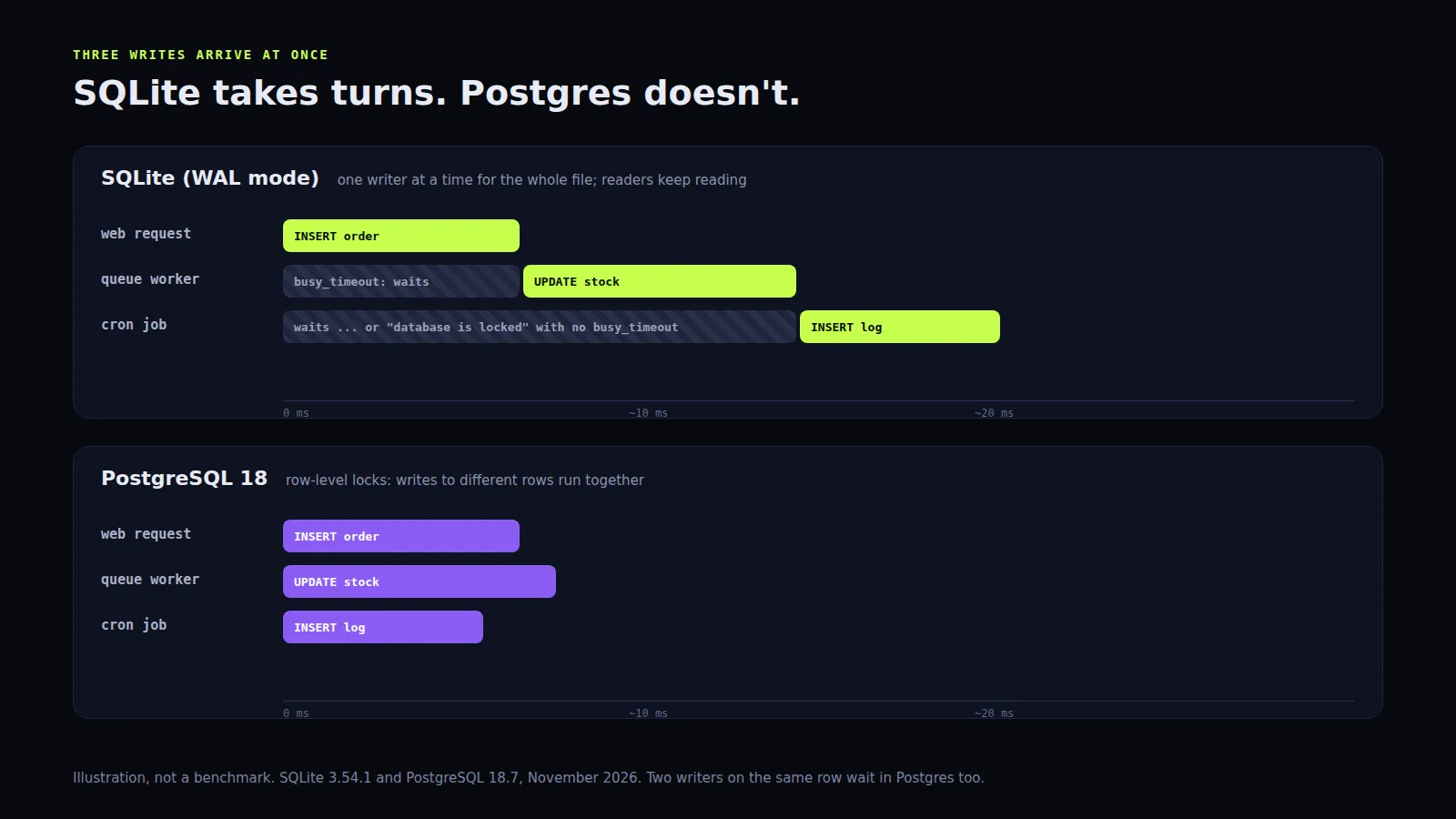
For a web app with one app server, that's usually fine. Writes are short, they queue, and each one takes a few milliseconds. It goes wrong in three specific setups:
A queue worker next to the web process. Your web request writes, your background job writes, both are on the same file. Without a busy timeout, one of them gets SQLITE_BUSY and the error you see is database is locked. Set PRAGMA journal_mode=WAL and PRAGMA busy_timeout=5000 and most of this goes away. WAL lets readers keep reading while someone writes. The busy timeout makes a writer wait instead of failing. Both should be on in any SQLite app that serves requests. Long transactions still hurt: one job that opens a transaction and then calls an external API holds the write lock the whole time.
More than one server. SQLite is a file. Two app servers can't share a file safely over the network, and SQLite's docs warn against network filesystems for exactly this. Once you need a second machine behind a load balancer, you either move to Postgres or to one of the replicated SQLite products, and at that point you've added the complexity you picked SQLite to avoid.
Lots of small concurrent writes. Chat messages, counters, event logging from many users at once. Postgres handles concurrent writers with row-level locks, so two users updating two different rows don't wait for each other. SQLite makes them take turns for the whole database.
What you give up with SQLite (and what you don't)
Types are the thing that bites developers coming from Postgres. SQLite tables are flexibly typed by default: a column declared INTEGER will happily store the string 'abc'. Since 3.37 you can declare a table STRICT and get real type checks. I'd do that on every new table, and I wish it were the default.
Other gaps, in the order I'd actually miss them:
- No
ALTER COLUMN. Changing a column's type means the create-copy-drop-rename dance. Migration tools hide it, but it's slow on big tables. - No row-level security, no roles, no
LISTEN/NOTIFY. One file, one permission: whoever can read the file can read everything. - Extensions exist but the ecosystem is thinner. Postgres has
pgvector, PostGIS and full text search with ranking built in. SQLite has FTS5, which is honestly good, and vector extensions that are younger. - Backups need thought. Copying the file while the app writes can give you a corrupt copy. Use the
.backupcommand orVACUUM INTO, or stream it continuously with Litestream to S3.
What you don't give up: JSON functions, window functions, CTEs, foreign keys (turn them on with PRAGMA foreign_keys=ON, they're off by default, another bad default), and speed. A query against a local file with no network hop is very fast. For read-heavy pages SQLite often beats a Postgres that sits in another availability zone.
What Postgres costs you
Not much money. A small managed Postgres is cheap, and a self-hosted one on the same box as your app is free. The cost is moving parts: a server process to keep running and patch, connections to pool (I wrote about PgBouncer for when that becomes a problem), a backup job that actually restores, and credentials to manage.
Postgres 18 also made upgrades less painful than they used to be, and it added uuidv7() so you get time-ordered IDs without an extension. Small things, but they add up to "the default choice for anything with more than one writer".
If you're comparing hosted Postgres options, the Neon vs Supabase post has the trade-offs, and MySQL vs Postgres covers the other common question.
How I'd decide
- A CLI tool, a desktop or mobile app, a single-server internal tool, a blog, a prototype: SQLite, with WAL, a busy timeout, foreign keys on and
STRICTtables. - Anything with a queue worker writing a lot, a second app server on the roadmap, or multiple services touching the same data: Postgres from day one.
- Not sure? If moving later would scare you, start with Postgres. Moving from SQLite to Postgres is not hard for a small schema, but the flexible typing means you find out in the migration which rows had text in a number column.
If you have an app that has outgrown its database, or you're picking one for a new build and want a second opinion, book a free call. All consultation is free.
Introductory offer
Free cloud cost optimization. You only pay from what I save.
I cut your AWS, cloud, Supabase or Vercel bill for free and keep half of what I save for 6 months. Save nothing, pay nothing. Code, architecture and infrastructure.