MySQL vs Postgres: What Actually Bites You in 2026
By Aakash Verma · · 5 min read
I have shipped far more MySQL than Postgres. Most of my PHP and Laravel work ran on it, and it never once let me down in a way I could blame on MySQL itself. These days I start new projects on Postgres anyway. Both of those are true, and the reasons are less about benchmarks than about a handful of behaviours that surprise people the first time they hit them.
So this is not a feature matrix. Both databases will hold your users table just fine. It's the stuff that bites.
Versions checked on November 4, 2026 against the PostgreSQL home page and the MySQL 9.7 release notes.
Where each one is right now
Postgres 18 is the current stable line (18.6, released August 13, 2026). Postgres 19 is at RC 1 since October 15, so the final release is close. 18 was a big one for day-to-day work: asynchronous I/O for reads, uuidv7() built in, and virtual generated columns as the default kind.
MySQL changed how it numbers releases, and if you haven't looked since 8.0 it is confusing. There are two tracks, LTS and Innovation. 8.4 is an LTS. 9.7 is an LTS too, and the last one with the old numbering: per the MySQL release model page, everything after it uses calendar versions in YY.M form, so 26.7 is the July 2026 release. An LTS gets 5 years of premier support plus 3 extended. An Innovation release is supported only until the next one ships, and you can't jump between Innovation majors directly, you go through an LTS. And 8.0, which half the internet still runs, reached end of life in April 2026.
If you are on MySQL 8.0 today, that is your actual decision. Not "MySQL or Postgres" but "8.4 LTS, 9.7 LTS, or move". The 8.0 to 8.4 upgrade notes are worth reading before you pick, because 8.4 no longer loads the old mysql_native_password plugin by default, and users created with it can't log in until you deal with that.
The collation thing
This is the one that catches Laravel developers moving to Postgres, every time.
MySQL's default collation since 8.0 is utf8mb4_0900_ai_ci. The ci means case-insensitive, and the ai means accent-insensitive. So in MySQL a unique index on email treats ana@example.com and Ana@Example.com as the same value, and WHERE name = 'Jose' finds José. Your app has quietly depended on this for years, and you never wrote a line of code for it.
Postgres compares strings exactly. Move the same schema over and a user who signed up as Ana@... can't log in typing ana@..., and worse, can sign up twice. You find out from a support email.
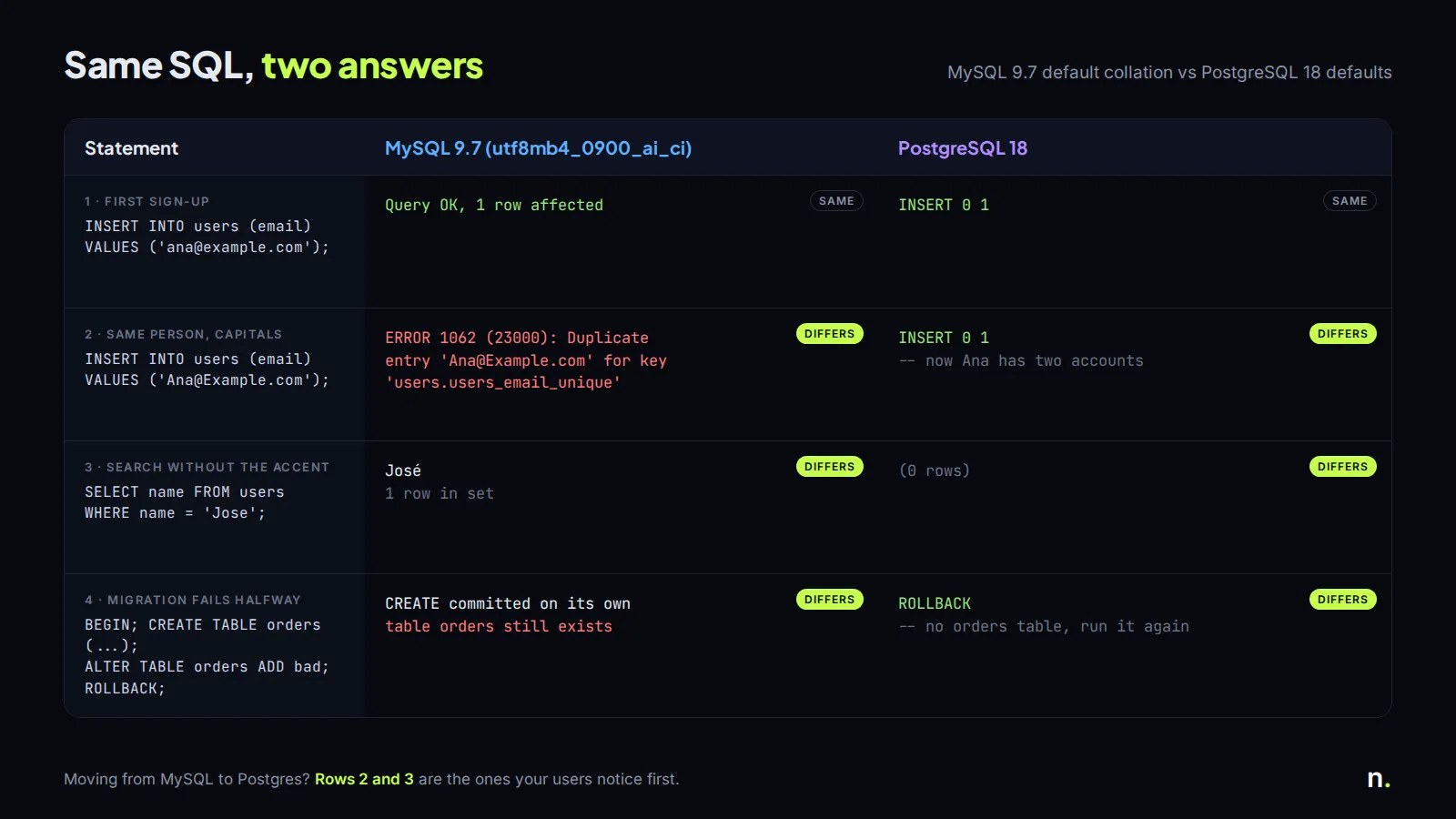
The fixes on the Postgres side are boring but you have to actually do them: lowercase emails on write and keep a unique index on lower(email), or use the citext extension, or a nondeterministic ICU collation. I go with the lowercase index. It's explicit, and anyone reading the schema can see what's going on.
Migrations that half-run
Postgres has transactional DDL. If a migration creates a table, adds two columns and then fails on the third, the whole thing rolls back and you fix it and run it again.
MySQL commits implicitly on most DDL. A Laravel migration that dies halfway leaves the table created but no row in the migrations table, so the next php artisan migrate stops with:
SQLSTATE[42S01]: Base table or view already exists: 1050 Table 'orders' already exists
On a laptop that's a shrug. On a production deploy at night it's a manual cleanup with the site in maintenance mode. I've learned to keep MySQL migrations small, one change each, for exactly this reason. Postgres lets me be lazier, and I'll take that.
What Postgres gives you that MySQL doesn't
Extensions are the real gap. pgvector for embeddings (I wrote up how it behaves with filters), PostGIS for maps, pg_trgm for fuzzy search, pg_cron for scheduled jobs inside the database. MySQL has vector types now too, but the ecosystem around Postgres is years ahead.
Row level security is the other one. It's the whole reason Supabase works the way it does: the browser talks to the database through policies. MySQL has nothing like it, so with MySQL every rule lives in your API code. That's not worse, honestly. It's just a different shape of app.
JSON works in both. Postgres jsonb with a GIN index is nicer to query, MySQL's JSON type is fine for storing a blob you mostly read whole.
What MySQL still does better
Simple replication and boring operations. A MySQL primary with a couple of replicas is something a lot of hosting people can run half asleep, and managed MySQL is available everywhere at the same price as Postgres. On AWS, RDS for MySQL and RDS for PostgreSQL cost the same per instance hour for the same class (see the RDS pricing page), so cost is not a reason to pick either.
Connection handling too. MySQL uses a thread per connection and copes with a few hundred open connections without drama. Postgres forks a process per connection, so once you have serverless functions or a big PHP-FPM pool you will want a pooler in front. I covered that in the PgBouncer post. It's one more moving part.
And if the existing app is on MySQL, works, and has a team that knows it, moving databases is a project with real risk and very little to show the customer at the end. I would not do it for taste.
What I'd pick
New project, any stack: Postgres, mostly for the extensions and because Supabase, Neon and most hosted backends are built on it.
Existing Laravel or WordPress app on MySQL 8.0: upgrade to 8.4 or 9.7 LTS, keep MySQL, and spend the saved weeks on features.
Moving MySQL to Postgres anyway: lowercase-and-index your emails, grep for LIKE queries that relied on case-insensitivity, check GROUP BY queries, test every migration on a copy first. pgloader does the data move well, it's the app code that needs the work.
If you're weighing a move like that on a production app and want a second pair of eyes on the schema first, book a free call.
Introductory offer
Free cloud cost optimization. You only pay from what I save.
I cut your AWS, cloud, Supabase or Vercel bill for free and keep half of what I save for 6 months. Save nothing, pay nothing. Code, architecture and infrastructure.