Cloudflare D1: Where It Fits and Where It Doesn't
By Aakash Verma · · 4 min read
Cloudflare D1 is SQLite run by Cloudflare, sitting next to your Workers. You bind it to a Worker, write normal SQL, and pay for rows instead of servers. For a lot of small apps that's close to free. For some apps it's the wrong database, and the reasons are all written down in Cloudflare's own limits page, which people tend to read after they've built on it.
Everything below is from the D1 pricing and limits pages, checked November 29, 2026.
What you pay for
D1 bills three things: rows read, rows written and storage.
| Workers Free | Workers Paid | |
|---|---|---|
| Rows read | 5 million a day | 25 billion a month included, then $0.001 per million |
| Rows written | 100,000 a day | 50 million a month included, then $1.00 per million |
| Storage | 5 GB total | 5 GB included, then $0.75 per GB-month |
| Databases | 10 | 100,000 included, then $0.10 each a month |
No charge for compute time, connections, or data leaving Cloudflare. Writes cost a thousand times more than reads per row, but 50 million included writes is a lot for a small product.
The catch: "rows read" means rows scanned
This is the line that surprises people. D1 counts every row the query looks at, not the rows it returns. A SELECT * FROM orders WHERE customer_email = ? on an unindexed column scans the whole table. With 2 million orders, that's 2 million rows read to return three.
On the free plan's 5 million rows a day, the third request like that is already over the limit. On the paid plan 25 billion is a big allowance, but a hot unindexed query run on every page load still chews through it: 10,000 such requests is 20 billion rows.
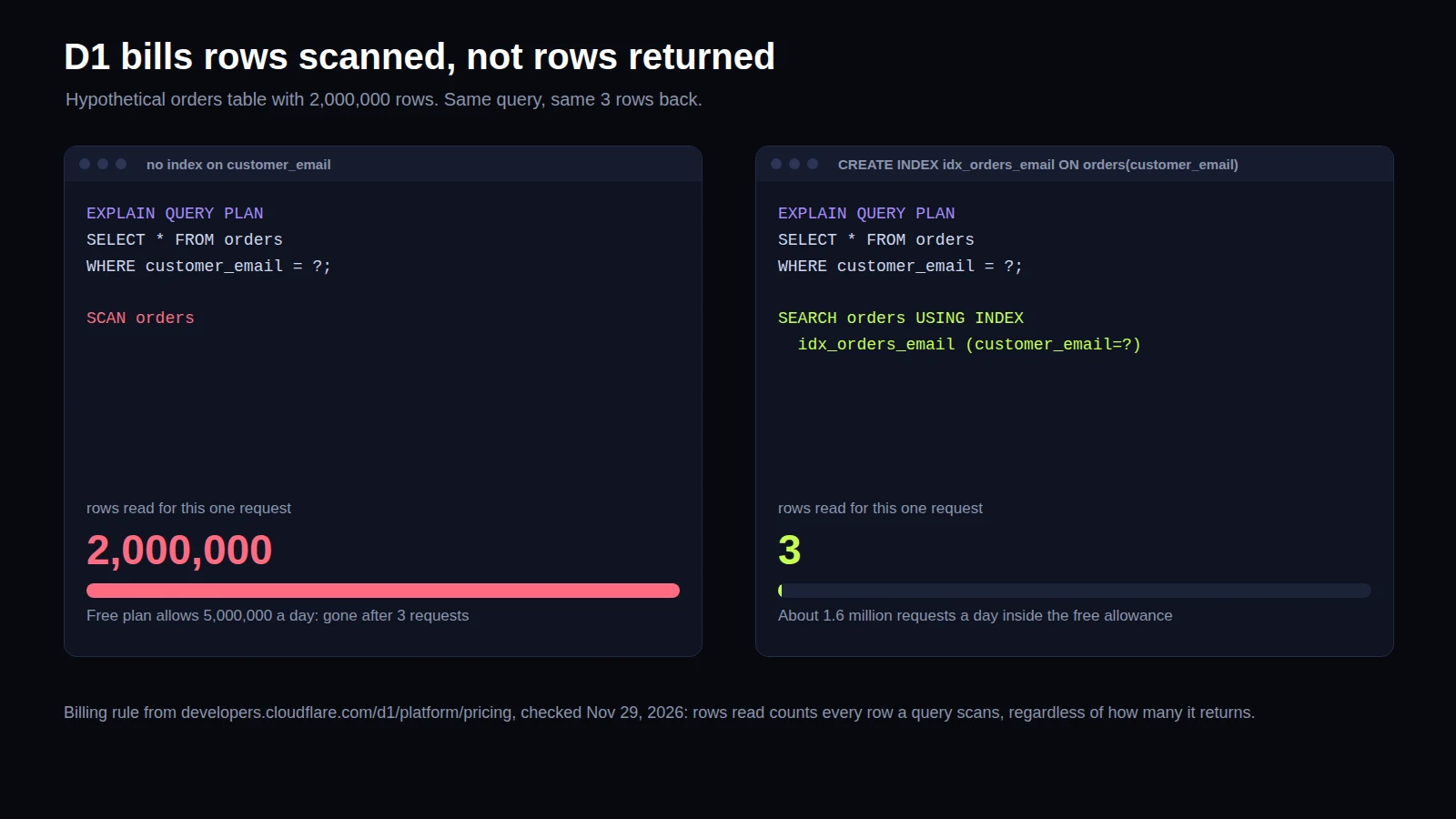
The fix is the same as on any SQLite or Postgres: index the columns you filter on. Run the query with EXPLAIN QUERY PLAN first. If it says SCAN orders instead of SEARCH orders USING INDEX, you're paying for the whole table. The D1 dashboard also shows rows read per query, which is the fastest way to find the expensive one.
The limits that decide the architecture
The pricing is generous. The limits are what make D1 a fit or not:
- 10 GB per database on the paid plan (500 MB on free). You can't raise it. D1 is built for many small databases (up to a million per account), not one big one.
- One query at a time per database. Each D1 database is single-threaded. Cloudflare's own example: queries averaging 1 ms give you about 1,000 queries a second, queries averaging 100 ms give you about 10.
- 30 seconds per query, and that includes a whole
batch()call. - 1,000 queries per Worker invocation on paid, 50 on free.
- 100 bound parameters per query, which bites on bulk inserts. Chunk them.
- 2 MB maximum row, string or BLOB. Files belong in R2.
That one-query-at-a-time line matters more than the 10 GB one. A single slow report query blocks every request behind it. Keep D1 queries short and indexed, and run anything heavy somewhere else.
Where D1 is a good fit
- Per-tenant databases. One database per customer, per workspace, per site. Each stays small, they don't block each other, and deleting a tenant is deleting a database. This is the design D1 is built around, and it's genuinely nice.
- Small apps already on Workers. Config, users, settings, a content table for a site. A few thousand users fit comfortably inside the free tier if the queries are indexed.
- Read-heavy data close to users. Read replication through the Sessions API (
withSession()) sends reads to replicas near the user with no extra storage or compute charge, and gives sequential consistency within a session, so a user sees their own writes.
Where I'd use something else
- One big shared database that will pass 10 GB. Use Postgres. Neon, Supabase, or RDS all work from a Worker through Hyperdrive.
- Heavy concurrent writes to the same data, like counters everyone updates, or a busy queue table. Single-threaded writes queue up. Durable Objects or a proper queue fit better.
- Analytics and long reports. A 20-second query is legal in D1 and blocks everything else on that database while it runs.
- Code that isn't on Workers. D1 has an HTTP API, but if your backend runs on a normal server, it's simpler to use a database built for normal connections.
Backups and the "oops" query
D1 has Time Travel: point-in-time restore to any minute in the last 30 days on paid, 7 on free, at no extra cost:
wrangler d1 time-travel restore my-db --timestamp=1764374400
It restores in place, overwriting the current database. So before running a risky migration, note the current bookmark (wrangler d1 time-travel info my-db) so you know exactly where to go back to. For anything you'd need for longer than 30 days, export with wrangler d1 export on a schedule and put the file in R2.
The short version
D1 is a very good small database and an awkward big one. If your data splits naturally into small pieces, or your app is small and lives on Workers, it's cheap and pleasant. If you're planning one shared database for everything, read the 10 GB and single-threaded lines twice, then pick Postgres.
If you're deciding between D1 and Postgres for something you're building, or a D1 app has started to slow down, book a free call. All consultation is free, and here's what I do for Node.js backends.
Introductory offer
Free cloud cost optimization. You only pay from what I save.
I cut your AWS, cloud, Supabase or Vercel bill for free and keep half of what I save for 6 months. Save nothing, pay nothing. Code, architecture and infrastructure.