Neon vs Supabase: Which Postgres Should You Pick?
By Aakash Verma · · 5 min read
Neon vs Supabase used to be an easy call. Neon was a database. Supabase was a database plus auth, storage, functions and a dashboard your non-technical cofounder could click around in. If you wanted "the whole backend", you picked Supabase, and if you wanted "just Postgres, cheap and serverless", you picked Neon.
That line is gone. Neon, now part of Databricks, sells itself as "a complete set of cloud backend primitives" and lists Managed Better Auth, a Data API, Functions, Object Storage and an AI Gateway next to the database. Both are Postgres underneath, both speak plain SQL, and both will run a normal Node, Laravel or Next.js app without complaint. So the real difference now is how each one charges you and how each one treats an idle database. That's what this comparison is about.
Prices below are from neon.com/pricing and supabase.com/pricing, checked on October 15, 2026.
The billing model is the whole argument
Supabase Pro is $25 a month for the first project, and that includes $10 of compute credit, which covers one Micro instance (1 GB of RAM). It also includes 8 GB of disk, 100,000 monthly active users, 250 GB of egress and 100 GB of file storage. The server runs all month whether anyone uses it or not. A paid project never pauses.
Neon Launch has no monthly fee at all. You pay $0.106 per compute-unit hour, where one compute unit is about 4 GB of RAM, plus $0.35 per GB-month of storage. The important part: after 5 minutes without queries, the compute suspends, and suspended compute costs nothing. The next query wakes it up, which Neon says takes "a few hundred milliseconds".
Here's what that means for a real-shaped app. Say a small B2B tool where people work US office hours, so the database is busy about 10 hours a day and idle the rest. Give it 0.25 CU, roughly the same 1 GB of RAM as Supabase Micro, and 5 GB of data.
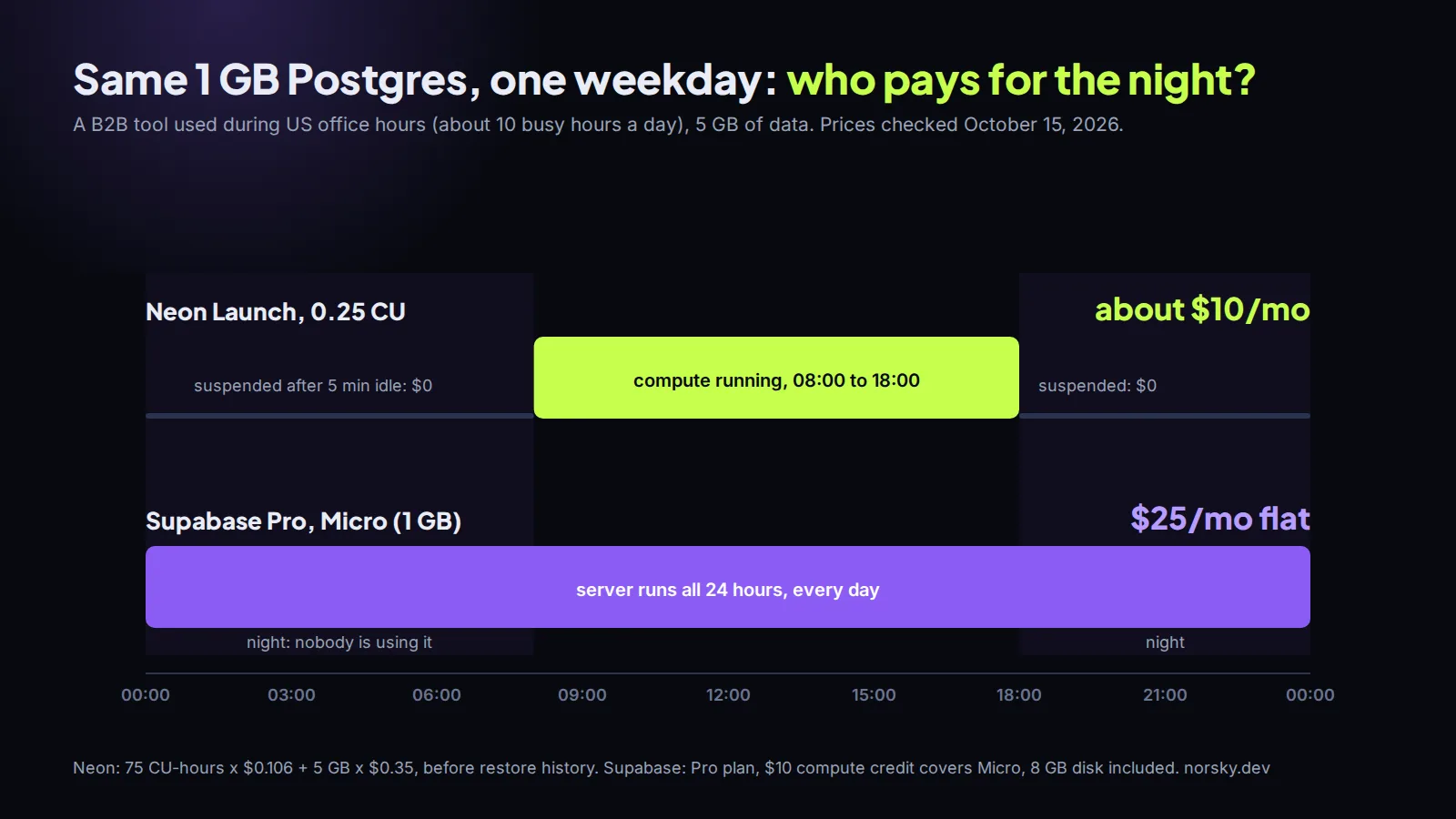
On Neon that's 0.25 × 10 hours × 30 days = 75 CU-hours, which is $7.95, plus $1.75 for storage, so about $10 a month before the restore history (more on that below). Leave it running 24/7 and it's 182.5 CU-hours, about $19, still under Supabase's sticker. On Supabase the same database is $25 flat, and the bundle around it is bigger.
So Neon wins on raw database cost for anything with quiet hours, and the gap gets wider the quieter the app is. An internal tool used twice a week costs almost nothing on Neon and still costs $25 on Supabase.
Where the cheap option gets expensive
I'd still not pick on that number alone, because the edges bite differently.
On Neon, the cost follows the traffic. A cron job that pings the database every 4 minutes means it never sleeps, and you've just paid for 730 hours instead of 300. Background workers, health checks from an uptime monitor pointed at an endpoint that queries the database, an ORM that keeps a connection open: any of these quietly kill scale-to-zero. Autoscaling is the other one. Launch can scale a compute up to 16 CU, which is lovely during a spike and less lovely on the invoice. Cap the autoscaling range per compute. Neon's own cost guide says the same.
Neon also bills the restore history: $0.20 per GB-month for the instant-restore window on the root branch (up to 7 days on Launch). Shorten the window if you don't need a week of point-in-time restore on a side project.
On Supabase the trap is the other way around: things that never turn off. The compute credit covers one Micro instance per organization, not per project. A staging project is another Micro, about $10 a month, every month, and Supabase's branching is billed at $0.01344 per branch per hour, which is the same Micro price again if the branch stays up. I wrote up the rest of Supabase's bill in Supabase pricing: what drives the bill, including the disk that grows and never shrinks.
Branches vs projects
This is the part that changes how you work day to day, not just what you pay.
A Neon branch is a copy-on-write clone of your database. Making one is instant, it starts at $0 of storage, and you get 10 per project on Free and Launch before the $1.50 per branch-month charge starts. People use them for a branch per pull request, or a disposable copy of production to test a migration against real data. When the branch's compute is idle, it scales to zero like everything else.
Supabase can do branching too, on paid plans, and it's integrated with its GitHub flow, but each branch is a running instance with an hourly price. It's fine. It's just not something you hand out casually.
If your team does migrations against a copy of real data before every release (and you should), Neon's model is nicer to live with.
When I'd pick Supabase
- The app needs auth, file uploads, realtime and row-level security, and you want them working this week. Supabase's auth, storage and realtime have been in production for years, the dashboard is good, and the docs answer most questions. Neon's auth and storage are newer.
- Someone non-technical needs to look at the data. Supabase's table editor is a real tool.
- The app is busy all day anyway. If the database never sleeps, scale-to-zero saves nothing, and the $25 bundle is good value.
- The frontend came out of an AI builder that already speaks Supabase. Swapping the backend costs more than it saves.
When I'd pick Neon
- The backend is your own code (Laravel, Express, Next.js API routes) and you only want Postgres. You don't need the rest of the bundle.
- Many small databases: per-customer databases, preview environments, side projects, internal tools. A hundred mostly idle databases are cheap on Neon and expensive on anything that bills per running server.
- You want a database per pull request.
- Traffic is spiky or office-hours only.
There's no wrong answer between the two for a typical CRUD app. Both are Postgres, so moving later is a pg_dump and a connection string change, plus whatever you built on the platform-specific extras (Supabase Auth or Neon's Data API). Keep those extras behind your own code and the choice stays cheap to undo.
If you're starting something and want a second opinion on the stack, or you already have an app and the database bill doesn't look right, book a free call. Database bills are also one of the things I cut under my pay-from-savings cloud cost offer.
Introductory offer
Free cloud cost optimization. You only pay from what I save.
I cut your AWS, cloud, Supabase or Vercel bill for free and keep half of what I save for 6 months. Save nothing, pay nothing. Code, architecture and infrastructure.