Redis Streams in Node: Consumer Groups Without the Surprises
By Aakash Verma · · 5 min read
Redis Streams are an append-only log inside Redis. You XADD an entry, it gets an ID like 1730851200000-0 (milliseconds, then a sequence number), and any number of readers can go through the log at their own pace. Add a consumer group and Redis hands each entry to exactly one worker in the group, remembers who has it, and keeps it on a pending list until that worker says XACK.
That last part is why I'd reach for Streams over Pub/Sub for anything I can't afford to lose. Pub/Sub forgets a message the moment it's sent: if your worker was restarting, the message is gone. A stream keeps it.
Versions as of November 6, 2026: Redis 8.10.3 (released October 26), and redis 6.3.1 on npm, the official Node client. Command details are from the Redis Streams docs.
Streams or BullMQ?
Quick answer first, because it decides whether the rest of this post is for you. If what you need is "run this job later, retry it three times with backoff, show me failed jobs in a dashboard", use BullMQ. It gives you delays, retries, rate limits and priorities, and you'd end up rebuilding all of that badly on top of Streams.
Streams fit when the data is an event log more than a to-do list: order events that three different services each need to see, webhook payloads you want to replay after a bug fix, an activity feed, change events from your app going to a search indexer. Several consumer groups can read the same stream independently, each at its own position. That's the thing a job queue doesn't give you.
The worker loop
Create the group once. $ means "only new entries from now on", 0 means "start from the beginning", and MKSTREAM creates the stream if it doesn't exist yet:
XGROUP CREATE orders billing $ MKSTREAM
Then each worker runs a loop like this with node-redis:
import { createClient } from 'redis';

const redis = await createClient({ url: process.env.REDIS_URL }).connect();
const consumer = `billing-${process.pid}`;

async function readBatch(id) {
  const res = await redis.xReadGroup('billing', consumer, { key: 'orders', id }, { COUNT: 50, BLOCK: 5000 });
  return res?.[0]?.messages ?? [];
}

// 1) whatever this consumer took before it crashed, 2) then new entries
let backlog = true;
while (true) {
  const messages = await readBatch(backlog ? '0' : '>');
  if (backlog && messages.length === 0) { backlog = false; continue; }
  for (const { id, message } of messages) {
    await handleOrder(message);          // must be safe to run twice
    await redis.xAck('orders', 'billing', id);
  }
}
Two details in there matter more than they look. Reading with > gives you entries never delivered to anyone in the group. Reading with 0 gives you your own pending history, the entries you were handed but never acknowledged. If a worker restarts with the same consumer name and only ever reads >, its old pending entries sit there forever. The Redis docs' own example does the same thing: drain your history first, then switch to new entries.
And handleOrder has to be idempotent. Streams are at-least-once: if the worker dies after charging the card but before XACK, the entry is still pending and will be delivered again. Store the stream ID with the result and skip if you've seen it.
Stuck messages: the part people skip
If a worker dies for good (the container is replaced and gets a new name), its pending entries belong to a consumer that will never come back. Nobody else will touch them until someone claims them:
XAUTOCLAIM orders billing billing-replacement 60000 0-0 COUNT 25
That takes up to 25 entries idle for more than 60 seconds and moves them to the caller. It returns a cursor to continue from, so you loop until the cursor comes back as 0-0. I'd run it from every worker on a timer, every 30 seconds or so; with a sensible idle time it's cheap and you never have to think about dead consumers.
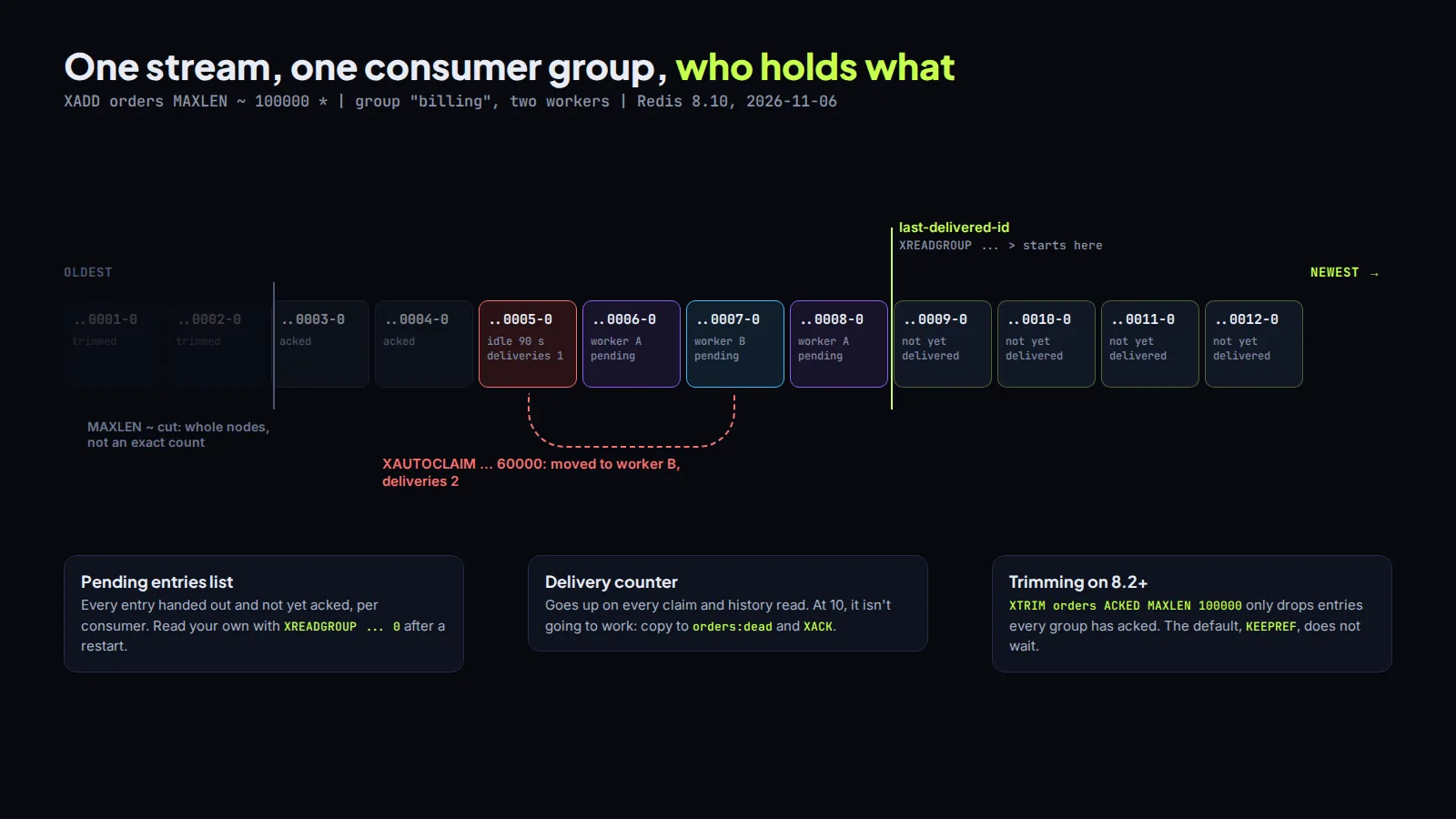
Every claim and every history read bumps the entry's delivery counter, which you can see in XPENDING orders billing - + 10. That's your poison message detector. An entry with a delivery count of 10 is not going to work on the 11th try. Copy it to a orders:dead stream, acknowledge it, and alert someone.
Redis 8.8 added XNACK for exactly this, with three modes: SILENT undoes the delivery (for a graceful shutdown), FAIL hands it back to the group as it is, and FATAL sets the counter to the maximum so it's marked as permanently failed. Nice, but it's new. If you're on Valkey or a managed Redis that's a few versions behind, check the command exists before you build on it. The same goes for everything in the next section.
Trimming, or your stream eats your RAM
A stream never shrinks on its own. Acknowledged entries stay in it, because another group might still want them. So you trim:
XADD orders MAXLEN ~ 100000 * order_id 8812 status paid
The ~ means "about": Redis trims in whole internal nodes instead of to the exact count, which is much cheaper. You can also trim by age with MINID, since IDs are timestamps.
The catch, before Redis 8.2: trimming deletes entries even if a consumer group hasn't processed them yet, and the pending list keeps pointing at entries that no longer exist. Redis 8.2 added a mode argument to XADD and XTRIM (and two new commands, XDELEX and XACKDEL): KEEPREF is the old behaviour and still the default, DELREF also removes the pending references, and ACKED only removes entries every group has acknowledged. On Redis 8.2 or newer, XTRIM orders ACKED MAXLEN 100000 is the one I'd use when several groups read the same stream.
The Redis settings still apply
Everything I wrote about Redis for BullMQ holds here too, because a stream is just a key. maxmemory-policy must be noeviction, or Redis may evict the whole stream under memory pressure. Persistence must be on, AOF with everysec being the usual choice, or a restart takes your unprocessed events with it. And XREADGROUP is a write command, so it only runs on the primary, never on a read replica.
If you're building an event pipeline in Node and want a second pair of eyes on the design, or someone to just build it, book a free call. All consultation is free.
Introductory offer
Free cloud cost optimization. You only pay from what I save.
I cut your AWS, cloud, Supabase or Vercel bill for free and keep half of what I save for 6 months. Save nothing, pay nothing. Code, architecture and infrastructure.