BullMQ in Production: The Settings That Bite
By Aakash Verma · · 5 min read
BullMQ is the queue most Node.js apps end up with once "send the email after the request returns" stops being a setTimeout. It's good. You install it, add a Queue and a Worker, point both at Redis, and jobs start flowing on the first try. That's the trap, honestly: nothing in development tells you which defaults will hurt you later, because in development Redis never restarts, never fills up, and your laptop never gets a SIGTERM halfway through a job.
This is the checklist I'd want ticked before a BullMQ setup goes live. Versions as of October 17, 2026: bullmq 6.3.15 on npm, and the BullMQ docs' own production guide, which is better than most people realise and gets read by almost nobody.
Redis first, because BullMQ trusts it completely
BullMQ keeps everything in Redis: the waiting list, the locks, the job data, the retry counters. So the Redis settings matter more than any BullMQ option.
maxmemory-policy has to be noeviction. This is the one that bites people on managed Redis. Redis is usually configured as a cache, which means that when it gets close to its memory limit it starts deleting keys to make room. For a cache that's the point. For a queue it means jobs, or worse, half of a job's bookkeeping, disappear without an error anywhere. The BullMQ docs are blunt that noeviction is the only setting that guarantees correct behaviour. Check what your provider defaults to before you trust it with anything: AWS ElastiCache's default parameter group, for example, ships with volatile-lru, so you need your own parameter group there.
Turn on persistence. A lot of hosted Redis plans don't persist to disk unless you ask. Restart the instance and every queued job is gone. The docs recommend AOF with a write every second, which is a sensible trade between safety and speed for almost any app.
If BullMQ is sharing a Redis instance with your cache, that's usually where both of these go wrong at once, because the cache wants eviction and the queue can't survive it. Give the queue its own instance or at least its own database with its own policy. A small one is cheap.
Queue and Worker want opposite things from the connection
When Redis drops for ten seconds, you want the code that adds jobs to fail fast, so your API returns an error instead of hanging, and you want the workers to sit and wait patiently until Redis is back.
BullMQ uses ioredis by default, and three options control that behaviour:
import { Queue, Worker } from 'bullmq';

const queue = new Queue('emails', {
  connection: { host, port, enableOfflineQueue: false },  // fail fast in the request path
});

const worker = new Worker('emails', processEmail, {
  connection: { host, port, maxRetriesPerRequest: null },  // wait forever for Redis
});
For workers, maxRetriesPerRequest has to be null. BullMQ sets that for you when it creates the connection, but if you pass in your own ioredis instance and forget it, you get workers that throw MaxRetriesPerRequestError after a short Redis blip and stop picking up jobs. The default reconnect strategy is exponential backoff between 1 and 20 seconds, which is fine; just don't override it with something that gives up.
And attach an error listener to both. Without one, a connection problem becomes an unhandled error event, and you find out from the process dying.
Retries are off until you turn them on
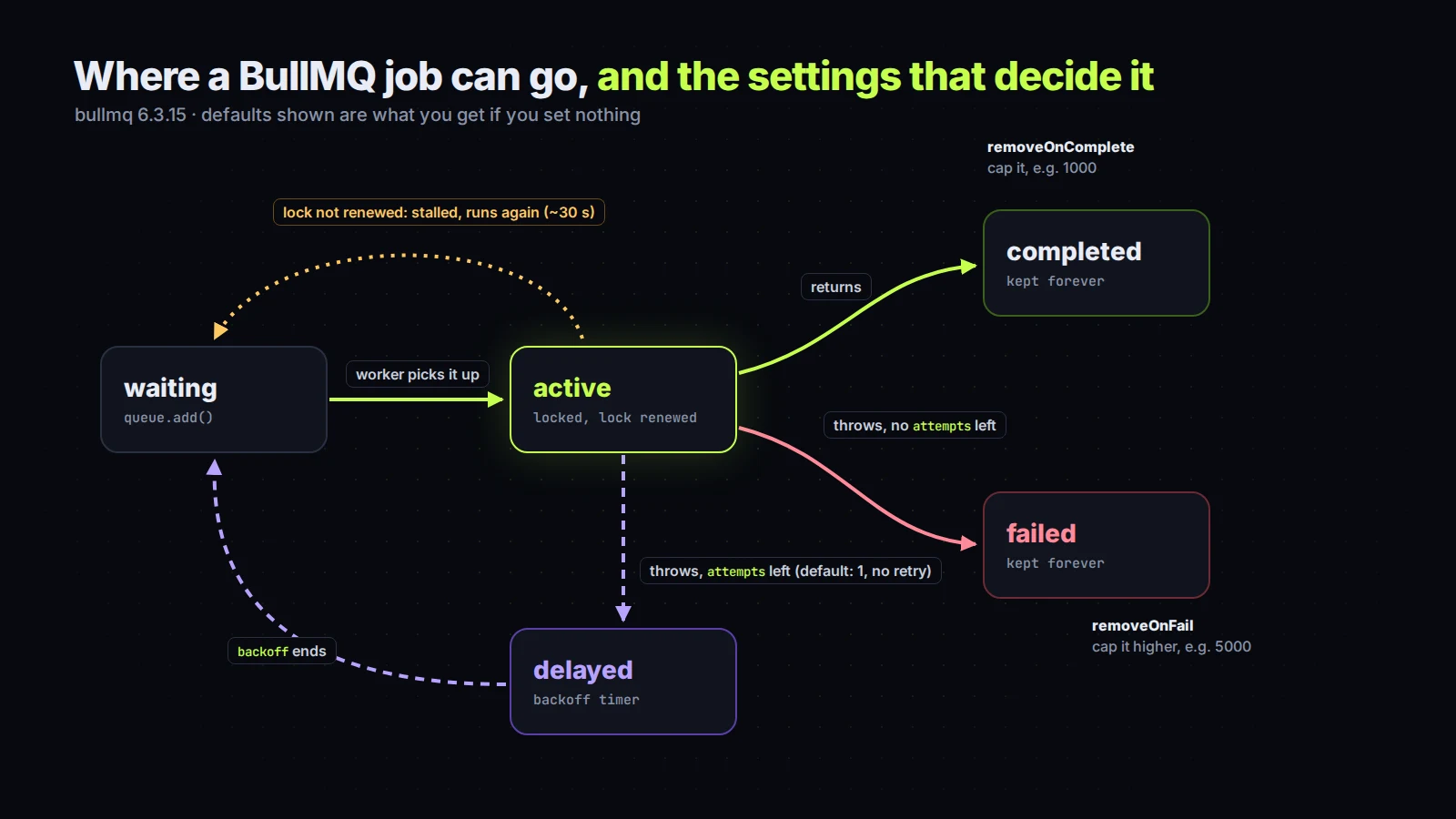
A job that throws is moved to the failed set, once, and that's it (the docs on retries). No retry. People are often surprised by this because "queue" sounds like it should retry by itself.
await queue.add('welcome', { userId }, {
  attempts: 5,
  backoff: { type: 'exponential', delay: 2000 },
});
With exponential backoff and a 2 second delay, the retries come roughly 2, 4, 8 and 16 seconds apart, which is enough to ride out a flaky third-party API without hammering it. Without a backoff, retries happen immediately, which against a rate-limited API is just five failures in a row. One more detail from the docs: throw real Error objects in your processor, not strings. BullMQ expects an Error.
Also think about what a retry means for your job. If the job charges a card and then sends a receipt, and the receipt step fails, a retry runs the whole processor again. Retries make jobs at-least-once, so the work inside them needs to be safe to repeat.
Stalled jobs and the CPU
When a worker takes a job, BullMQ puts a lock on it and the worker keeps renewing that lock while it works. If the renewals stop, the job is marked stalled and handed to another worker. After too many stalls it moves to failed.
Renewals stop for two reasons. The process died, which is fine and is exactly what the mechanism is for. Or the process is alive but so busy that the event loop never gets a chance to renew the lock: image resizing in pure JS, a giant JSON.parse, a tight loop over a CSV. Then the same job runs twice, on two workers, at the same time. For CPU-heavy work, use sandboxed processors (a separate process per job) or break the work into chunks that give the event loop room to breathe.
Deploys: close the worker before the process exits
Every deploy kills your workers. If the process just exits, any job in progress is left with a lock nobody renews, and it gets picked up again as stalled, after about 30 seconds by default. Handle the signals and close the worker first:
async function shutdown(signal) {
  console.log(`${signal}: closing worker`);
  await worker.close();   // stops taking jobs, waits for the active ones
  process.exit(0);
}
process.on('SIGTERM', () => shutdown('SIGTERM'));
process.on('SIGINT', () => shutdown('SIGINT'));
systemd, PM2 and most container platforms send SIGTERM and then wait a few seconds before SIGKILL. If your jobs can run longer than that grace period, raise it (TimeoutStopSec= in a systemd unit) or accept that the long ones will come back as stalled.
Old jobs pile up forever
By default every completed and every failed job stays in Redis forever. On a busy queue that's a slow memory leak, and with noeviction set, Redis full means writes fail, which means your queue stops. Set limits when you add jobs:
{ removeOnComplete: 1000, removeOnFail: 5000 }
Keep more failed jobs than completed ones, since the failed ones are the ones you'll want to read.
Two smaller things while you're in there. Job data is stored in Redis in plain text, so don't put tokens, passwords or card details in it; pass an ID and look the rest up inside the job. And if you still use repeatable jobs for cron-style work, the docs now point you to Job Schedulers (queue.upsertJobScheduler, since 5.16.0), which don't create duplicates every time your app restarts and re-registers the schedule.
If you'd rather someone checked it
None of this is exotic. It's a dozen settings, and the cost of getting them wrong is jobs that vanish quietly, which is the worst kind of bug because nobody files it. If you've got a Node app with background jobs and you're not sure they'd survive a Redis restart or a busy Monday, I'm happy to look. The first call is free.
Introductory offer
Free cloud cost optimization. You only pay from what I save.
I cut your AWS, cloud, Supabase or Vercel bill for free and keep half of what I save for 6 months. Save nothing, pay nothing. Code, architecture and infrastructure.