node-cron in Production: Overlaps, Replicas and DST
By Aakash Verma · · 4 min read
node-cron is the package most Node apps reach for when they need "run this every night at 3". You give it a cron expression and a function, and it calls the function on schedule inside your running process. Two lines, no server config. That's also its whole risk: the schedule only exists while that process is alive, and it exists once per process.
Version 4 fixed most of what used to make it a bad idea in production. Versions as of November 7, 2026: node-cron 4.6.0 (released July 5, needs Node 20 or newer), and croner 11.0.0 if you want the alternative. Details below are from the node-cron README and its docs at nodecron.com.
import cron from 'node-cron';

cron.schedule('0 3 * * *', runNightlyReport, {
  name: 'nightly-report',
  timezone: 'Europe/London',
  noOverlap: true,
});
The three bugs it can give you
Overlap. A job scheduled every minute that sometimes takes 90 seconds will run twice at once. In v3 that was your problem; in v4 noOverlap: true skips the next run instead of stacking it, and fires an execution:overlap event so you can see it happened. I turn it on for every job. If a skipped run is a problem, the job is too slow for its schedule and that's the real bug.
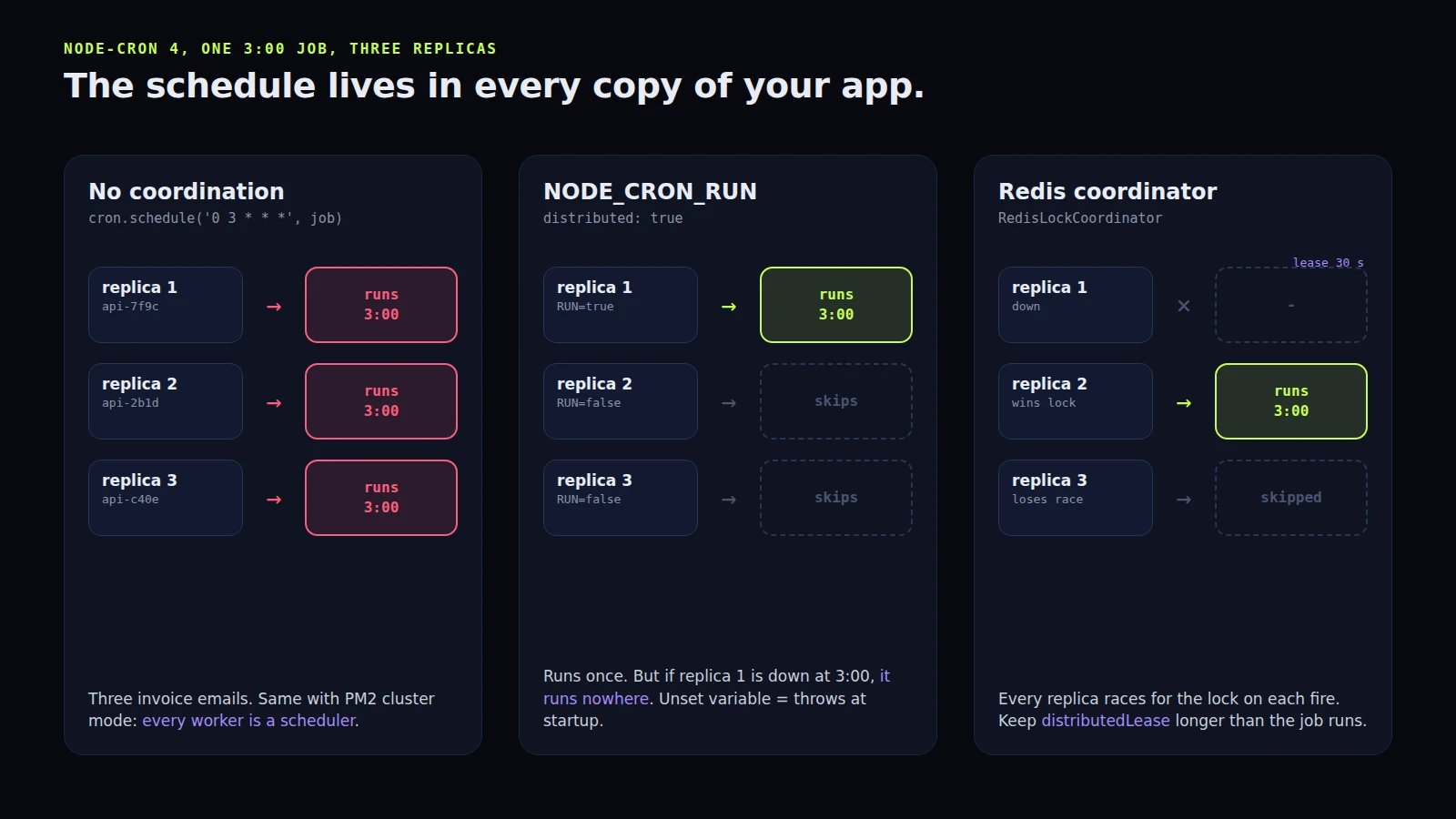
Replicas. Deploy your API as three containers or three PM2 cluster workers and you have three schedulers. Every job runs three times. People find this when a customer gets three copies of the weekly invoice email. node-cron 4 has distributed: true, and the default behaviour is blunt: it reads an environment variable called NODE_CRON_RUN, which you set to 'true' on exactly one instance and 'false' on the rest. There's no default; if it's missing, scheduling throws at startup, which I actually like. The weakness is obvious though. If that one instance is down at 3:00, nothing runs anywhere.
For real failover there's @node-cron/redis-coordinator. Every instance competes for a Redis lock on each fire, the winner runs it, and if the winner crashes mid-run the lock still holds for distributedLease (30 seconds by default) before anyone else can take it. Set the lease longer than the job takes, or a slow job and a second runner will overlap anyway.
import { createClient } from 'redis';
import { setRunCoordinator } from 'node-cron';
import { RedisLockCoordinator } from '@node-cron/redis-coordinator';

const redis = createClient({ url: process.env.REDIS_URL });
await redis.connect();
setRunCoordinator(new RedisLockCoordinator(redis));
Daylight saving. Schedules match wall-clock time in the task's timezone. On the night the clocks go back, the repeated hour runs once, so a */15 job can go quiet for up to an hour. In spring it's worse for one job in particular: a daily 2:30 job in a zone that jumps from 2:00 to 3:00 doesn't run that day at all. The docs say node-cron skips times that don't exist rather than guessing, and picks up again at 2:30 the next day. If a job needs a steady interval, schedule it in UTC and convert in your head. If it needs to run "at 9 in the morning for the user", keep the user's zone and accept the two weird nights a year.
The cron syntax trap
node-cron accepts an optional seconds field in front, so six fields means seconds, not a year. 0 */5 * * * * is every five minutes at second zero, and */5 * * * * * is every five seconds, which is a fun one to ship by accident.
The quieter trap is what happens when you set both day of month and day of week. Classic Unix cron treats them as OR: 0 9 1 * 1 runs on the 1st of the month and on every Monday. node-cron's README says it combines them with AND: both must match, so the same line runs only when the 1st falls on a Monday. If you copy expressions out of an old crontab, check that one. It also adds Quartz-style extras (L for the last day, 15W, 2#3 for the third Tuesday) but keeps standard weekday numbers, so 1 is Monday, not Sunday as in Quartz.
When I wouldn't use it at all
node-cron doesn't persist anything. If the process is restarting at 3:00, the 3:00 run is simply gone, and nothing will tell you unless you listen for execution:missed. That's fine for "clean up expired sessions", where the next run catches up. It's not fine for "charge annual renewals".
For anything that must happen, I'd put a queue under it. The schedule (node-cron, or the queue's own repeatable jobs) only adds a job to a queue like BullMQ, and the queue gives you retries, a record of what failed, and workers you can scale without three copies of the schedule. On a single Linux server, a systemd timer with Persistent=true is the other honest option: it runs a missed job at the next boot, logs every run to the journal, and doesn't care whether your Node process is healthy. That's where I'd put backups and certificate checks, things that should work even when the app is broken.
croner is worth a look if you also run on Deno or Bun, or want a scheduler that tells you the next ten run dates for a pattern before you deploy it. For a plain Node service, node-cron 4 with noOverlap and a coordinator is good enough now, and I don't say that about many cron libraries.
If your scheduled jobs are running twice, not at all, or at the wrong hour, and you'd like someone to sort it out properly, book a free call. All consultation is free.
Introductory offer
Free cloud cost optimization. You only pay from what I save.
I cut your AWS, cloud, Supabase or Vercel bill for free and keep half of what I save for 6 months. Save nothing, pay nothing. Code, architecture and infrastructure.