Postgres JSONB: When I Use It and Which Index I Pick
By Aakash Verma · · 5 min read
Postgres jsonb is a column type that stores JSON in a parsed binary form, so Postgres can search inside it and index it. The plain json type keeps your exact text and reparses it every time you touch it. If you're asking which one to use, it's jsonb, and the only real reason to pick json is when you need the original text back byte for byte, like a webhook body you'll verify a signature against later.
Everything below is checked against the PostgreSQL 18 docs (18.7 came out on November 12, 2026; 19 is at its second release candidate).
What jsonb throws away
The JSON types page is clear about it: jsonb "does not preserve white space, does not preserve the order of object keys, and does not keep duplicate object keys. If duplicate keys are specified in the input, only the last value is kept."
Key order bites people more than you'd think. Somebody stores a settings object, reads it back, and the keys come out in a different order, and a snapshot test fails or a hash changes. Postgres never promised the order. That's the same webhook point as above: if anything downstream depends on the exact bytes, keep a text or json copy next to it.
Where it earns its place, and where it doesn't
I use jsonb for data whose shape I don't control or that changes per row: payloads from a third-party API, per-customer settings, form answers where every form has different questions, feature flags, audit log "before and after" snapshots.
I don't use it for anything I filter, join or sort on all the time. If every query has WHERE data->>'status' = 'paid', then status wants to be a real column with a real type and a CHECK or an enum. Real columns get proper statistics. The planner has nothing on the keys inside a jsonb value unless you give it an expression index (or, since Postgres 14, extended statistics on the expression), so on a big table it guesses row counts for those filters and sometimes picks a terrible plan. It's a common path: an app starts with one data jsonb column "to move fast", and two years later every important field lives in there. Getting out of that is a migration project, not a refactor.
A decent rule: if a key shows up in more than a couple of WHERE clauses, promote it to a column.
Containment is the query to learn
The operator that makes jsonb worth it is @>, "contains":
SELECT id FROM events
WHERE payload @> '{"type": "invoice.paid", "livemode": true}';
It matches rows whose payload has at least those keys with those values, anywhere else can be anything. Arrays work too, and order doesn't matter: '[1, 2, 3]'::jsonb @> '[3, 1]' is true. Most "find the rows where this nested thing equals that" queries can be written as containment, and containment is what the GIN index is good at.
jsonb_ops or jsonb_path_ops
A GIN index on a jsonb column comes in two flavours, and the default isn't always the one I want.
-- default: jsonb_ops
CREATE INDEX events_payload_gin ON events USING GIN (payload);

-- smaller, faster for @> but no key-exists operators
CREATE INDEX events_payload_path ON events USING GIN (payload jsonb_path_ops);
The default jsonb_ops supports the key-exists operators ?, ?| and ?&, plus @> and the jsonpath operators @? and @@. jsonb_path_ops drops the key-exists ones and keeps the other three. The docs say a jsonb_path_ops index "is usually much smaller" and searches "typically perform better", especially when your queries use keys that appear in most rows.
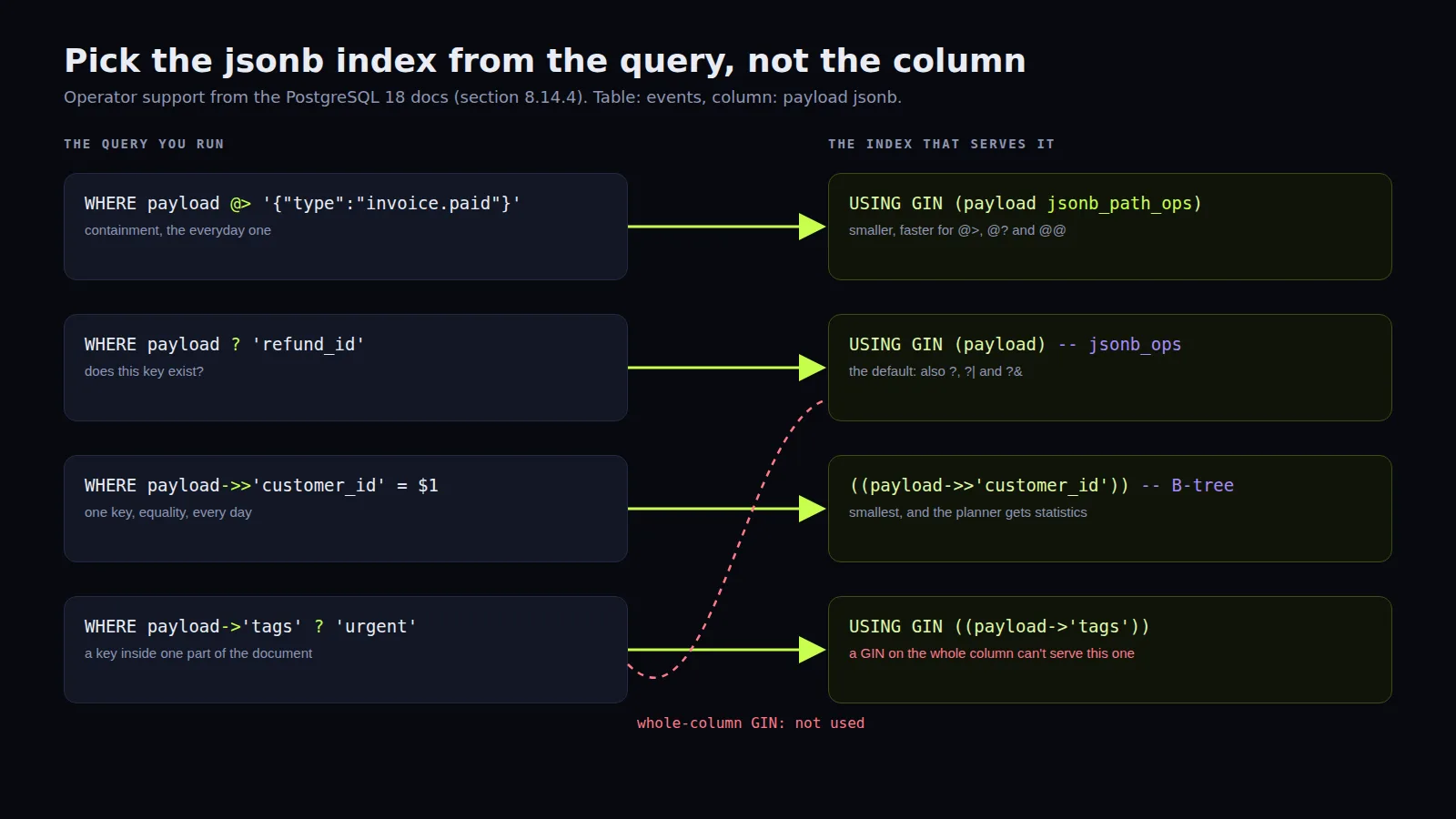
So my default is jsonb_path_ops, unless the app really asks "does this key exist?" with ?. There's one odd gap the docs mention: jsonb_path_ops makes no index entries for structures with no values, like {"a": {}}, and searching for those becomes a full index scan. Querying for empty objects is rare enough that I accept that.
Often you don't want either. If the query is always payload->>'customer_id' = $1, a plain B-tree on that expression is smaller than any GIN index and gives the planner statistics:
CREATE INDEX events_customer ON events ((payload->>'customer_id'));
And if you only search inside one part of the document, index just that part. The docs' own example is CREATE INDEX ... USING GIN ((jdoc -> 'tags')), which serves jdoc -> 'tags' ? 'qui'. A GIN index on the whole column can't help that query, because the ? isn't applied to the indexed column itself.
Updating one key rewrites the whole value
Postgres doesn't patch a jsonb value in place. UPDATE ... SET payload = jsonb_set(payload, '{status}', '"paid"') writes a new copy of the entire document, and values over about 2 kB get compressed and stored out of line (TOAST), so that write isn't free either. A 40 kB document with a counter inside it that you bump on every page view is a bad idea. Put the counter in its own column.
Two smaller traps on the same line:
jsonb_setis strict. Pass it a SQLNULLas the new value and the whole result isNULL, which means you just wiped the column. Usejsonb_set_lax(Postgres 13+) orto_jsonb(...)around the value, which turns a NULL into JSONnull.- Subscript updates like
SET payload['a']['b'] = '1'are nice to read, but if any row hasaset to a string or a number, the statement raises an error and the transaction aborts. On a NULL column, subscripting creates{"a": ...}instead of failing, which is a different behaviour fromjsonb_set.
What I'd actually do
Start with real columns for what you know, add one jsonb column for what you don't, index it with jsonb_path_ops once you're querying it with @>, and add B-tree expression indexes for the two or three keys you filter on every day. Then watch which keys keep showing up in WHERE clauses and move them out.
If you're on Supabase, all of this applies as-is, it's the same Postgres; I wrote about Supabase RLS and Postgres full text search too. And if you have a table where jsonb slowly took over the schema and queries crawl, book a call. The first conversation is free.
Introductory offer
Free cloud cost optimization. You only pay from what I save.
I cut your AWS, cloud, Supabase or Vercel bill for free and keep half of what I save for 6 months. Save nothing, pay nothing. Code, architecture and infrastructure.