Postgres Partitioning: When It Pays Off, and the Traps
By Aakash Verma · · 4 min read
Postgres partitioning splits one big table into smaller physical tables that you still query as one. You declare the parent with PARTITION BY RANGE, LIST or HASH, create a partition per month (or per tenant, or per hash bucket), and the planner skips the partitions a query can't touch. It's been built in since PostgreSQL 10. On PostgreSQL 18, the current major version, it's mature enough that the hard part isn't the feature. It's knowing whether your table needs it at all.
Most don't. I'd say that first because partitioning shows up in a lot of "how to scale Postgres" lists, and people reach for it at 5 million rows when what they needed was an index.
Everything below is checked against the PostgreSQL 18 partitioning docs on November 12, 2026. (Side note: PostgreSQL 14 reaches end of life today, per the versioning policy. If your RDS instance is still on 14, that's a more urgent job than partitioning, and on RDS it now costs extra too.)
The one case where it clearly wins
An append-mostly table with a timestamp, queries that nearly always filter on recent time, and a retention rule. Events, audit logs, webhook deliveries, IoT readings, request logs. That shape.
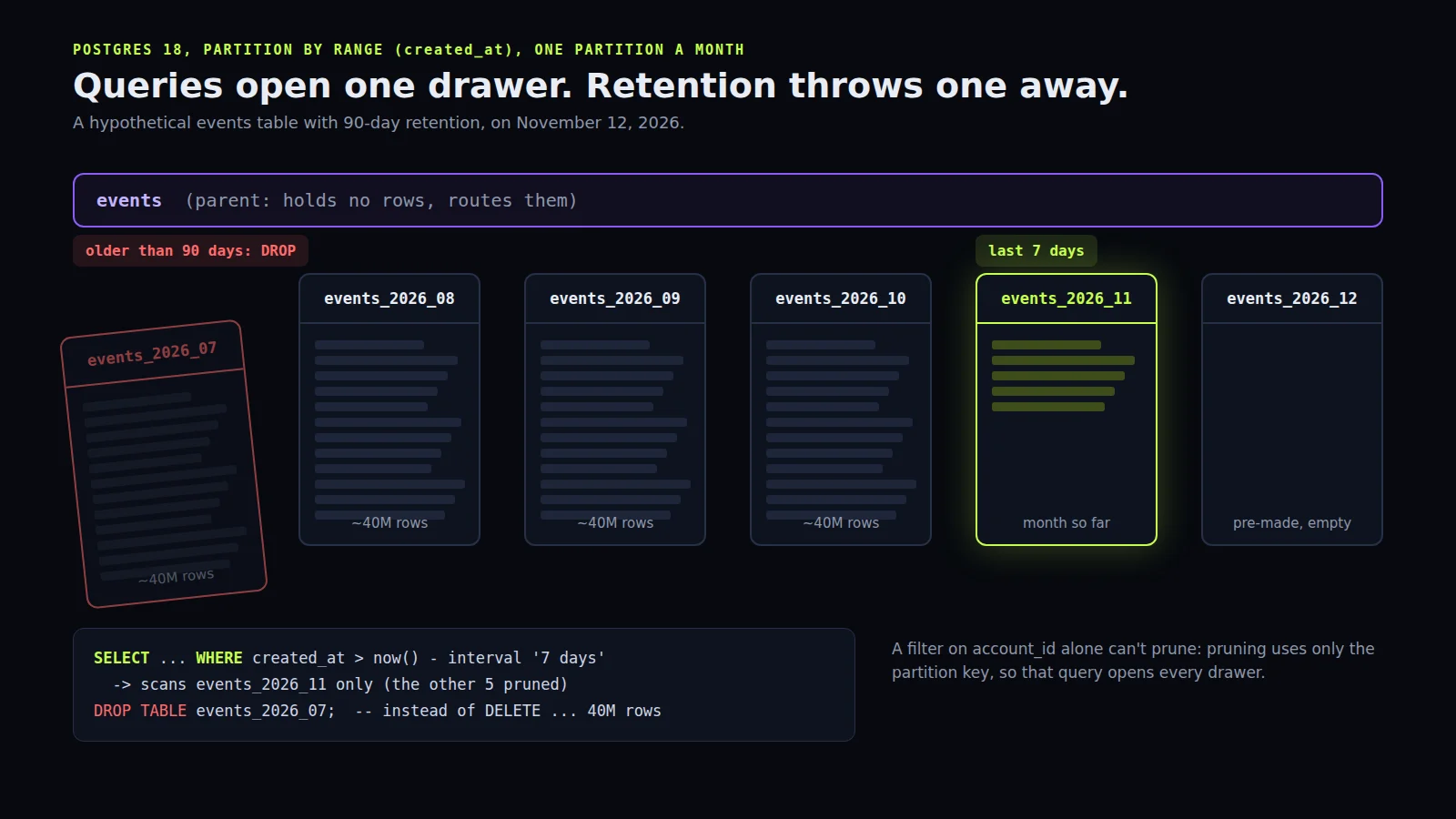
The win isn't mostly query speed. It's deleting old data. Without partitions, "keep 90 days" means a nightly DELETE FROM events WHERE created_at < now() - interval '90 days', which touches millions of rows, bloats the table, leans on autovacuum and fills the WAL. With monthly partitions it's DROP TABLE events_2026_07, which the docs describe as able to "very quickly delete millions of records because it doesn't have to individually delete every record". It does take an ACCESS EXCLUSIVE lock on the parent, so you want it in a quiet minute, but it's over almost instantly. DETACH PARTITION ... CONCURRENTLY first if you can't afford even that.
Setting one up
CREATE TABLE events (
  id         bigint GENERATED ALWAYS AS IDENTITY,
  created_at timestamptz NOT NULL,
  account_id bigint NOT NULL,
  payload    jsonb,
  PRIMARY KEY (id, created_at)
) PARTITION BY RANGE (created_at);

CREATE TABLE events_2026_11 PARTITION OF events
  FOR VALUES FROM ('2026-11-01') TO ('2026-12-01');
Notice the primary key. It's (id, created_at), not id. The docs are blunt about it: a unique or primary key constraint's "columns must include all of the partition key columns". So you can't have a plain id primary key on a table partitioned by time, and you can't enforce "email is unique" across a table partitioned by anything other than email. That rule alone rules partitioning out for most user-facing tables, and it's the first thing I'd check before anything else.
Ranges include the lower bound and exclude the upper one, so months chain cleanly. And if a row arrives for a month with no partition, the insert fails with "no partition of relation ... found for row". That's the classic outage: someone created partitions by hand through December, and on January 1 every insert errors. Either add a DEFAULT partition as a catch-all or, better, let pg_partman create them ahead of time (5.5.0 is the current release, from July 2026). Supabase and RDS both ship it as an extension.
Pruning only works if you ask the right way
The planner skips partitions using the partition key in your WHERE clause, and only that. The docs: pruning "is driven only by the constraints defined implicitly by the partition keys, not by the presence of indexes". So WHERE created_at > now() - interval '7 days' touches one or two partitions. WHERE account_id = 42 with no time filter scans every partition, and it's now slower than the unpartitioned table, because it's 24 index lookups instead of one.
Run EXPLAIN on your top ten queries before you partition. If most of them don't filter on the key you picked, pick a different key or don't partition.
How many partitions is fine? The docs say the planner handles "up to a few thousand" well, as long as queries prune down to a few. Daily partitions for a table you keep for years gets you there faster than you'd think. Monthly is my default; weekly if a month is still huge.
Converting a table that already exists
There's no ALTER TABLE ... PARTITION BY. You create a new partitioned parent and move things over. The trick that saves you from copying everything: attach the old table itself as one partition.
ATTACH PARTITION normally scans the table to prove every row fits the range, holding an ACCESS EXCLUSIVE lock on it while it does. The docs' way around that is to add a CHECK constraint that matches the range first (that can be added NOT VALID and validated separately, with a weaker lock), then attach, then drop the now-redundant check. On a 200 GB table, that's the difference between a long lock and a quick one. The parent itself only needs SHARE UPDATE EXCLUSIVE for the attach, so reads and writes keep going.
Indexes have their own gotcha. CREATE INDEX CONCURRENTLY doesn't work on a partitioned parent. You create the parent index with ON ONLY, build each partition's index concurrently, then ALTER INDEX ... ATTACH PARTITION each one; the parent index becomes valid when the last one attaches. Tedious, and worth scripting.
When I'd skip it
If the table is under roughly 100 GB, has no retention rule, and its slow queries are slow because of a missing index or a bad plan, partitioning adds complexity and fixes nothing. Same for tables where every query filters by user and nothing filters by time. Fix the indexes, look at pg_stat_statements, maybe add a read replica. Come back to partitioning when deleting old rows becomes the problem.
If you're staring at a Postgres table that's grown past what the app was designed for and you'd like a second pair of eyes before you restructure it, book a free call. All consultation is free.
Introductory offer
Free cloud cost optimization. You only pay from what I save.
I cut your AWS, cloud, Supabase or Vercel bill for free and keep half of what I save for 6 months. Save nothing, pay nothing. Code, architecture and infrastructure.