pnpm vs npm: Which One I'd Pick for a New Project
By Aakash Verma · · 4 min read
Short answer: for a new project, pnpm. For an existing project that works fine on npm and has one developer, probably leave it alone. The interesting part is why, because the reasons people usually give (speed, disk space) aren't the ones that matter most anymore.
Versions as of November 24, 2026 on the npm registry: pnpm is at 12.23.0 (released November 22), with the 11.x line still getting fixes (11.29.0 the same day). npm is at 12.2.3 (November 18). Node 24 LTS still ships npm 11, so npm -v on most machines says 11.x until you upgrade it yourself.
What's actually different
Both read the same package.json and pull from the same registry. The difference is what they put on disk.
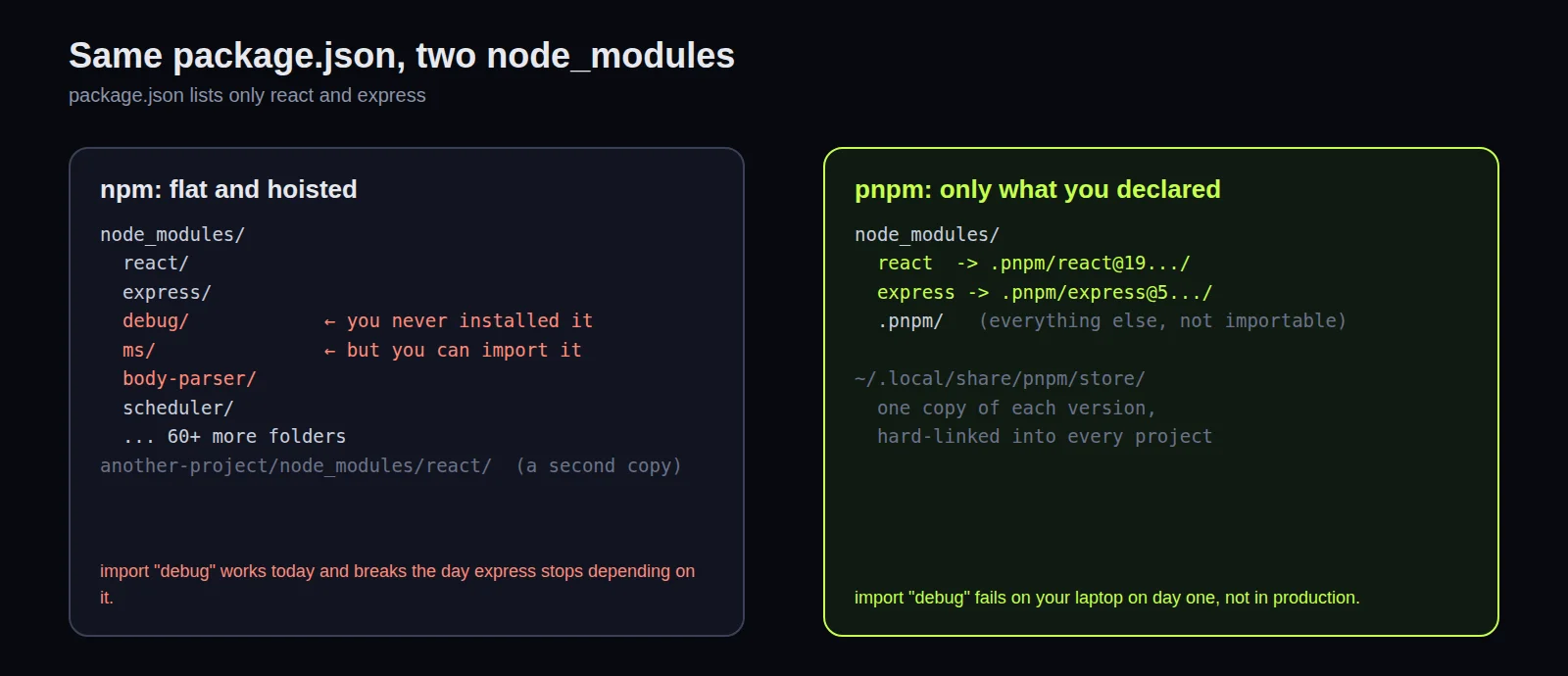
npm copies every package into each project's node_modules and flattens the tree, hoisting dependencies to the top level so they're easy to find. Ten projects using React means ten copies of React.
pnpm keeps one copy of every package version in a global content-addressable store and hard-links it into each project. Then it builds node_modules out of symlinks, so your project's top level holds only the packages you actually listed in package.json. Everything else sits in node_modules/.pnpm. The pnpm docs on symlinked node_modules explain the layout properly.
The reason I'd switch: phantom dependencies
That symlink layout sounds like an implementation detail. It isn't. With npm's flat tree, your code can import a package you never installed, because something else pulled it in and it got hoisted. It works on your machine. Then a minor update of the other package drops it, and production breaks on a dependency you didn't know you had.
pnpm makes that import fail immediately, on day one, on your laptop. That's annoying for about a week when you first convert an old project, because you find all the missing lines in package.json. After that it's the most useful thing the tool does. In a codebase written partly by AI assistants, which happily import whatever they've seen before, I'd call it essential.
Security defaults
This is where the gap has grown. pnpm stopped running dependency lifecycle scripts (postinstall and friends) by default in version 10. A package that needs a build step has to be approved, with pnpm approve-builds or an allow list in the config. Most supply-chain attacks of the last few years ran through exactly those install scripts.
pnpm also has minimumReleaseAge, which refuses versions published less than a set time ago, so a hijacked release that gets pulled within hours never reaches you. The November releases keep tightening this: 11.29.0 added a --minimum-release-age command-line option, and 12.22.0 fixed a case where a registry change skipped the check.
npm runs install scripts unless you set ignore-scripts=true in .npmrc, which you can, but almost nobody does, and then the packages that genuinely need a build step silently don't get one.
Speed and disk
pnpm is faster on repeat installs and in CI with a cached store, and uses far less disk when you have many projects. On a single project with a warm npm cache the difference is smaller than the benchmarks suggest. If install time is your only complaint, it's not a strong reason to switch on its own. Lockfile churn in pull requests tends to matter more day to day.
Monorepos
If you have more than one package in a repo, pnpm workspaces are simply nicer. The workspace: protocol links local packages explicitly, pnpm --filter runs a command in one package and its dependents, and catalogs let you pin one version of React for every package in a single place. npm has workspaces too, and they work, but the filtering and version control are thinner.
When I'd stay on npm
- A small project, one developer, no complaints. Switching costs an afternoon and buys little.
- A hosting platform or tool that only documents npm, and you don't want to be the person debugging its pnpm support.
- A team that won't install anything new. Everyone already has npm with Node.
Switching takes about an hour
Delete node_modules and package-lock.json, run pnpm import first if you want pnpm to start from the npm lockfile's versions, then pnpm install. Add "packageManager": "pnpm@12.23.0" to package.json so everyone and CI use the same version. Fix the phantom imports it finds. Approve the build scripts you actually need. Update CI to cache the pnpm store instead of ~/.npm.
The pnpm feature comparison lists the rest, and the npm CLI docs cover the npm side, including npm ci for clean installs from the lockfile.
If you've got a Node project with a dependency mess, a slow CI pipeline, or an install that only works on one person's laptop, book a free call. All consultation is free.
Introductory offer
Free cloud cost optimization. You only pay from what I save.
I cut your AWS, cloud, Supabase or Vercel bill for free and keep half of what I save for 6 months. Save nothing, pay nothing. Code, architecture and infrastructure.