Next.js vs React: You're Choosing a Server, Not a Library
By Aakash Verma · · 4 min read
The question is a little off, and that's why the answers online go in circles. Next.js isn't an alternative to React. It's React plus a server, a router, a build setup and a set of opinions about where your code runs. So the real question is: do you want those opinions, and do you want a server?
Versions on the npm registry as of November 26, 2026: React 19.3.1 (October 14) and Next.js 16.4.6 (November 9). Every Next app is a React app. Not every React app needs Next.
What React on its own gives you
Components, state, hooks, and the rendering engine. That's it, on purpose. Routing, data fetching, bundling and deployment are yours to pick. The usual starting point today is Vite with React, React Router or TanStack Router for pages, and TanStack Query for data. Build it and you get a folder of static files that any CDN can serve for close to nothing.
It's worth knowing what the React team itself says now. The Creating a React App page recommends starting with a framework: Next.js (App Router) first, then React Router, then Expo for native apps. Starting from scratch with Vite, Parcel or Rsbuild is described as "a lot like building your own framework". That's fair. It's also exactly what a lot of apps need, because their "framework" is ten routes and a login screen.
What Next.js adds
- Server rendering and static generation. The HTML arrives with content in it. For anything that needs Google to read it (a marketing site, a blog, a store, docs) this matters a lot.
- React Server Components as the default in the App Router. Components run on the server, fetch data there, and ship no JavaScript for themselves to the browser.
- File-based routing, layouts, loading and error states per route.
- Server Actions and route handlers, so a form can post straight to server code without you writing an API.
- Image, font and script handling that you'd otherwise wire up by hand.
None of that is magic. All of it is work you don't have to do, as long as you're happy doing it the Next way.
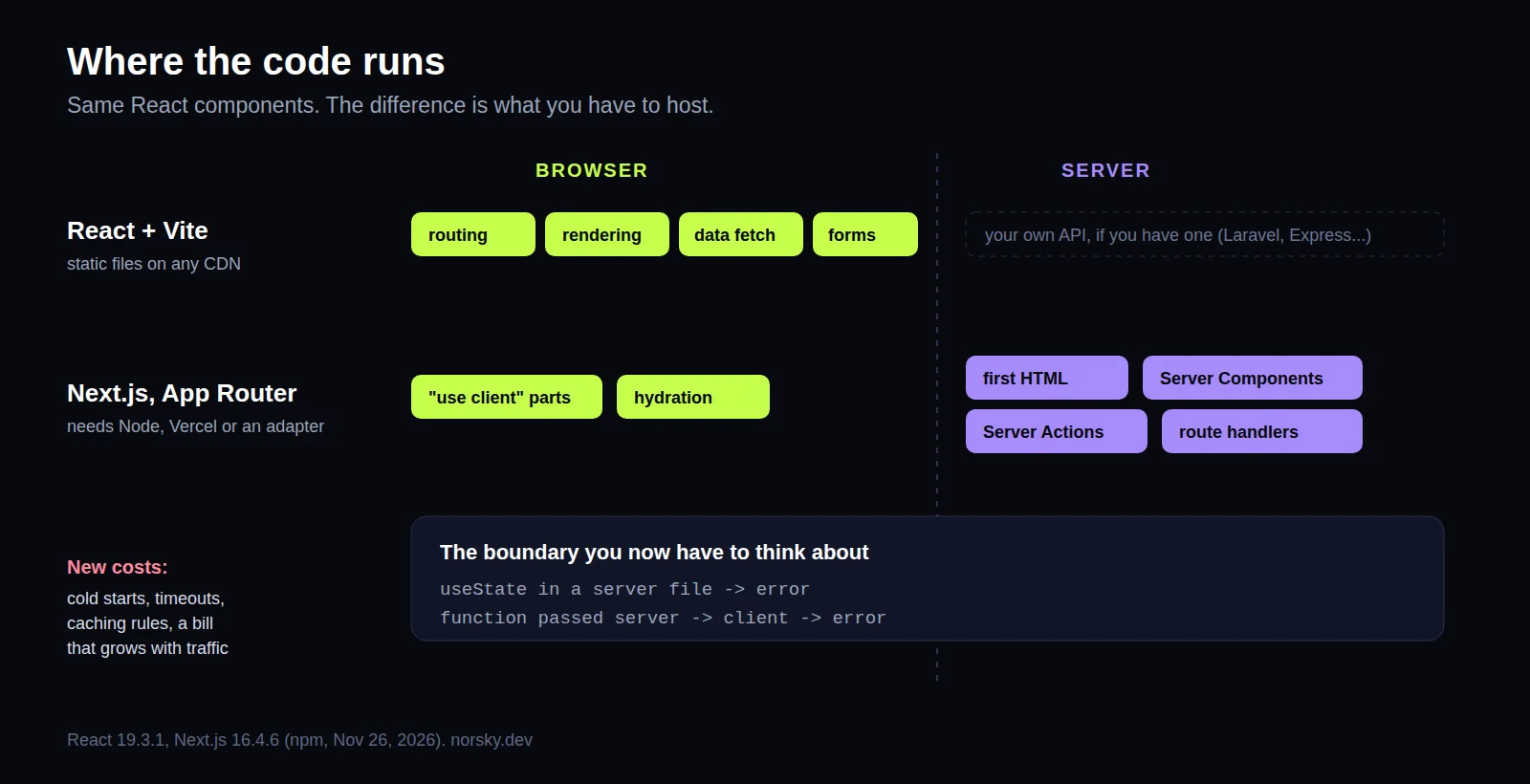
The cost nobody puts in the comparison table
A plain React build is static files. A Next app that uses server rendering, Server Components or Server Actions needs something running server code. That's either Vercel (made by the same company, easiest by far), a Node server you run yourself, or an adapter for another platform. Static export exists in Next, but it switches off the features you probably picked Next for.
So when people say "Next.js is more complex", this is mostly what they mean. You now have a server: cold starts, function timeouts, caching rules that changed meaning between major versions, environment variables that exist on the server but not in the browser, and a bill that grows with traffic instead of staying at almost nothing. None of it is hard. It's just more things that can be wrong at 2 a.m.
The other cost is mental. With Server Components you always have to know which side of the line a file is on. "use client" at the top, or not. A hook in a server component is an error. Passing a function from server to client is an error. Senior people get used to it in a week. Juniors trip on it, and so do AI coding tools, which happily put a useState in a server file and then "fix" the error by marking half the app as client code.
When I'd pick which
Plain React with Vite when the app lives behind a login. Dashboards, internal tools, admin panels, most SaaS apps after the marketing page. Google never sees those pages, so server rendering buys you little, and static hosting with an API behind it is simpler and cheaper to run. Same if you already have a backend in Laravel, Django or Express: let it be the server, and keep the frontend a frontend.
Next.js when pages need to be found and fast on first load: content sites, stores, landing pages, anything public with lots of URLs. Also when you want one codebase and one deploy for frontend and a light backend, and you're fine hosting on Vercel or running Node yourself.
Both is a perfectly normal answer. Public site in Next (or Astro, honestly, if it's mostly content), the logged-in app as a Vite React SPA on its own subdomain. Two simple things often beat one clever thing.
One thing I'd avoid: picking Next because it's "the default" and then turning every page into a client component because Server Components felt confusing. You end up paying for a server and getting an SPA.
What about Vue?
Same split, different names. Vue is the library, Nuxt is the framework with the server. This site runs on Nuxt, and the logic for choosing is identical, which tells you the question was never really about React.
If you're stuck on this for your own project, or you have a Next app that got slow or expensive and you're not sure why, book a free call. I'll tell you straight whether it needs a server at all. More about what I build is on my full-stack development page.
Introductory offer
Free cloud cost optimization. You only pay from what I save.
I cut your AWS, cloud, Supabase or Vercel bill for free and keep half of what I save for 6 months. Save nothing, pay nothing. Code, architecture and infrastructure.