Nginx vs Caddy: Which Reverse Proxy I'd Pick in 2026
By Aakash Verma · · 4 min read
For one app on one server, I'd pick Caddy. It gets a certificate on its own, renews it, speaks HTTP/3, proxies WebSockets and passes the right forwarding headers, all from a three-line config. Nginx is still my choice when the server is busy, when I need fine control over caching and buffering, or when nginx is already there and someone else on the team knows it. The gap between them got smaller this year, and most comparisons online haven't caught up.
Versions I checked on November 2, 2026: Caddy 2.11.7 (released October 3) and nginx 1.31.8 mainline / 1.30.6 stable, from the Caddy releases and the nginx changelog.
The same job in both
The job is the most common one I'm asked to set up: a Node app on port 3000 behind a domain, HTTPS, WebSockets working, the app seeing the real client IP.
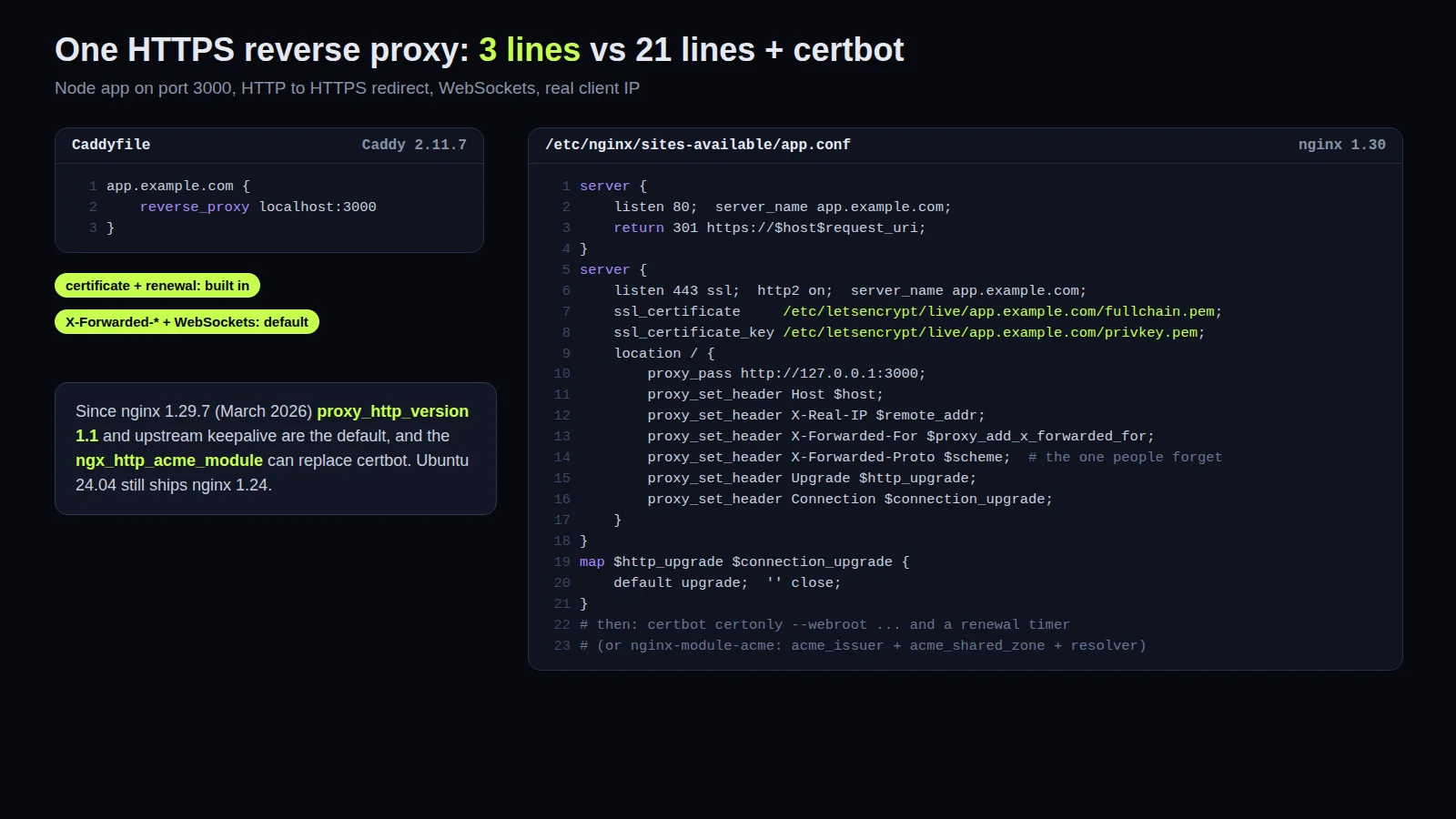
Caddy:
app.example.com {
	reverse_proxy localhost:3000
}
That's the whole file. Caddy sees a real domain, gets a certificate from Let's Encrypt (or ZeroSSL if that fails), redirects HTTP to HTTPS, and renews before expiry. The reverse_proxy docs list what it does by default: it sets X-Forwarded-For, X-Forwarded-Proto and X-Forwarded-Host, and WebSocket upgrades just work.
Nginx needs a server block for port 80 that redirects, a server block for 443 with the certificate paths, proxy_set_header lines for Host, X-Real-IP, X-Forwarded-For and X-Forwarded-Proto, the Upgrade and Connection headers for WebSockets, and certbot to fetch the certificate and a timer to renew it. About 20 lines and a second tool. None of it is hard. All of it is something you can get slightly wrong, and the usual mistake is forgetting X-Forwarded-Proto, so the app thinks every request is plain HTTP and generates http:// links or loops on its own HTTPS redirect.
What changed in nginx this year
Two things that most "nginx vs caddy" posts still get wrong.
First, nginx 1.29.7 (March 2026) changed the proxy defaults: proxy_http_version is now 1.1 and keepalive to upstreams is on by default. Old configs that set proxy_http_version 1.1; by hand still work, they're just redundant now. But Ubuntu 24.04 ships nginx 1.24 from its own repository, so on a typical VPS you're still on the old behaviour unless you use the nginx.org packages.
Second, nginx has native ACME now. The ngx_http_acme_module is available as a prebuilt nginx-module-acme package and gets and renews certificates from inside nginx, no certbot. It's more verbose than Caddy's version (an acme_issuer block, a shared zone, a resolver, and you still need the port 80 listener for the HTTP-01 challenge), and it's a separate module to install and load. Still, "nginx can't do automatic HTTPS" is no longer true. I'd use it on new nginx setups; I wouldn't rip out a working certbot setup for it.
Where nginx still wins
Load. Nginx is C with an event loop that has been tuned for twenty years. Caddy is Go and is fast, but under heavy traffic nginx uses less memory and CPU for the same work. On a $6 VPS serving one app, you will never see the difference. On a box doing tens of thousands of requests a second, you will.
Caching and buffering. proxy_cache with its keys, lock and stale-while-revalidate options is a serious cache. Caddy's caching lives in a third-party plugin, which means building a custom binary with xcaddy. Same story for rate limiting.
Everyone knows it. Every Laravel Forge, Ploi and RunCloud server is nginx. Every Stack Overflow answer about a 502 is nginx. When I hand a server over to a client's next developer, nginx is the thing they'll be able to read. That matters more than it sounds.
PHP. Both work with PHP-FPM (Caddy has php_fastcgi, which is pleasant), but the nginx + PHP-FPM setup for Laravel is so well trodden that I don't see a reason to change it on an existing server.
Where Caddy wins
Small servers where I'm the only one touching the config. Side projects, staging boxes, an internal tool on a VPS, a Nuxt app behind a proxy. Also anything with lots of customer domains: Caddy's on-demand TLS issues a certificate the first time a new hostname connects (with an ask endpoint so random domains can't make it request certificates). Doing that with nginx means writing your own glue.
One thing to know about Caddy: it runs an admin API on localhost:2019 by default, which can change the running config. It only listens on localhost, so it's fine on a normal server, but in a container or with other users on the box I turn it off with admin off in the global options.
What I actually run
New single-app VPS for a client: Caddy, unless they already have a hosting panel that uses nginx. Existing server on nginx: leave it, switch to the nginx.org package if it's an old distro version, and look at the ACME module next time the certificates need attention. High-traffic or cache-heavy: nginx, no discussion.
If you have an app that needs to get onto a server properly, with HTTPS, deploys and backups that someone has thought about, that's the kind of DevOps work I do. The first call is free.
Introductory offer
Free cloud cost optimization. You only pay from what I save.
I cut your AWS, cloud, Supabase or Vercel bill for free and keep half of what I save for 6 months. Save nothing, pay nothing. Code, architecture and infrastructure.