pgvector in Production: The Settings I'd Check First
By Aakash Verma · · 4 min read
pgvector is the Postgres extension that stores embeddings in a normal table and finds the nearest ones with an index. If your app already runs on Postgres, it's the vector database I'd reach for first, before Pinecone or anything else with its own bill and its own copy of your data. It works. It also has three or four defaults that quietly give you wrong-looking results, and none of them show up until you have real data.
Everything here was checked against the pgvector README and changelog on October 27, 2026. The current release is 0.8.7 (October 1). 0.9.0 is in progress on the main branch and drops Postgres 13 and 14, so if you're still on 14, that's your nudge.
The column and the dimension limit
You add a column like embedding vector(1536) and store one row per chunk of text. Easy part.
The catch is the index, not the column. A vector column can hold up to 16,000 dimensions, but HNSW and IVFFlat indexes only cover vector up to 2,000 dimensions. OpenAI's text-embedding-3-large returns 3,072. So the most obvious "use the best model" choice gives you a column you can't index.
Two ways out. Store it as halfvec(3072), which indexes up to 4,000 dimensions at half precision. Or ask the API for fewer dimensions: the v3 OpenAI embedding models take a dimensions parameter, and 1,024 or 1,536 is plenty for most search. I'd do the second one first. Smaller vectors are cheaper everywhere, not just in the index.
The storage maths is worth doing once. Per the README, a vector takes 4 * dimensions + 8 bytes and a halfvec takes 2 * dimensions + 8. A million rows at 1,536 dimensions is about 6.2 GB for the column alone as vector, about 3.1 GB as halfvec, before the index. On a managed Postgres that charges for disk and RAM, that's a real line on the bill.
HNSW or IVFFlat
HNSW. I don't think this is close for most apps.
IVFFlat builds faster and uses less memory, but you have to build it after the data is there (it clusters what exists), pick a lists count (rows / 1000 up to a million rows, sqrt(rows) after that, per the README), and set probes at query time. Get those wrong and recall drops without any error. HNSW you can create on an empty table, it keeps working as rows come in, and the defaults (m = 16, ef_construction = 64) are fine to start.
The one HNSW thing to know: building it on a big table is slow and memory-hungry. If the graph doesn't fit in maintenance_work_mem, Postgres tells you, in a NOTICE that's easy to miss:
NOTICE: hnsw graph no longer fits into maintenance_work_mem after 100000 tuples
Raise maintenance_work_mem for that session before you build. Not so high that the server runs out of memory, which the README warns about too, and which on a small managed instance is not a lot of headroom.
The filtering trap
This is the one I'd put at the top of any pgvector checklist.
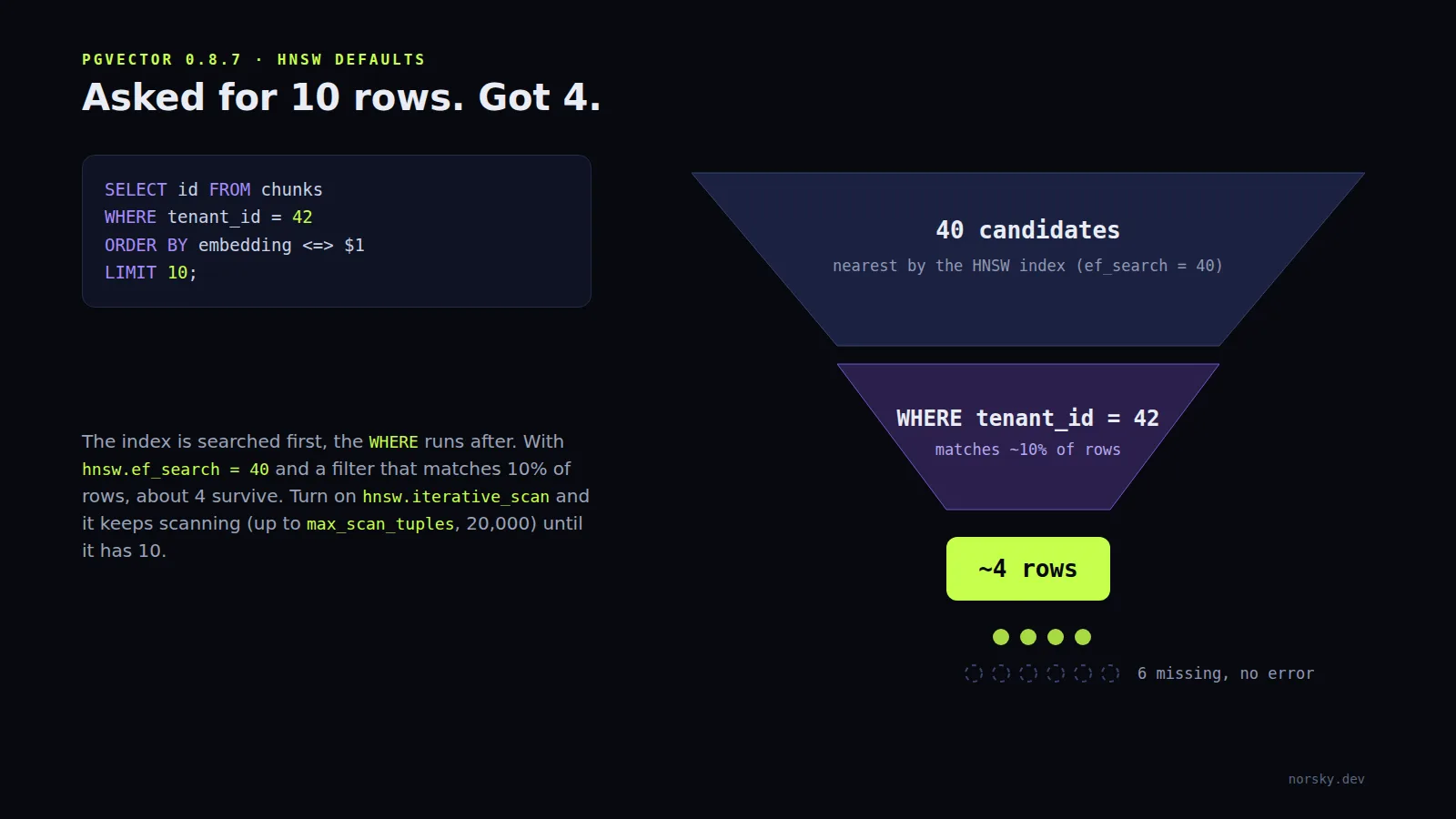
With an approximate index, Postgres scans the index first and applies your WHERE clause after. HNSW's default search width, hnsw.ef_search, is 40. So a query like "the 10 closest documents where tenant_id = 42" finds 40 candidates, throws away the ones from other tenants, and returns what's left. The README's own example: if your filter matches 10% of rows, you get about 4 results on average. You asked for 10. Nothing errors. Your RAG answer just has less context and nobody knows why.
Since 0.8.0 there's a proper fix:
SET hnsw.iterative_scan = strict_order;
With iterative scans on, pgvector keeps scanning more of the index until it has enough rows or hits hnsw.max_scan_tuples (20,000 by default). relaxed_order is faster and can return results slightly out of order, which is usually fine for retrieval. If you filter on a handful of values, a partial index per value is often better still, and for many tenants, partitioning.
I'd turn iterative scans on in any app that filters vector search by user, team or document set, which is most of them.
Where to run it
Every major managed Postgres has it now. Supabase enables it from the dashboard (their pgvector guide), Neon and RDS support it, and on your own server it's a package install. The thing to check is the version: managed providers lag the releases, and 0.8.0 is the minimum I'd accept because of iterative scans.
What I wouldn't do is run a separate vector database alongside Postgres for an app with a few million vectors or fewer. You'd be syncing two copies of the same rows, handling deletes twice, and paying for both. pgvector keeps the embedding next to the row it describes, inside the same transaction, behind the same row level security. That's the whole reason to use it.
The short list
If I were reviewing someone's pgvector setup tomorrow, I'd check: extension version (0.8.0 or later), dimensions under 2,000 or halfvec, HNSW rather than IVFFlat unless there's a reason, maintenance_work_mem raised for index builds, and hnsw.iterative_scan on wherever there's a WHERE clause. Then I'd run the app's real queries with EXPLAIN ANALYZE and count the rows that come back.
If you want a second pair of eyes on yours, or a Postgres-backed search built from scratch, book a free call.
Introductory offer
Free cloud cost optimization. You only pay from what I save.
I cut your AWS, cloud, Supabase or Vercel bill for free and keep half of what I save for 6 months. Save nothing, pay nothing. Code, architecture and infrastructure.