Cloudflare Tunnel: Put a Server Online With No Open Ports
By Aakash Verma · · 5 min read
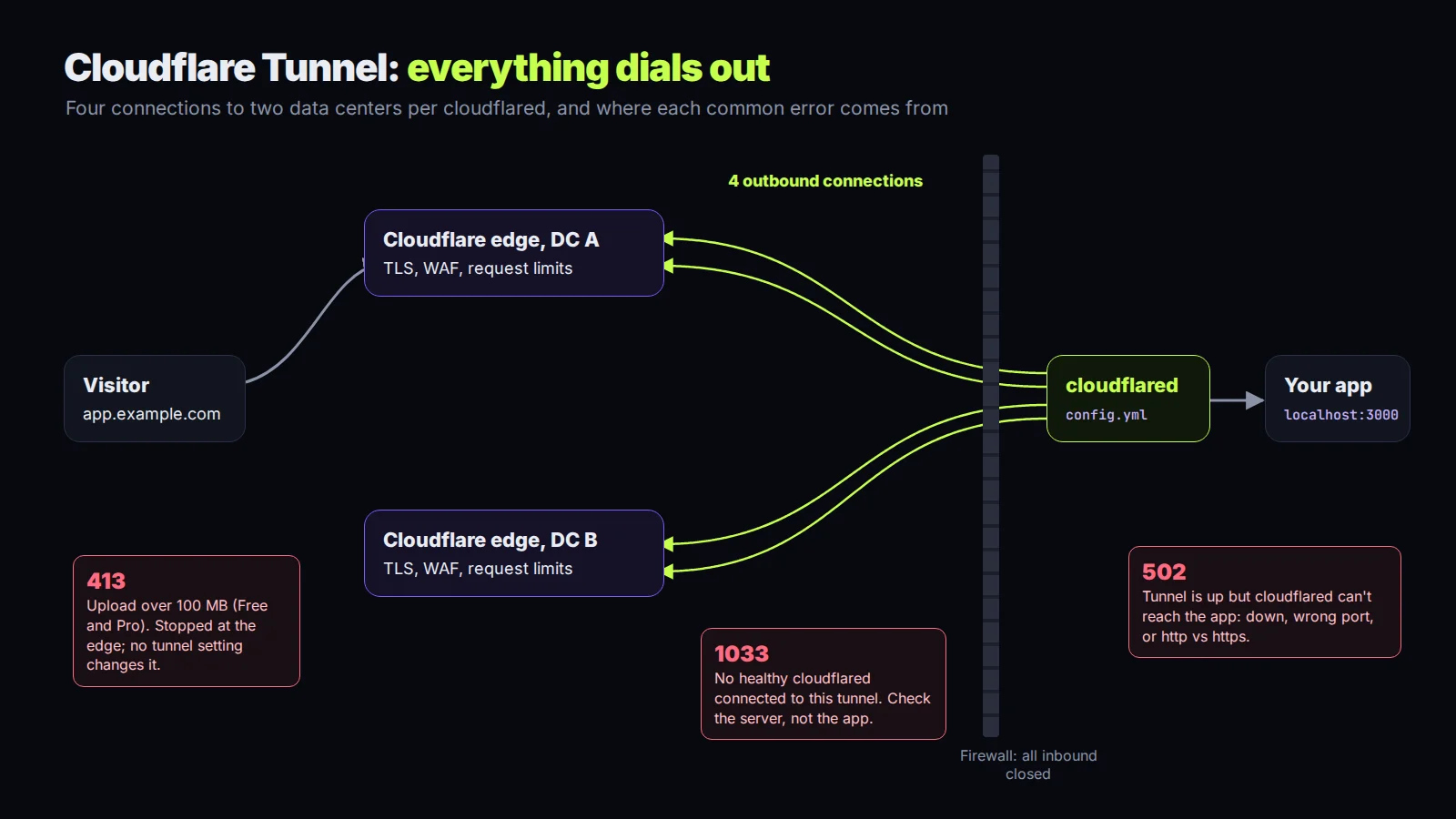
Cloudflare Tunnel lets you publish a web app from a machine that has no public IP and no open inbound ports. A small daemon, cloudflared, runs next to your app and dials out to Cloudflare. Visitors hit your hostname on Cloudflare, and Cloudflare sends the request back down that outbound connection. Your firewall can drop every inbound packet and the site still works.
It's available on every Cloudflare plan, the Free one included. I checked everything below on November 9, 2026 against Cloudflare's Tunnel docs, the configuration file reference, the troubleshooting page and the Zero Trust account limits.
How it actually connects
Each running cloudflared keeps four long-lived connections open to two Cloudflare data centers. That's the redundancy you get for free. If you run a second copy of cloudflared for the same tunnel (a replica), it opens four more. Cloudflare allows up to 25 replicas per tunnel, so 100 connections, and sends each visitor to the geographically closest one.
One thing people assume and shouldn't: replicas are not a load balancer. There's no health-based steering between them. If you want failover between two different servers with checks, Cloudflare points you to its Load Balancing product instead.
Quick tunnels, for five minutes of sharing
If you just want to show someone what's running on your laptop, you don't need an account or a domain:
cloudflared tunnel --url http://localhost:8080
It prints a random trycloudflare.com URL that works until you stop the process. They're the right tool for testing webhooks against a local server, the kind of thing I wrote about in the Stripe webhooks post, and for letting a client click through a build without deploying it anywhere.
Newer cloudflared versions can also gate a quick tunnel by email: add --allowed-mail client@example.com (repeat it, or use '*@example.com' for a whole domain) and visitors get a one-time PIN before they see anything. It needs a real browser, so it won't help with webhooks.
Know the limits before you lean on one. Quick tunnels have no uptime guarantee, cap out at 200 in-flight requests (anything past that gets a 429), and don't support Server-Sent Events at all. If your app streams with SSE, a quick tunnel will look broken when it isn't.
Named tunnels, for anything that stays up
For a real hostname you create a tunnel in your account. There are two ways to manage it.
Remotely managed: you create the tunnel in the dashboard (Networking, then Tunnels), add public hostnames there, and run cloudflared on the server with the token it gives you. The configuration lives in Cloudflare. This is the easier one, and I'd use it for a single app on a single box.
Locally managed: you run cloudflared tunnel create <name>, which writes a credentials JSON file, and you describe the routes in a config.yml. I prefer this one on servers with several services, because the routing sits in a file I can read, diff and keep under version control (the routing, never the credentials file).
A config for two services looks like this:
tunnel: 6ff42ae2-765d-4adf-8112-31c55c1551ef
credentials-file: /home/deploy/.cloudflared/6ff42ae2-765d-4adf-8112-31c55c1551ef.json

ingress:
  - hostname: app.example.com
    service: http://localhost:3000
  - hostname: api.example.com
    service: http://localhost:8000
  - service: http_status:404
That last line is not optional. Any config with ingress rules must end in a catch-all rule, and http_status:404 is the sensible one. Rules are checked top to bottom, and the path is forwarded to your app untouched, so a rule matching /api sends /api/users as /api/users. If you need the prefix stripped, do it with a Cloudflare rewrite rule or a local Nginx.
Two commands I run before every restart:
cloudflared tunnel ingress validate
cloudflared tunnel ingress rule https://api.example.com
The first checks the file. The second tells you which rule a URL would hit, which settles most "why is this going to the wrong app" arguments in about a second.
Running it as a service
On Linux, cloudflared service install sets up a systemd unit. There's a small trap here. You'll run it with sudo, and then $HOME is /root, so it can't find the config.yml you made in your own home directory. Pass it explicitly:
sudo cloudflared --config /home/deploy/.cloudflared/config.yml service install
systemctl start cloudflared
After you change the config, systemctl restart cloudflared. Long-lived connections like WebSockets drop on that restart. If that matters, Cloudflare's suggestion is to start a replica with the new config first, wait for it to connect, then stop the old one.
The errors, and what each one means
1033 means Cloudflare can't find a healthy cloudflared for that tunnel. The connector isn't running, never ran, or the DNS record points at the wrong tunnel ID. Look at the server, not the app.
502 Bad Gateway is the opposite: the tunnel is connected, but cloudflared can't reach your app. The app is down, the port is wrong, or the protocol is wrong (http:// in the rule when the app only speaks HTTPS, or the reverse).
ERR_TOO_MANY_REDIRECTS usually means your app redirects HTTP to HTTPS and the rule sends it plain HTTP. Every request gets the same redirect, forever. Either point the rule at the HTTPS port or stop the app from redirecting, since Cloudflare already terminates TLS for visitors.
x509: certificate signed by unknown authority happens when the app uses a self-signed cert. Set originServerName or caPool under originRequest. noTLSVerify: true works too, and I'd only leave it on for as long as it takes to fix the certificate.
Limits that bite later
Uploads. Tunnel hostnames go through Cloudflare's proxy like any orange-clouded record, so the plan's request body limit applies: 100 MB on Free and Pro, 200 MB on Business. A user uploading a 300 MB video gets a 413, and no setting in cloudflared changes that. Chunk the upload or send big files straight to object storage with a presigned URL; my S3 presigned URL post has the pattern.
Streaming. The tunnel buffers responses unless your app sends Content-Type: text/event-stream. If tokens from an LLM arrive all at once at the end, that header is usually the reason.
Workers. If a Worker route also matches the tunnel's hostname, the Worker gets the request first. Exclude the hostname or have the Worker pass the request through.
And account size: 1,000 tunnels per account before you need Cloudflare's separate platform offering. Most of us will never notice.
Last, lock down the box. The point of a tunnel is that nothing listens publicly, so bind the app to localhost, close the inbound ports in the firewall, and check from outside that the server's IP really doesn't answer. If it still does, you have a second way in that Cloudflare never sees.
If you want a server set up this way, or you've inherited one that half uses a tunnel and half doesn't, book a free call. All consultation is free.
Introductory offer
Free cloud cost optimization. You only pay from what I save.
I cut your AWS, cloud, Supabase or Vercel bill for free and keep half of what I save for 6 months. Save nothing, pay nothing. Code, architecture and infrastructure.