S3 Presigned URLs: Uploads, Expiry and the Errors You'll Hit
By Aakash Verma · · 5 min read
An S3 presigned URL is a normal S3 URL with a signature in the query string. Whoever holds it can do one thing, like download one object with GET or upload one object with PUT, until it expires, without having any AWS credentials of their own. It's signed with the credentials of whoever generated it, which is the detail behind most of the bugs people hit with them.
S3 is in almost every project I build, and presigned uploads are how I let a browser or a mobile app push files straight to a bucket without the bytes passing through my server. Everything below was checked against the AWS presigned URL docs on October 23, 2026.
How long a presigned URL actually lasts
The number you pass as expiresIn is a maximum, not a promise. AWS's own wording: a presigned URL expires at its configured time "or when its associated credentials expire, whichever occurs first."
So the real limit depends on what signed it:
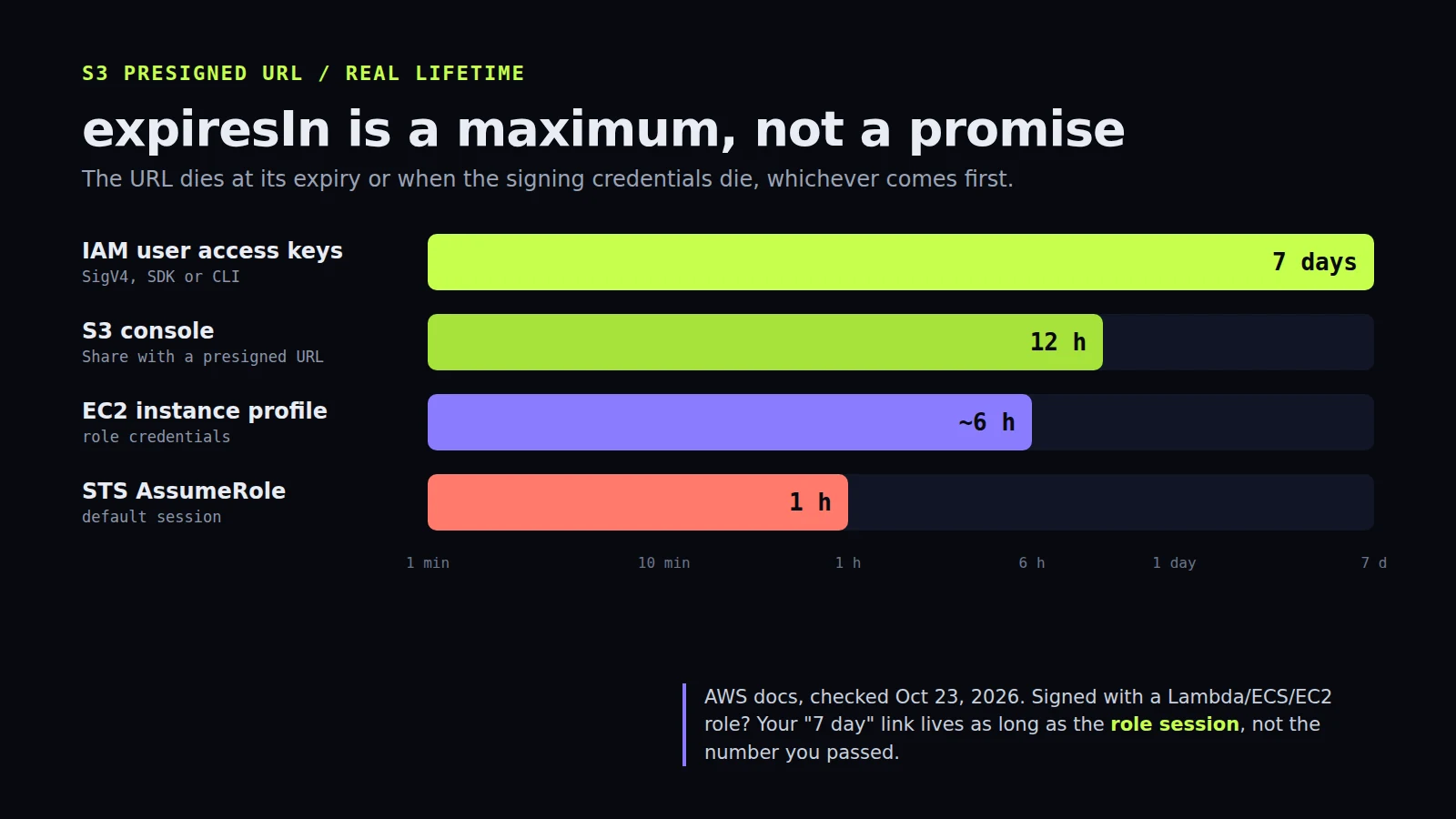
- IAM user access keys with Signature Version 4: up to 7 days (604,800 seconds). Ask for more and the SDK refuses to sign.
- The S3 console (Object actions, Share with a presigned URL): anything from 1 minute to 12 hours.
- An EC2 instance profile: the role credentials last around 6 hours, so a "7 day" URL signed on that box can die the same afternoon.
- STS AssumeRole: the session is 1 hour by default, and the URL goes with it. ECS task credentials rotate every 1 to 6 hours.
This is the classic one. Locally you sign with your own access keys and the 24-hour links you email to users work fine. You deploy to Lambda or ECS, the code signs with the role's temporary credentials, and support tickets start arriving with ExpiredToken in the XML. Nothing changed in your code. If links have to live for days, sign them with a dedicated IAM user that has s3:GetObject on one prefix and nothing else, or stop handing out long links and generate a fresh one each time the user clicks.
One nice detail: S3 checks the expiry when the request starts. A big download that begins one second before expiry finishes. A resumed download after expiry fails.
A browser upload in Node, the short version
With the AWS SDK for JavaScript v3 it's two packages, @aws-sdk/client-s3 and @aws-sdk/s3-request-presigner:
import { S3Client, PutObjectCommand } from '@aws-sdk/client-s3'
import { getSignedUrl } from '@aws-sdk/s3-request-presigner'
import { randomUUID } from 'node:crypto'

const s3 = new S3Client({ region: 'eu-west-1' })

export async function uploadUrl(userId, contentType) {
  const key = `uploads/${userId}/${randomUUID()}`
  const url = await getSignedUrl(
    s3,
    new PutObjectCommand({ Bucket: 'my-app-uploads', Key: key, ContentType: contentType }),
    { expiresIn: 300 }
  )
  return { url, key }
}
The browser then sends fetch(url, { method: 'PUT', body: file, headers: { 'Content-Type': file.type } }), and you save key in your database once it returns 200.
Two things I always do here. The key is generated on the server with a UUID, never taken from the file name the user picked, because if an object with that key already exists, S3 simply replaces it. And five minutes is plenty: the URL is only needed for the one upload that starts right after the page asks for it.
The bucket also needs a CORS rule or the browser blocks the PUT before S3 ever sees it. Allow PUT from your own origin, allow the Content-Type header, and expose ETag if you'll do multipart later. The S3 CORS docs have the JSON shape.
The errors, and what they usually mean
SignatureDoesNotMatch. Nine times out of ten the request isn't the one you signed. The usual culprit is Content-Type: you signed image/png and the browser sent image/jpeg, or you signed application/octet-stream and some upload library added its own header. Method, headers and query string all have to match what was signed. The other causes AWS lists are clock drift on the signing machine and corporate proxies that rewrite headers.
AccessDenied (403). The URL can only do what its signer can do. If the Lambda role lacks s3:PutObject on that prefix, the URL is born broken, and you won't find out until someone uses it. A bucket policy with an explicit deny wins too.
ExpiredToken. The temporary credentials behind the URL are gone (see the expiry section above).
AccessDenied with HeadersNotSigned: if-range. Rare, but it shows up with video players doing range requests: if Range is signed, S3 wants If-Range signed as well.
You can't cap the file size with a PUT URL
This one surprises people. A presigned PUT lets the holder upload anything up to S3's 5 GB single-request limit, to that key, as many times as they like until it expires. You can't say "max 10 MB" in it.
If size matters (avatars, user content on a free plan), use a presigned POST instead. createPresignedPost from @aws-sdk/s3-presigned-post takes a policy with conditions, and ['content-length-range', 0, 10485760] makes S3 itself reject anything over 10 MB. It's a form upload with fields instead of a raw body, so the browser code is slightly uglier, and I think it's worth it. Checking file.size in JavaScript is a UX nicety, not a limit.
For files over a few hundred MB, I switch to multipart: the server starts the upload, presigns one URL per part (UploadPartCommand), the client sends parts in parallel, and the server completes it. More moving parts, but a dropped connection costs one part instead of the whole file.
Locking them down a bit more
Presigned URLs are bearer tokens. Anyone who gets the link gets the access, so they shouldn't show up in logs, analytics tools or error trackers that record full URLs. Two bucket-level controls help:
- The
s3:signatureAgecondition key in a bucket policy denies any presigned request whose signature is older than a limit you set (AWS's example uses 10 minutes), no matter whatexpiresInthe code asked for. Good backstop for the day someone writesexpiresIn: 604800"just for testing". aws:SourceIporaws:SourceVpceconditions restrict where requests may come from, which is handy for internal tools.
For downloads served to lots of users, I usually don't hand out S3 presigned URLs at all. I put CloudFront in front of the bucket and use CloudFront signed URLs or signed cookies, so the files are cached at the edge and I'm not paying S3 request and transfer prices on every view. That's also where the S3 line on the bill stops growing so fast. If yours is already too big, that's exactly what my free bill review at slashcloudbill.com looks at.
If you're adding uploads to an app and want a second pair of eyes on the bucket setup, book a free call.
Introductory offer
Free cloud cost optimization. You only pay from what I save.
I cut your AWS, cloud, Supabase or Vercel bill for free and keep half of what I save for 6 months. Save nothing, pay nothing. Code, architecture and infrastructure.