Windsurf vs Cursor in Late 2026: Windsurf Is Devin Desktop Now
By Aakash Verma · · 4 min read
If you search "Windsurf vs Cursor" today, half the comparisons you find are out of date, because Windsurf the product name is gone. On June 2, 2026, Cognition renamed it Devin Desktop, shipped as a normal over-the-air update. Their Devin Desktop FAQ says plans, settings, extensions and workflows carried over unchanged, and windsurf.com/pricing now redirects to devin.ai/pricing. So the honest version of the question is: Devin Desktop or Cursor?
Short answer from me: for one developer working in one repo most of the day, they're closer than the marketing says, and the deciding factor is now the pricing model and which models you actually want, not the editor.
What actually changed with the rename
The editor is the same code base. Your .windsurfrules and .windsurf/rules/ files are still read, but .devin/rules/ is the new preferred location and wins if both exist. The surf command became devin-desktop (the old commands still ship), and the app binary is Devin.app / Devin.exe / devin now, which matters if a company allowlists software by name.
The bigger shift is the default screen. Devin Desktop opens on an "Agent Command Center", a view for running and watching several agents, and its local agent is called Devin Local, which the FAQ says supports subagents and runs the same architecture as the Devin CLI. Memories and workflows are replaced by rules and skills. In other words: it's being pushed from "AI editor" toward "place where you manage agents". Whether you want that depends a lot on how you work.
Prices, side by side
From devin.ai/pricing and cursor.com/pricing, both checked November 28, 2026:
| Devin Desktop (ex-Windsurf) | Cursor | |
|---|---|---|
| Free | $0, light agent quota, unlimited Tab and inline edits | $0, limited usage |
| Entry | Pro $20 | Plus $8, Grok models only |
| Middle | Premium $30, third-party models at API list price on top | |
| Heavy | Max $200 | Super $100, Ultra $200 |
| Teams | $80 a month | from $30 a user |
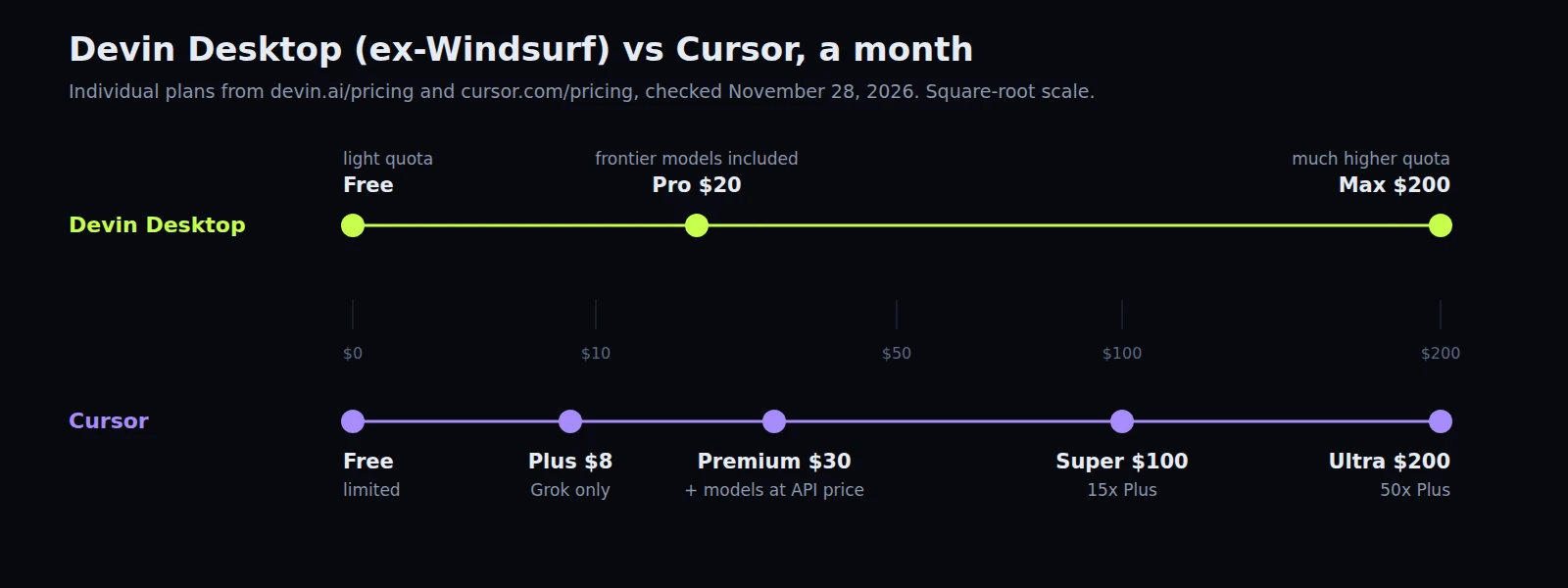
The row that trips people up is Cursor's. Plus at $8 looks like the cheap option until you notice it only runs Grok models. If you want the big third-party models (the GPT ones and the rest) inside Cursor you're on Premium, and those models are billed "at API list price" on top of the $30. For a heavy month that can be a lot more than $30.
Devin Desktop's Pro is $20 with "frontier models from several providers" included up to a quota that refreshes daily and weekly, plus the option to buy more at API rates, and it accepts a ChatGPT plan. So for someone who wants the big third-party models and doesn't want to watch a meter, Pro at $20 is the simpler number. For someone happy on Grok, Cursor Plus at $8 is hard to beat.
How I'd choose
Pick Cursor if you mostly want a very good editor with strong completions and you drive the AI yourself, change by change. Its Tab completions are still the thing people miss when they leave, and the plan ladder lets you start cheap.
Pick Devin Desktop if you want to hand off bigger tasks to agents and check back, or you already use Devin in the cloud. The Command Center view makes sense once you have more than one agent running; with one, it's mostly in the way.
Pick neither if you're happy in a terminal. A CLI agent next to whatever editor you already use is still my default for real work, because the editor stays boring and the agent stays replaceable. I wrote about the tools I'd actually use for vibe coding separately.
Two things I'd do either way. Keep project rules in the repo, not in the tool's settings, so a teammate on the other editor gets the same rules (Devin Desktop reads its own rules folders, Cursor reads .cursor/rules/; my notes on Cursor rules cover that side). And set a spending cap on day one. Both products now have a "usage at API rates" door, and it's easy to walk through without noticing.
One more case: the Lovable export
A lot of people end up comparing these two at the same moment: an app built in Lovable gets real users, someone exports the GitHub repo, and the question becomes which AI editor to continue in. Either works on that code. What decides how the next month goes is the state of the code you open, not the editor: whether the Supabase tables have row-level security, whether the business logic lives in the browser, whether there are any tests at all.
If you're at that point, Lovable 2 Live, my agency, does that handover work and takes Lovable apps to production. For anything else, book a free call. All consultation is free.
Introductory offer
Free cloud cost optimization. You only pay from what I save.
I cut your AWS, cloud, Supabase or Vercel bill for free and keep half of what I save for 6 months. Save nothing, pay nothing. Code, architecture and infrastructure.