Cursor Rules: How I'd Set Up .cursor/rules for a Real Repo
By Aakash Verma · · 4 min read
Cursor rules are plain text instructions the Cursor agent reads before it writes code in your project. Project rules live in .cursor/rules/ as .mdc files and get committed with the code. That extension matters more than anything else in this post: Cursor's rules documentation says it outright, "A plain .md file in .cursor/rules is ignored by the rules system." People write a lovely conventions.md, drop it in the folder, and the agent never sees a word of it.
Everything below is from those docs as they read on November 19, 2026. The opinions about what to write in them are mine.
The four ways a rule gets used
Each .mdc file starts with a small frontmatter block with three fields: description, globs and alwaysApply. Which ones you fill in decides when the rule reaches the agent:
alwaysApply: trueputs it in every chat. The other two fields are ignored.- A
descriptionwith noglobsandalwaysApply: falselets the agent decide if it's relevant, based on that description. globswithalwaysApply: falseattaches the rule when a matching file is in the context.- Nothing set at all means it only applies when you @-mention it, like
@migrations.
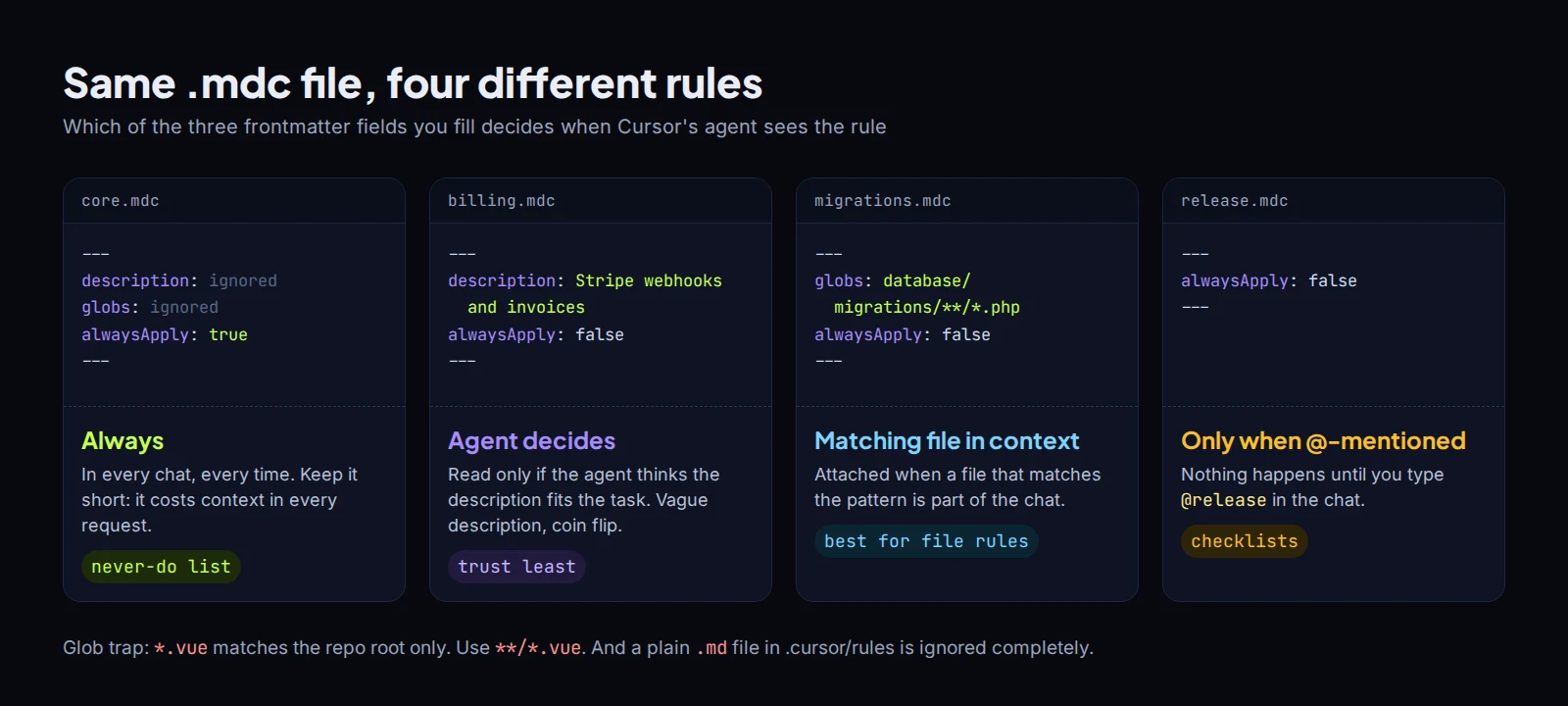
The "apply intelligently" mode sounds clever and is the one I trust least. The agent reads a one-line description and guesses. If the description is vague ("backend stuff"), the guess is a coin flip. I'd rather use globs for anything tied to files and keep the always-on set tiny.
Globs are where it quietly breaks
Glob patterns are comma separated, and they don't behave the way people assume. *.ts only matches TypeScript files in the root of the repo. You almost always want **/*.ts. In a Laravel app with a Vue frontend, a rule for components needs resources/js/**/*.vue, and a rule for migrations needs database/migrations/**/*.php. Write *.vue and the rule sits there doing nothing, and you'll never get an error telling you so.
A quick test I'd do after adding any glob rule: open a file the pattern should match, start a new chat, and ask the agent which rules it has loaded. If yours isn't in the answer, the glob is wrong.
What I'd actually put in a repo
For a typical client codebase (Laravel or Node API, Vue or React frontend, Postgres, maybe Supabase), I'd start with four files and nothing else:
.cursor/rules/
  core.mdc          alwaysApply: true   (stack, how to run tests, never-do list)
  migrations.mdc    globs: database/migrations/**/*.php
  frontend.mdc      globs: resources/js/**/*.vue
  security.mdc      alwaysApply: true   (secrets, auth checks, RLS)
The never-do list is the useful part. Never edit a migration that has already run, write a new one. Never put a secret in anything the browser gets (VITE_ and NUXT_PUBLIC_ variables are public). Every new Postgres table on Supabase gets row level security in the same migration. Run the tests before saying it's done. Those are mistakes an agent will make on day one, and a rule is cheap insurance against them.
What I'd keep out: the whole style guide (that's what ESLint, Prettier and Pint are for), commands the agent already knows, and long pasted schemas. The docs suggest keeping rules under 500 lines and referencing files rather than copying them in. I'd go further and keep core.mdc under a screen. One thing to know about references, though: a file you point to with @service-template.ts is read when needed, not inlined, so anything that must always be in front of the agent goes in the rule body itself.
Where AGENTS.md fits
Cursor also reads AGENTS.md, a plain Markdown file with no frontmatter, in the project root or in subfolders. A nested one applies when the agent works in that folder, combined with the parent ones, and the more specific file wins. Other coding agents read AGENTS.md too, so if your team uses more than one tool, put the shared never-do list there and keep the Cursor-only glob rules in .cursor/rules/.
Precedence when they disagree: Team rules (on Team and Enterprise plans), then project rules, then your personal user rules. Earlier wins.
The rule that matters most isn't in the file
The docs have one warning I'd underline twice: "AI guidance should not be your only security control." A rule saying "check auth on every endpoint" is a suggestion. A test that fails when an endpoint has no auth check is a control. Add rules when the agent keeps making the same mistake, and add a test or a lint rule when the mistake is expensive.
If you've got a repo that an AI tool built quickly and you want someone to set up the rules, the tests and the CI around it properly, that's work I do. Book a call; the first conversation is free.
Introductory offer
Free cloud cost optimization. You only pay from what I save.
I cut your AWS, cloud, Supabase or Vercel bill for free and keep half of what I save for 6 months. Save nothing, pay nothing. Code, architecture and infrastructure.