Vercel Pricing: What Drives the Bill
By Aakash Verma · · 6 min read
Vercel pricing starts at $20 a month for Pro, and for a lot of projects that really is the whole bill. The trouble is that the $20 is a platform fee with a usage credit baked into it, and the moment you pass that credit everything turns into meters: requests, transfer, CPU time, memory, image transformations, seats. Most people only find out which meter matters when the invoice arrives.
So this is the order I'd go through it in. All numbers are from vercel.com/pricing and the pricing docs as of October 2026. Vercel changes this often (the CDN pricing below is newer than most blog posts about it), so check the date on anything else you read.
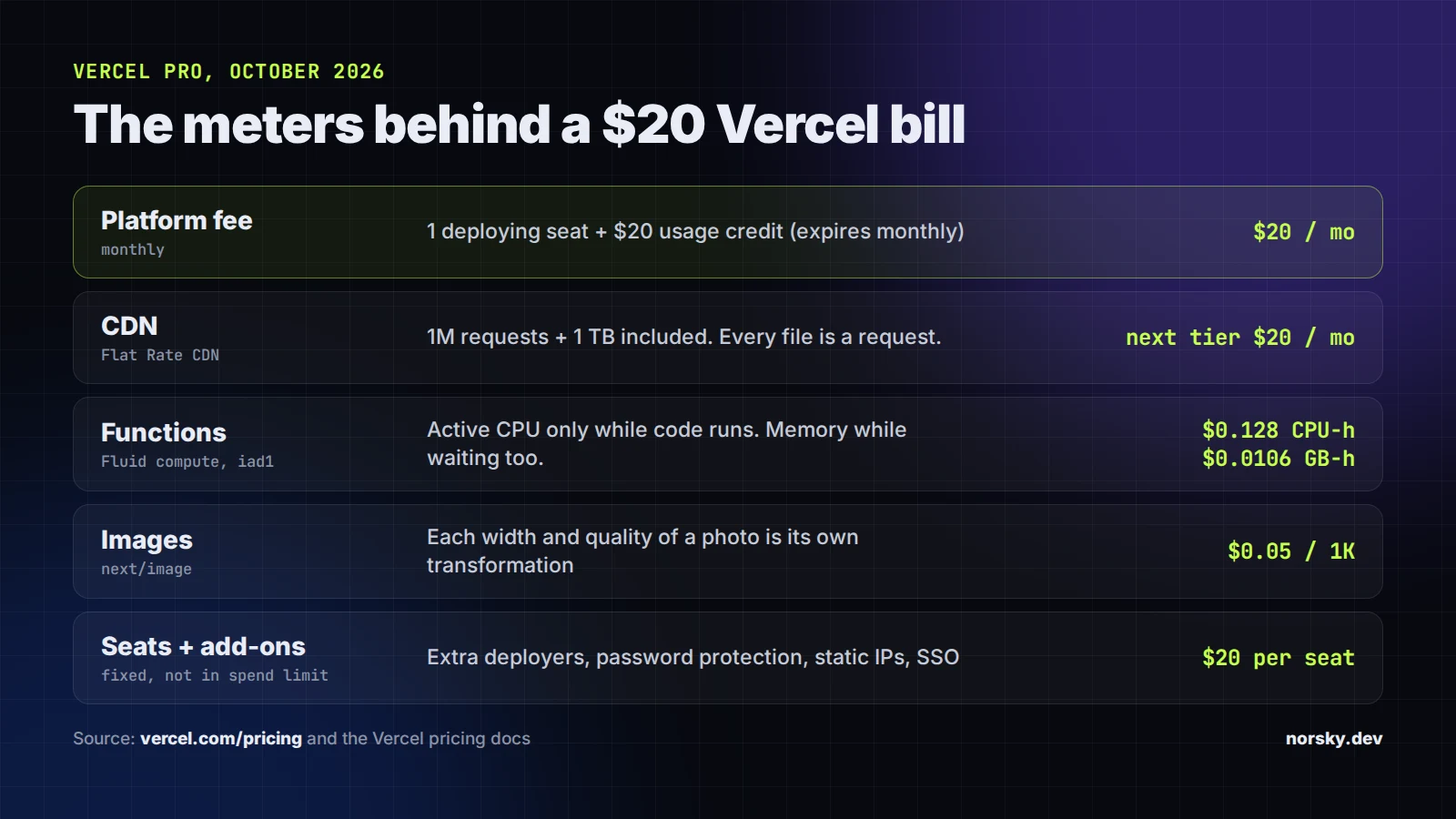
The $20 is a fee and a credit
Pro is a $20 monthly platform fee. It includes one deploying seat and $20 of usage credit. The credit applies to infrastructure from the first unit you use, expires at the end of the month, and doesn't roll over. Once it's gone, you're on on-demand rates for everything.
Hobby is free, but it's for non-commercial personal use only. That's in Vercel's fair use guidelines, and it's the first thing I'd fix if a client's business site is running on a Hobby account. When Hobby hits a limit, things stop (new images fail to optimize with a 402, for example). When Pro passes the credit, things keep running and you get billed. Different failure mode, and you should know which one you're on.
Seats are the quiet one. Every extra person who can deploy is $20 a month. Viewer seats are free, so the designer who only comments on previews doesn't need a paid seat.
CDN: what 1 million requests actually is
Pro now includes the lowest tier of what Vercel calls Flat Rate CDN: 1 million CDN requests and 1 TB of data transfer a month. Past that, the tiers are $20 a month for 10M requests, $100 for 50M and $300 for 150M (all with 50 TB transfer). If a month goes over your tier, you're moved up at the start of the next cycle, so a one-day spike doesn't change the bill.
That sounds generous until you count requests the way the CDN does. A request is every file, not every page view. A Next.js page that loads 30 JavaScript chunks, a few fonts, a favicon and 10 images is around 45 requests for one visitor on a cold cache. Divide 1 million by 45 and you get roughly 22,000 page views. Vercel's own docs put the included tier at about 33,000 requests a day, which sounds like a lot until you see it's maybe 700 visitors' worth.
Two things push this up faster than people expect. Bots, because a crawler loading every page of a 5,000-page site is a few hundred thousand requests by itself. And prefetching: Next.js <Link> prefetches routes as they scroll into view, so one visitor scrolling a long listing page can request pages they never open. Neither is wrong. You just pay for it.
The bot part has a cheap fix now. Since May 2026, traffic that the Vercel Firewall denies, challenges or rate-limits doesn't count toward CDN requests or data transfer. A rate-limit rule on the paths scrapers hammer costs nothing and takes those requests off the bill.
Flat Rate CDN also has rules. Vercel says it isn't for bulk file downloads or sites where media delivery is most of the bandwidth. If that's you, put the big files on a storage bucket with a cheaper CDN in front, not on Vercel.
Functions: CPU and memory are billed differently
Server-side code runs on what Vercel calls Fluid compute, and it's billed on three meters (function pricing):
- Active CPU: only while your code is actually running. $0.128 per hour in the cheapest US regions (iad1, cle1, pdx1), up to $0.221 in São Paulo.
- Provisioned Memory: for as long as the instance is alive with a request in flight, including while it waits on a database or an API. $0.0106 per GB-hour in the cheap regions.
- Invocations: $0.60 per million requests, counted whether they succeed or fail.
The split matters. Waiting on a slow database doesn't cost CPU any more, but it still costs memory, because the instance is held open. A function with 2 GB configured that spends 8 seconds waiting on an LLM response pays for 2 GB times 8 seconds on every call. If your API routes call slow third-party APIs, memory size is the setting to look at first, and most functions don't need the default.
Region is the other cheap win. If your database is in us-east-1 and your functions are in Frankfurt, you pay 44% more for CPU and you add a transatlantic round trip to every query. Put functions next to the data.
Image Optimization
The next/image component is great until you look at what it costs at scale. Vercel bills image transformations at $0.05 to $0.0812 per 1,000, on every cache miss, plus cache reads and writes.
The cache key includes the width and quality, so one source photo can turn into many transformations: one for each size in your deviceSizes, times every quality value you use. A marketplace with 20,000 user-uploaded photos and a dozen widths can do six figures of transformations a month without anyone noticing. Fixes, cheapest first: trim deviceSizes and imageSizes to what you actually render, use one quality value, raise minimumCacheTTL for images that never change, and lock remotePatterns down so nobody can use your optimizer to resize images from other sites. For user uploads, I'd usually resize once at upload time and serve the result as a plain file.
The add-ons that sit in the invoice
These are billed monthly and don't count toward spend limits: Password Protection is $20 per project per month, SAML SSO $300, Static IPs $100 per project, Observability Plus $1.20 per million events, Web Analytics Plus $10, Speed Insights Plus $10 per project. Each one is fine. Five of them switched on for a test two years ago and forgotten is $100+ a month for nothing. Open Settings, Billing, Add-Ons and switch off what nobody uses.
There's also a new line coming for older teams: Deployment Storage, the space your old deployments and function bundles take, billed at $0.10 per GB-month. Default retention moves to 30 days on October 23, 2026 unless you opt out. Unless you really roll back to builds from last spring, let it happen.
Spend Management: set it up on purpose
Vercel's Spend Management lets you set an on-demand budget and get emails at 50%, 75% and 100% of it (SMS at 100%), call a webhook, or pause every production deployment when you hit it. New Pro customers start with notifications at $200.
Two caveats from the docs. The budget only alerts unless the Pause Production Deployments switch is on, so check that it's in the state you want. And Vercel checks spend every few minutes, not continuously, so usage keeps running for a bit after you cross the line. A paused project shows visitors a 503 DEPLOYMENT_PAUSED and has to be resumed by hand, project by project. For a business site I'd rather have alerts plus a webhook to Slack than a hard pause. For a side project, pause it.
Also, Pro teams can now get a partial invoice in the middle of the cycle once on-demand usage passes a threshold. If your card gets charged on the 14th, that's why, and it's a good time to open the Usage page.
Where to look
The Usage page in your team dashboard breaks spend down by product, and vercel usage in the CLI can split CDN usage by day, which is how you find the day the bot showed up. Read it in this order: seats and add-ons (fixed money), CDN requests, function memory, image transformations. That's usually most of it.
If you go through all of this and the bill still doesn't add up, send it to me. Cutting bills like this is what my free cloud cost optimization is for: I look at the invoice, the usage graphs and the code behind them, and you only pay out of what I actually save. Sometimes the answer is moving part of it off Vercel, and I'll tell you when it is.
Introductory offer
Free cloud cost optimization. You only pay from what I save.
I cut your AWS, cloud, Supabase or Vercel bill for free and keep half of what I save for 6 months. Save nothing, pay nothing. Code, architecture and infrastructure.