Supabase vs Firebase in 2026: How to Choose
By Aakash Verma · · 5 min read
Supabase vs Firebase looks like a feature comparison, and most articles treat it as one: both have auth, both have a database, both have file storage, both have functions, both do real time. Line up the feature lists and they match almost row for row. That's why the comparison is useless.
The two differ in two places that decide how the next three years go: the shape of your data, and the way you get billed. Everything else is details.
The data question
Firebase's main database, Cloud Firestore, stores documents in collections. Supabase gives you a Postgres database, with tables, foreign keys and SQL.
That sounds academic until you build an admin screen. Take an orders page that shows each order with the customer's name and the product title. In Postgres that's one query with two joins. In Firestore there are no joins, so you either fetch the order, then the customer, then the product (three reads per row, and code to stitch them together), or you copy the customer's name and the product title into every order document when you write it. Copying is the normal Firestore answer. It's fast and cheap to read. Then a customer changes their name and you need a Cloud Function to update every order they ever placed.
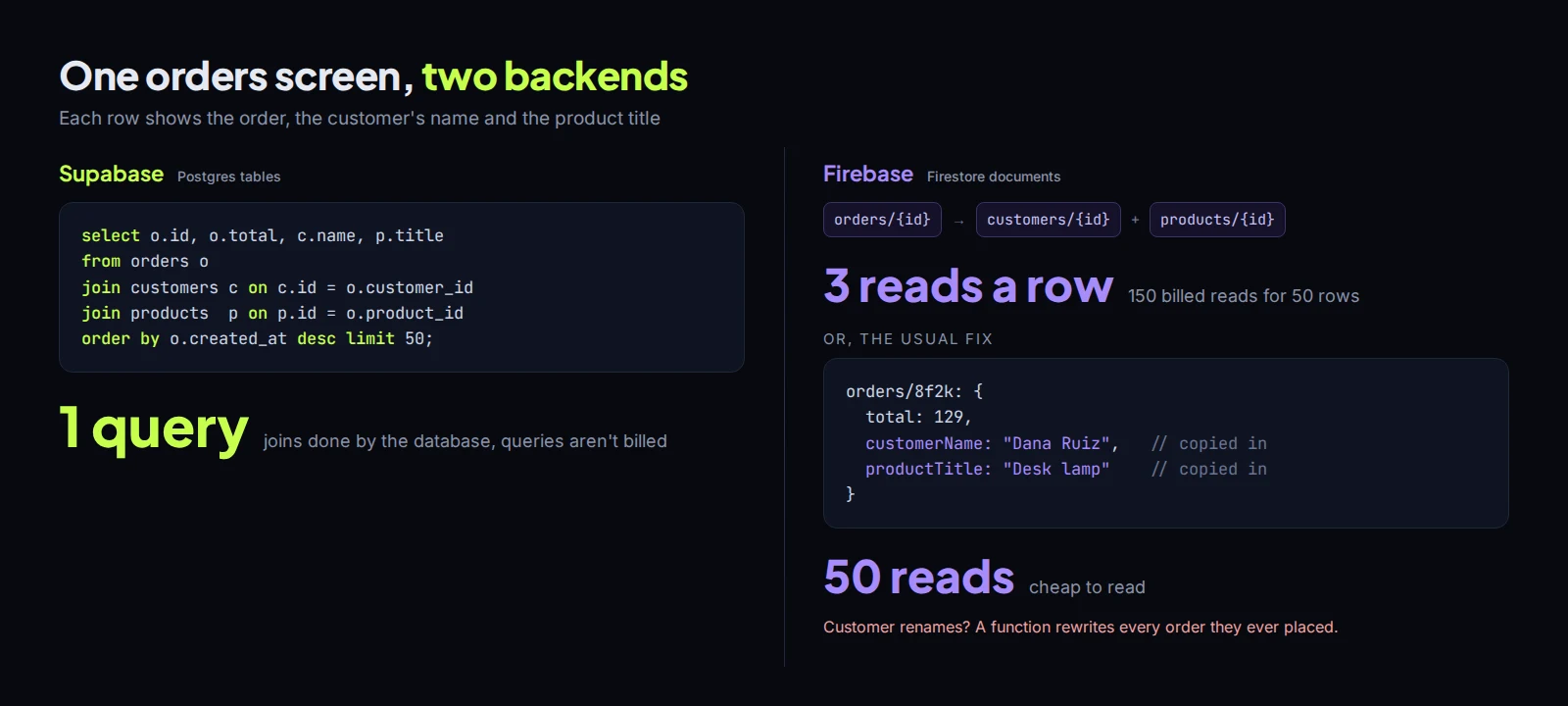
Neither is wrong. Firestore is excellent for data that's read the way it's written: a chat thread, a user's settings, a feed. It gets awkward for data people slice in many directions: reports, filters on four fields, "all customers who ordered X but not Y". Firestore needs a composite index for most multi-field queries and it will tell you so with an error that links to the console. Postgres just runs the query, slowly if you forgot an index, but it runs.
My rule of thumb: if the app has a back office, a dashboard or anything that looks like a spreadsheet, start with Postgres. Most business apps do, even if version one doesn't.
The billing question
This is where the two really split.
Firebase bills per operation. Firestore charges per document read, written and deleted ($0.03 per 100,000 reads in us-central1, double that in the nam5 multi-region), with a free quota of 50,000 reads a day. You never pay for an idle database, which is lovely for a side project, and your bill tracks usage exactly, which is less lovely when a real-time listener on a busy screen re-reads documents for every connected user. There is a line-by-line breakdown of how each Firebase charge grows in slashcloudbill's Firebase pricing guide, and there's a Firebase pricing calculator next to it.
Supabase bills per project and per resource. Pro is $25 a month with $10 of compute credit, which covers one Micro instance, and every extra project or bigger instance is billed by the hour whether anyone uses it or not (Supabase pricing). Queries themselves are free: a badly written dashboard makes the database slow, not the bill bigger. You pay for that eventually with a bigger instance, but it's a step you choose, not a surprise. I went through the Supabase side in detail in Supabase pricing: what drives the bill.
So the trade is predictability. Firebase is cheaper when traffic is small or spiky. Supabase is easier to forecast once you have steady users, because the bill moves when you resize something, not when someone ships a new screen.
Free tiers that bite differently
Supabase Free gives you a 500 MB database, 50,000 monthly active users and 1 GB of file storage, but free projects pause after a week of inactivity and you get two of them. Fine for building. Not fine for a demo you send to an investor three weeks later.
Firebase's Spark plan never pauses, but if you go over its limits your app is shut off for the rest of the month, and you can't use Cloud Functions on Spark at all. New Cloud Storage buckets need the paid Blaze plan too. In practice anything real is on Blaze from day one, with Spark's free quotas still applied.
Offline and mobile
This is Firebase's strongest point, and it's not close. Firestore's Android and iOS SDKs cache data and queue writes while the phone is offline, then sync when it comes back, with very little code. For a field app or anything used on bad connections, that's weeks of work you don't have to do.
Supabase doesn't ship an offline layer. You add one yourself (a local SQLite with sync, or a library like PowerSync) or you accept that the app needs a connection. For most web apps that's fine. For a mobile app used in warehouses or basements, it's the deciding factor.
Lock-in
Supabase is open source and it's Postgres. pg_dump gives you your whole database, and you can move it to RDS, Neon, a Hetzner box or anything else that runs Postgres. You can even self-host Supabase itself. Auth and storage take some work to move, the data takes an afternoon.
Firestore has a managed export to a Cloud Storage bucket, in a format meant for importing back into Firestore or loading into BigQuery. Leaving means writing a migration that reads every collection and reshapes documents into tables. People do it, it's just a project, and the copied-everywhere data from the orders example above is the hard part.
Auth, functions, the rest
Both have solid auth with email, social logins and phone sign-in. Firebase Auth is free up to 50,000 monthly active users and charges per SMS for phone codes ($0.01 to US numbers after the first ten a day). Supabase includes 50,000 MAUs on Free and 100,000 on Pro, and for phone sign-in you bring your own SMS provider such as Twilio, so you pay them instead.
Functions: Firebase uses Node on Cloud Run, Supabase Edge Functions run Deno. Both work. If your team writes Node, Firebase's functions will feel more familiar, and Supabase gets most of its server-side logic done in the database anyway, with SQL functions, triggers and row level security policies.
So which one?
Pick Firebase if it's a mobile-first app that has to work offline, the data is mostly per-user documents, and you're happy deep inside Google Cloud.
Pick Supabase if the app has relational data, any kind of admin or reporting side, or a team that already knows SQL. And if you might one day want to run it somewhere else.
If you're already on one and the bill is the reason you're reading this, that's a different job from choosing. I look at bills like that for free on slashcloudbill and only get paid out of what the changes save. Otherwise, if you want a second opinion before you commit to either, book a free call. All consultation is free.
Introductory offer
Free cloud cost optimization. You only pay from what I save.
I cut your AWS, cloud, Supabase or Vercel bill for free and keep half of what I save for 6 months. Save nothing, pay nothing. Code, architecture and infrastructure.