Puppeteer vs Playwright: Which One I'd Pick in 2026
By Aakash Verma · · 4 min read
If you searched "puppeteer vs playwright" because a test just failed with TimeoutError: Waiting for selector .welcome failed: Waiting failed: 30000ms exceeded, I can save you some reading: that error isn't really Puppeteer's fault, and switching to Playwright will mostly make it go away anyway. The rest of this post is why.
As of October 18, 2026, puppeteer is at 25.14.0 and playwright at 1.64.1 on npm. Both shipped a release on October 14, so neither is dying. npm counted about 6.7 million downloads of puppeteer last week and about 69 million of playwright, 46 million of those for @playwright/test. Playwright won testing. Puppeteer is still what a lot of Node code uses to drive Chrome for everything else, PDFs especially.
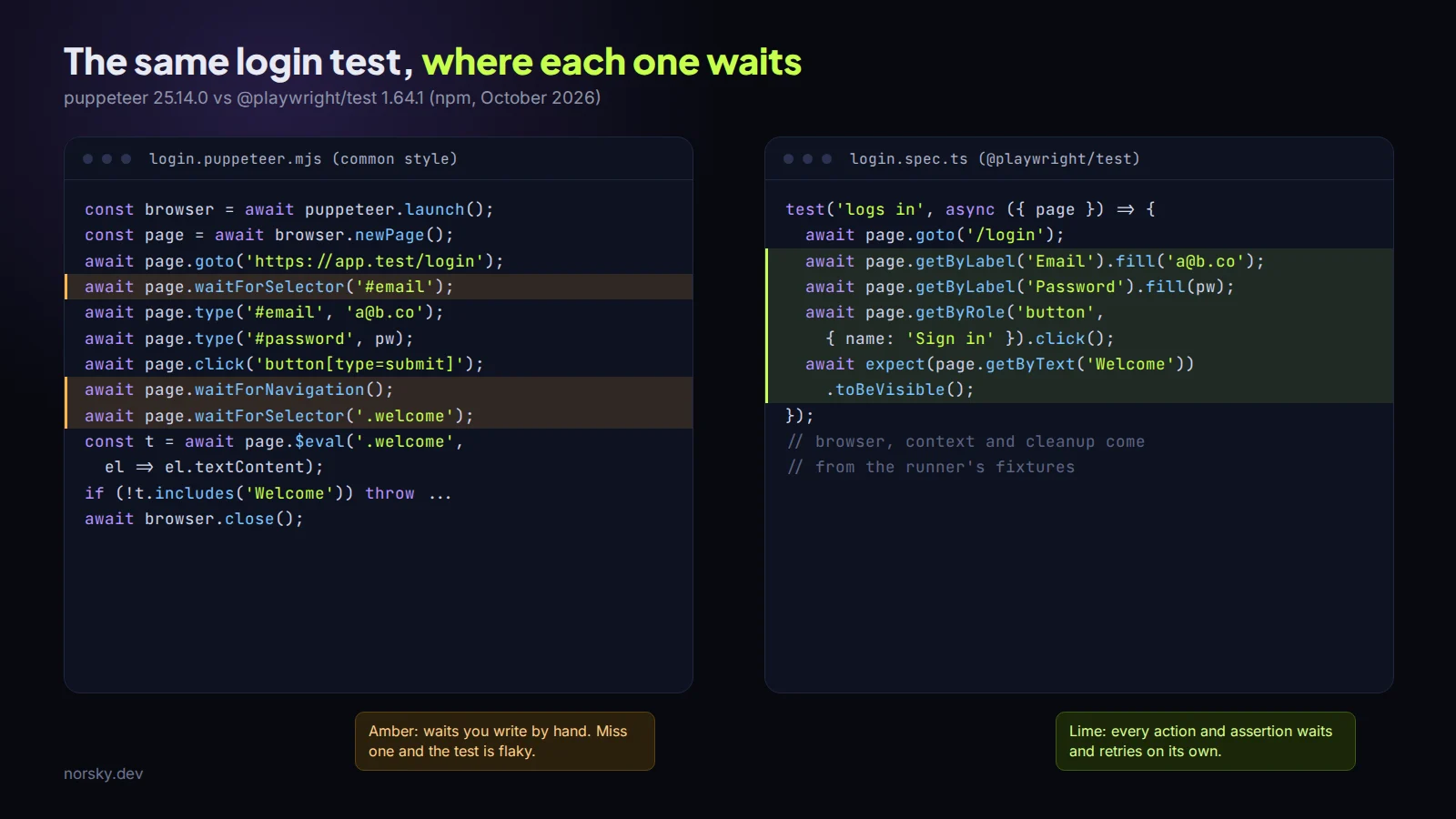
That timeout, and why Playwright mostly doesn't have it
Look at the left side of the picture. Puppeteer code written the common way has explicit waits: waitForSelector before you type, waitForNavigation after you click. Each one is a guess about when the page is ready. The classic bug is the click followed by waitForNavigation: if the navigation finishes before the wait starts, the wait sits there for 30 seconds and fails. The fix people find on Stack Overflow is to wrap both in Promise.all. The fix people actually commit is await new Promise(r => setTimeout(r, 2000)), and now the test is slow and still flaky on a busy CI box.
Playwright's locators wait for you. page.getByRole('button', { name: 'Sign in' }).click() waits until the button exists, is visible, is enabled and has stopped animating. Its expect keeps retrying until the timeout instead of checking once. You still get timeouts, they just read differently: locator.click: Timeout 30000ms exceeded. And you get one error Puppeteer never gives you, strict mode violation: getByRole('button', { name: 'Save' }) resolved to 2 elements, which is Playwright refusing to guess which button you meant. Annoying the first week. Then you notice it caught a real bug.
To be fair to Puppeteer: it has had its own locator API since mid-2023, with the same kind of waiting. Almost nobody uses it, because every tutorial and every inherited codebase predates it.
The runner matters more than the library
@playwright/test is the part people leave out of the comparison. Parallel workers, retries, fixtures, a project per browser and phone size, an HTML report. And the trace viewer: turn on trace: 'on-first-retry' and a failed CI run leaves a zip with every action, a DOM snapshot before and after it, network calls and console output. You open it with npx playwright show-trace and scrub through the failure like a video. For anyone who has debugged a test that only fails in CI, that one feature is the argument.
Puppeteer has no runner. You put it under Jest or Vitest, write your own setup and teardown, and decide yourself what a retry means.
Browsers
Puppeteer is the Chrome team's. Since v20 it downloads Chrome for Testing (25.14.0 pairs with 155.0.8059.79), since v23 it drives stable Firefox through WebDriver BiDi, and it's JavaScript only. Playwright ships its own Chromium, Firefox and WebKit builds, can use branded Chrome or Edge through channel, and has official Python, Java and .NET versions. Its docs are honest that their WebKit isn't Safari, and say to run it on a Mac when you need the closest thing. On Linux CI it still catches plenty of Safari layout bugs that a Chromium-only suite never sees.
PDFs, which is where Puppeteer earns its keep
Both render PDFs through Chromium with page.pdf() (in Playwright it only works in Chromium). For an HTML-to-PDF service I'm happy with Puppeteer. It's one browser and one protocol client, and if you're on Laravel you're probably on it already, because Spatie's Browsershot runs Puppeteer underneath.
The problems with a PDF service are rarely the library. They're the server. On a slim Linux image the first invoice comes out with empty squares where the text should be, because there are no fonts installed. A service that launches a browser per request falls over at a few dozen concurrent PDFs, and one that forgets to close pages in a finally collects zombie Chrome processes until the box runs out of memory. Launch one browser, reuse it, open and close a page per job, and put a queue in front of it.
Installs are similar on both sides now. npx playwright install pulls all three browsers unless you name one, so in CI use npx playwright install --with-deps --only-shell chromium. Puppeteer split the old headless mode out into chrome-headless-shell, which you get with headless: 'shell'.
So
For end-to-end tests of a web app, Playwright and its runner, and I wouldn't spend long deciding. For a Node service that makes PDFs or screenshots, keep Puppeteer if you have it, start with either if you don't. For a quick script that fills in the same form every morning, use whichever you know, though npx playwright codegen recording your clicks into code is hard to beat. If half your team writes Python, that decides it for you: Playwright. (I do scraping too, with various methods and techniques to avoid blockers, but that's a different post.)
Stuck with a flaky suite, or a PDF service that falls over under load? Book a free call. All consultation is free.
Introductory offer
Free cloud cost optimization. You only pay from what I save.
I cut your AWS, cloud, Supabase or Vercel bill for free and keep half of what I save for 6 months. Save nothing, pay nothing. Code, architecture and infrastructure.