Laravel Reverb in Production: The Limits to Raise First
By Aakash Verma · · 4 min read
Laravel Reverb is Laravel's own WebSocket server. You install it with php artisan install:broadcasting, start it with php artisan reverb:start, and your existing broadcast events reach the browser through Laravel Echo without paying Pusher or Ably. It works out of the box on a laptop. On a real server it hits a wall around 1,000 open connections, and the wall isn't Reverb.
Everything below is checked against the Reverb docs for Laravel 13 on October 31, 2026.
What the install actually does
install:broadcasting runs reverb:install behind the scenes, writes config/reverb.php, and adds three credentials to .env:
REVERB_APP_ID=...
REVERB_APP_KEY=...
REVERB_APP_SECRET=...
It speaks the Pusher protocol, which is why the client side is just Echo with the reverb broadcaster, and why moving off Pusher is mostly a config change rather than a rewrite. Your ShouldBroadcast events, private channels and presence channels stay as they are.
The bit that confuses everyone on the first deploy is the two pairs of host and port variables. REVERB_SERVER_HOST and REVERB_SERVER_PORT are where the Reverb process listens (default 0.0.0.0:8080). REVERB_HOST and REVERB_PORT are where Laravel and the browser send things. In production those are different:
REVERB_SERVER_HOST=0.0.0.0
REVERB_SERVER_PORT=8080

REVERB_HOST=ws.example.com
REVERB_PORT=443
REVERB_SCHEME=https
If you see Echo trying to connect to ws://localhost:8080 from a live site, it's the second pair. The Vite build bakes VITE_REVERB_* values in at build time, so fix .env and then rebuild the frontend, or you'll be staring at the same wrong URL wondering why nothing changed.
The five limits, in the order you'll hit them
A WebSocket server keeps every connection open. On Linux each one is an open file, and several layers each have their own cap. Reverb's production section lists them; here they are in the order I'd raise them.
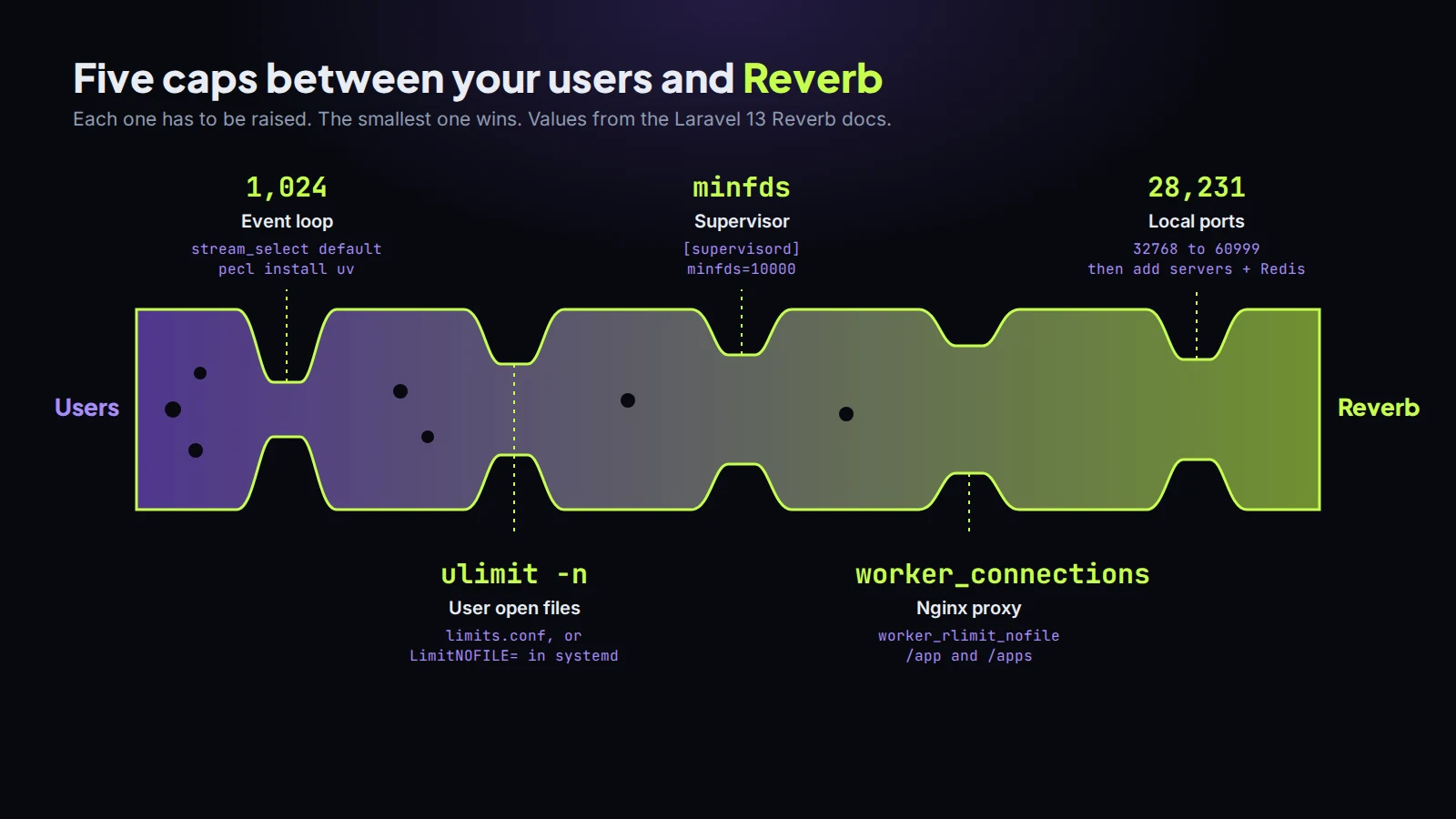
1. The event loop. Reverb runs on a ReactPHP event loop. The default one uses stream_select, which "is typically limited to 1,024 open files." So past roughly 1,000 concurrent connections you need the uv extension (pecl install uv), and Reverb switches to it by itself when it's loaded. This is the one that bites people, because everything looks fine in staging with 40 users.
2. Open files for the user. ulimit -n shows the limit for the user running Reverb. The docs raise it in /etc/security/limits.conf, for example to 10,000 soft and hard for that user. If Reverb runs under systemd instead, set LimitNOFILE= in the unit file, because systemd services don't read limits.conf.
3. Supervisor. If Supervisor keeps Reverb alive, its own minfds setting caps what its child processes can open. The docs set minfds=10000 under [supervisord]. Miss this and you've raised the OS limit for nothing.
4. Nginx. Reverb shouldn't face the internet directly. Put Nginx in front, proxy with the Upgrade and Connection "Upgrade" headers, and make sure both /app (WebSocket connections) and /apps (the HTTP API Laravel uses to publish) reach it. Then raise worker_rlimit_nofile and worker_connections in nginx.conf, since Nginx holds a connection open for every socket it proxies.
5. Ports. cat /proc/sys/net/ipv4/ip_local_port_range usually prints 32768 60999, which is 28,231 connections per server. You can widen it in sysctl.conf, but by then you should be adding servers instead.
Scaling past one server
Set REVERB_SCALING_ENABLED=true, point every Reverb server at one shared Redis, and put them behind a load balancer. Reverb uses Redis pub/sub to pass each message to the other servers, so a user connected to server A still gets the event that was published on server B. Use a Redis your app already trusts; if the WebSocket servers can't reach it, messages quietly stop crossing over.
The parts I'd add before going live
reverb:start is a long-running process, so new code doesn't reach it until you run php artisan reverb:restart in your deploy script. Forget that and your broadcast payloads come from last week's code. Put it next to queue:restart so the two never drift apart.
Set allowed_origins in config/reverb.php to your real domains instead of *. Turn on the Pulse recorders (ReverbConnections, ReverbMessages) if you already run Pulse; the graph of connections over a day tells you more about capacity than any load test. And keep --debug for your laptop, it prints every frame.
Is it worth it over Pusher? For most Laravel apps, I think yes. It's one more process to run, but it's PHP you can read, it scales sideways with Redis you probably already have, and the bill doesn't grow with your connection count. If you'd rather someone else ran it, Laravel Cloud offers managed Reverb clusters.
If you're adding real-time features to a Laravel app and want the server side done properly, that's part of the Laravel development work I do. The first call is free.
Introductory offer
Free cloud cost optimization. You only pay from what I save.
I cut your AWS, cloud, Supabase or Vercel bill for free and keep half of what I save for 6 months. Save nothing, pay nothing. Code, architecture and infrastructure.