Expo vs React Native: Which One Should You Start With?
By Aakash Verma · · 4 min read
Expo vs React Native is mostly a false choice in 2026. Expo is React Native with a framework on top: file-based routing, a standard library of native modules and tools that generate the iOS and Android projects for you. React Native's own getting started page tells you to create new projects with Expo (npx create-expo-app@latest). So for a new app, my answer is Expo, and the real questions are whether you pay for Expo's cloud services and when you'd ever skip the framework.
I've built a fitness app for iOS and Android in React Native, so this is a choice I have opinions about. Everything below about versions and prices was checked on October 22, 2026.
What "Expo" actually means now
People still picture the Expo of 2019: a sandbox that couldn't run your own native code, which you "ejected" from the moment you needed Bluetooth or a payment SDK. That's not what it is anymore, and most of the old Reddit threads comparing the two are about that version.
Today the word covers three different things, and it helps to keep them apart:
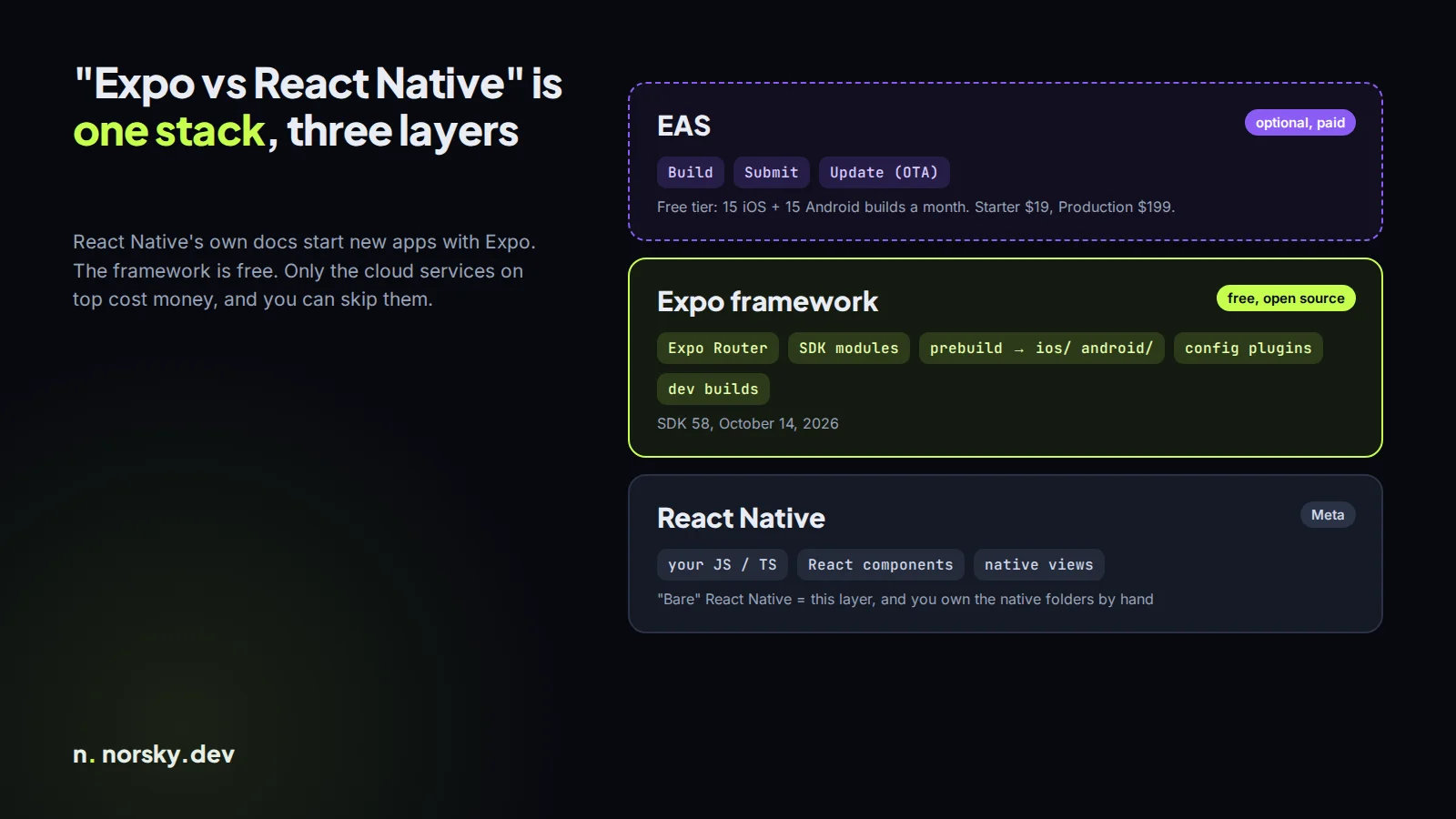
- React Native is the core: your JavaScript or TypeScript, React components, and the bridge to real native views. Meta maintains it.
- The Expo framework is free and open source: Expo Router for screens as files, the Expo SDK modules (camera, notifications, file system, secure storage and a lot more), and "prebuild", which writes the
ios/andandroid/folders from your config. The latest version is SDK 58, released October 14, 2026, according to the Expo changelog. - EAS (Expo Application Services) is the optional paid cloud: builds, store submission and over-the-air updates.
You can use the first two and never pay Expo anything.
Why I'd start with Expo
The honest reason is the native folders. In a bare React Native project, ios/ and android/ are yours. Every SDK you add may ask you to edit a Gradle file, a Podfile or AppDelegate, and every React Native upgrade means merging Apple's and Google's latest template changes into files you edited by hand. That upgrade is the part teams put off for a year and then pay for in a week.
With prebuild, those folders are generated. Libraries ship config plugins that make their native edits for you, and you can regenerate the projects from scratch on every upgrade. If something truly needs custom native code, you write a local Expo module or a config plugin, and it still lives in your repo, not as a hand edit nobody remembers.
You also get development builds instead of Expo Go: your own app binary with your native modules inside, plus fast refresh. That's the setup I'd want on any app that's going to the stores.
When bare React Native still makes sense
There are a few real cases:
- You're adding React Native to an existing native app. A brownfield app already owns its Xcode and Android Studio projects. You embed React Native screens into them, and a generated project doesn't fit.
- A team that wants to own every line of native config, usually because they have native engineers who already maintain it and a CI pipeline built around it.
- An SDK so invasive that a config plugin would be fighting it. This is rarer than people think, but it exists, mostly in older enterprise SDKs.
Notice what's not on the list: "I need native code". Expo handles that now.
What EAS costs (and when you don't need it)
From Expo's pricing page, checked today:
| Plan | Price | What's included |
|---|---|---|
| Free | $0 | 15 Android and 15 iOS builds a month, low-priority queue, updates to 1,000 monthly active users |
| Starter | $19 a month + usage | $45 of build credit, high-priority queue, updates to 3,000 MAUs |
| Production | $199 a month + usage | $225 of build credit, 15 concurrencies, updates to 50,000 MAUs |
For a solo developer or a small team, Free covers a lot. The thing people actually pay for is EAS Update, sending JavaScript fixes to installed apps without a store review, once their user count passes the free tier.
You don't need EAS at all to ship. You can run npx expo run:ios and npx expo run:android locally, archive in Xcode, upload an Android App Bundle yourself, and wire your own CI. It's more work, and the iOS side still needs a Mac. For a client app I'd set up EAS Build for the first release, because it removes the "works on my machine" signing problems, and then we decide on updates once there are real users.
So which one?
Start with Expo, use development builds, keep native changes in config plugins, and add EAS services only where they save you time. Go bare only if you're embedding React Native into an app that already exists, or your team has a strong reason to own the native projects.
If you're still deciding whether React Native is right at all, I wrote about React Native vs Flutter too. And if you have an app idea or a half-built React Native project that needs finishing, book a free call and tell me where it's stuck.
Introductory offer
Free cloud cost optimization. You only pay from what I save.
I cut your AWS, cloud, Supabase or Vercel bill for free and keep half of what I save for 6 months. Save nothing, pay nothing. Code, architecture and infrastructure.